Notifuse 44: Self-Host a Newsletter and Transactional Email Platform with Docker Compose
Notifuse v44.0 bundles a visual email builder, automations, a transactional API and web analytics. Here is how to run it with Docker Compose, what tripped us up, and why you should read its Business Source License first.
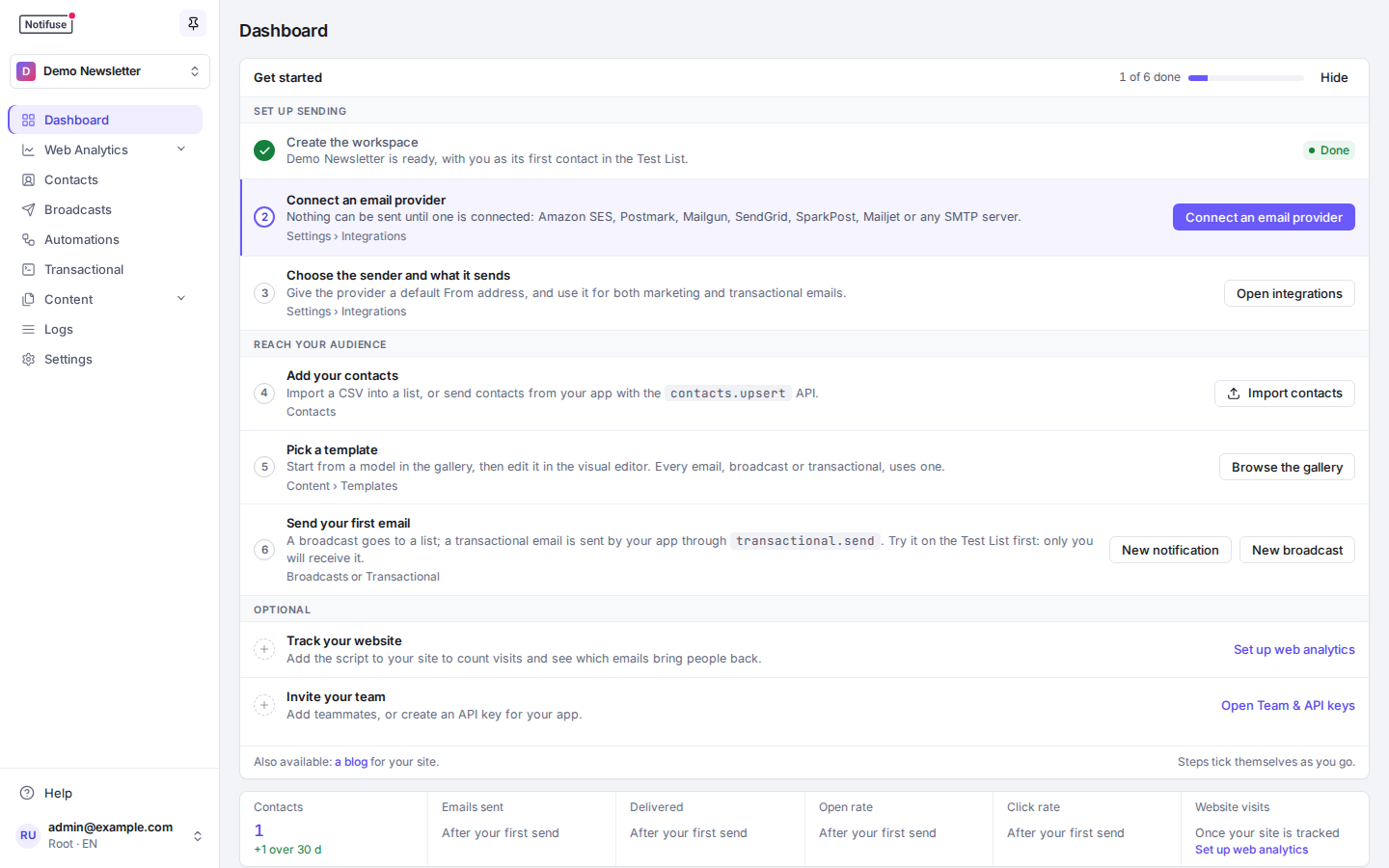
Newsletter tools tend to get expensive in the way that sneaks up on you. A few hundred subscribers cost nothing, a few thousand cost a monthly bill, and the automation features sit one plan higher. Notifuse is a self-hosted answer to that: a Go and React application with a visual email builder, broadcasts, automations, a transactional API and even built-in web analytics, backed by nothing more than PostgreSQL.
Version 44.0 came out on 19 November 2026 and the project turned up in this month's self-hosting roundups. Before you get excited, though, there is one thing to know up front, and it is the license. We will get to that right after a quick look at what the tool does.
What Notifuse does
The README describes it as a self-hosted emailing platform for newsletters and transactional email. In practice that breaks down into a handful of areas:
- Broadcasts and templates. A drag-and-drop builder based on MJML, A/B tests for subject lines and content, scheduling, lists and segments.
- Automations. A canvas where each journey is a graph of nodes: delays, emails, branches, filters, list changes and webhook calls.
- Transactional API. A REST API for emails your own app sends (password resets, receipts), plus webhooks for delivery events.
- Web analytics. A cookieless tracking script served by your own instance, running on the same PostgreSQL database.
- Sending providers. Notifuse does not send mail by itself. You connect Amazon SES, Mailgun, Postmark, Mailjet, SparkPost, SendGrid or any SMTP server.
- Workspaces. Several isolated projects on one installation, each with its own database.
That last point about sending is worth repeating. Self-hosting Notifuse gives you the software, the contact data and the reports. Deliverability still depends on the provider you plug in and on your domain's SPF, DKIM and DMARC setup.
Read the license before you install
Notifuse describes itself as open source, and the README calls it an alternative to Mailchimp and friends. The license file tells a more precise story. Since v40.0, the project is under the Business Source License 1.1, and the license text itself says that this is not an open source license. Each version converts to AGPL-3.0-or-later four years after it was published. Versions up to v39.x stay AGPL permanently, and the web_analytics_sdk/ folder is AGPL in every version. The LICENSING.md explains the split in plain language.
For most self-hosters the practical impact is small. The additional use grant allows production use, including hosting it for third parties, as long as you do not use one of six listed features without a paid license key:
- creating more than three workspaces on one deployment,
- creating or editing granular permission sets for members or API keys,
- provisioning an Amazon SES tenant,
- signing in through single sign-on (OpenID Connect),
- creating or editing multilingual variants of a template,
- recording an audit log of administrative actions.
Everything else, including unlimited emails, contacts and team members, needs no key according to the license file. The project also states that a missing key refuses a single action at the moment you take it and does not touch the sending path. We did not test the paid features, so take that as the project's own description. If you need SSO or more than three workspaces, plan for a license. If you need a strictly OSI-approved license, look at the alternatives further down.
What you need
Docker Engine 25.0 or newer and Docker Compose v2.24 or newer, as stated in the header of the official compose.yaml. We tested on a fresh Ubuntu 24.04 VM with 2 vCPUs, 1.8 GB of RAM and swap, with Compose v5.6.1. You also need a way to send mail. The administrator signs in with a magic code that is sent by email, so a working SMTP server is not optional, not even for the first login.
Install Notifuse with Docker Compose
The project ships a single compose.yaml that starts three things: the Notifuse server, PostgreSQL 18 and a small one-shot helper called pg-upgrade that only does something when it finds data from PostgreSQL 17. On a new installation it exits immediately, which is normal and not an error.
1. Download the file and pin the version
Download the file from the release tag instead of the main branch, so you know exactly what you are running:
mkdir -p ~/notifuse && cd ~/notifuse
curl -fsSL https://raw.githubusercontent.com/Notifuse/notifuse/v44.0/compose.yaml -o compose.yaml
2. Create the .env file
Two values are generated here. SECRET_KEY encrypts the provider credentials stored in the database, signs sessions and API keys. Back it up together with your database dumps, because losing it means losing those credentials. DB_PASSWORD initializes PostgreSQL and is used by the server to connect to it.
cat > .env <<EOF
NOTIFUSE_VERSION=v44.0
SECRET_KEY=$(openssl rand -base64 32)
DB_PASSWORD=$(openssl rand -hex 24)
EOF
The file also says that values containing a # must be quoted. Both generated values are safe in that respect.
3. Keep the ports on localhost
The stock file publishes the web interface on port 8081 for every network interface. It also publishes port 587 for the optional inbound SMTP bridge. Looking at the file, the HTTP line honors an HTTP_BIND setting, while the 587 line has no bind address at all. Since the bridge is off by default, you do not need that port, so we replace the whole port list with a small override file:
# compose.override.yaml
services:
  api:
    ports: !override
      - '127.0.0.1:8081:8080'
Compose reads compose.override.yaml automatically. The !override tag replaces the list from the main file instead of appending to it. In our test run we used a different free host port (18081) on the VM, everything else was identical.
4. Start it
docker compose up -d
docker compose ps
curl -s http://127.0.0.1:8081/healthz
After the images were pulled, the server and the database were healthy about 20 seconds after up. The health endpoint answers with {"status":"ok"}. The first pull of the two images took roughly a minute on our VM. The Notifuse image is about 236 MB on disk, PostgreSQL 18 Alpine about 434 MB.
First-time setup
Notifuse serves plain HTTP, so do not open it to the internet as it is. For a first look, an SSH tunnel is enough:
ssh -L 8081:127.0.0.1:8081 user@your-serverNow open http://localhost:8081/console/. A fresh installation redirects you to a setup wizard with five numbered sections.
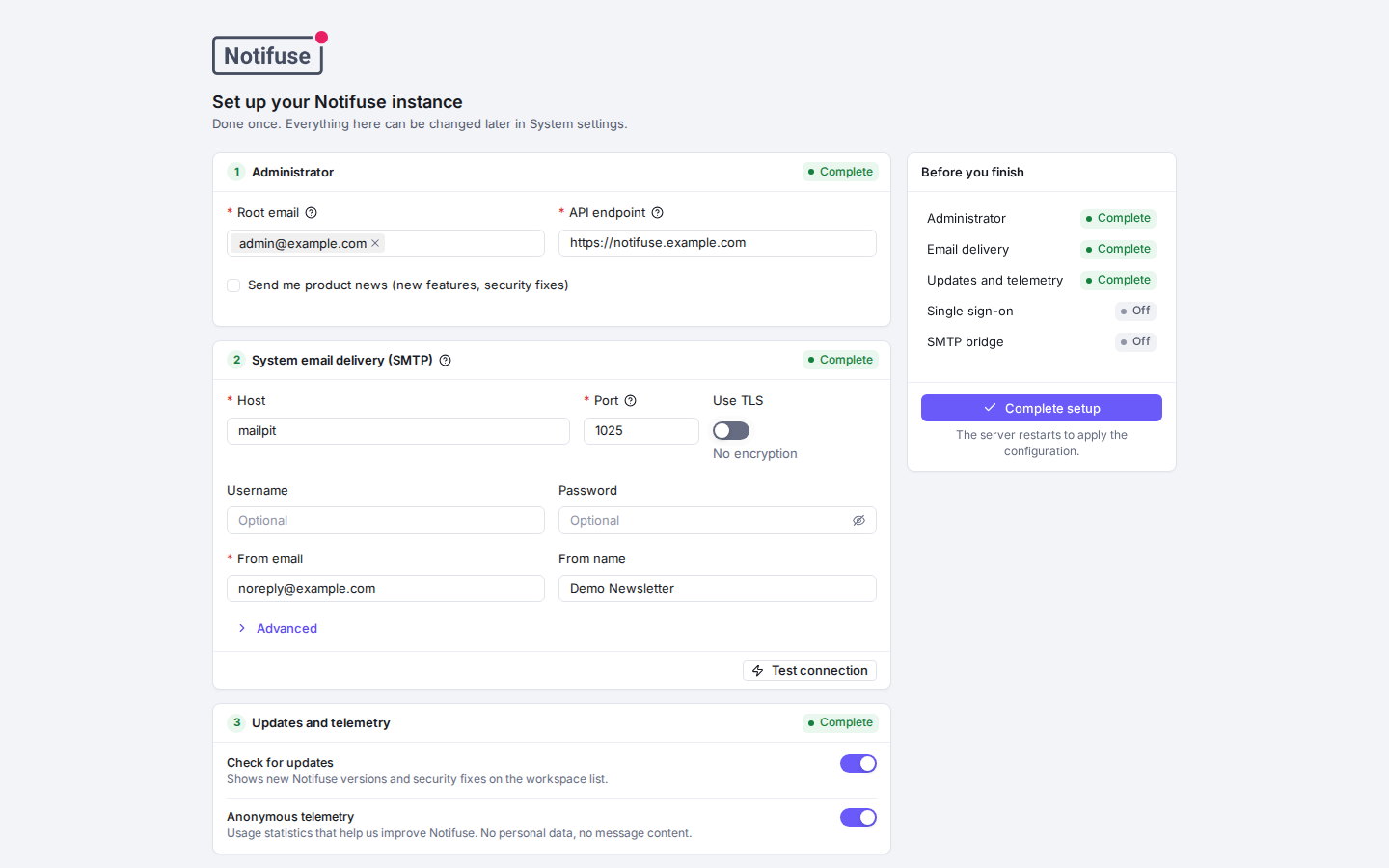
You fill in a root email address and the API endpoint, then the SMTP settings for system mail, then you decide about two switches: update checks and anonymous telemetry. Single sign-on and the SMTP bridge are the last two sections and both start switched off. Both switches in the third section were on by default in our run, so look at them before you click Complete setup. The server restarts to apply the configuration.
The API endpoint trap
This one cost us a restart. The API endpoint is the address your browser uses to talk to the server. Our first attempt used the placeholder https://notifuse.example.com, which obviously did not exist in our test setup. The sign-in page then showed a red error saying it cannot reach the configured API endpoint, and it named the address the page was actually served from. So during the first setup, enter the address you really open in your browser, for example http://localhost:8081 when you use the tunnel. Once the reverse proxy and your domain are in place, change it in the system settings. The error message in the app links to a short guide for changing your domain.
Sign in and create a workspace
After the restart, the sign-in page asks for your email address and sends a six-digit magic code. In our test the mail did not arrive right away. The log shows that the email queue worker starts about 30 seconds after the server boots, so give it a minute after the restart. For the test we pointed the wizard at a throw-away local SMTP catcher; on a real server you enter your actual provider's SMTP details instead.
Next, Notifuse asks you to create a workspace with a name, an ID and your website URL. The dashboard then shows a checklist: connect an email provider, choose the sender, add contacts, pick a template and send a first email. Your own root account is already there as the first contact in a list called Test List, which makes the first test send harmless.
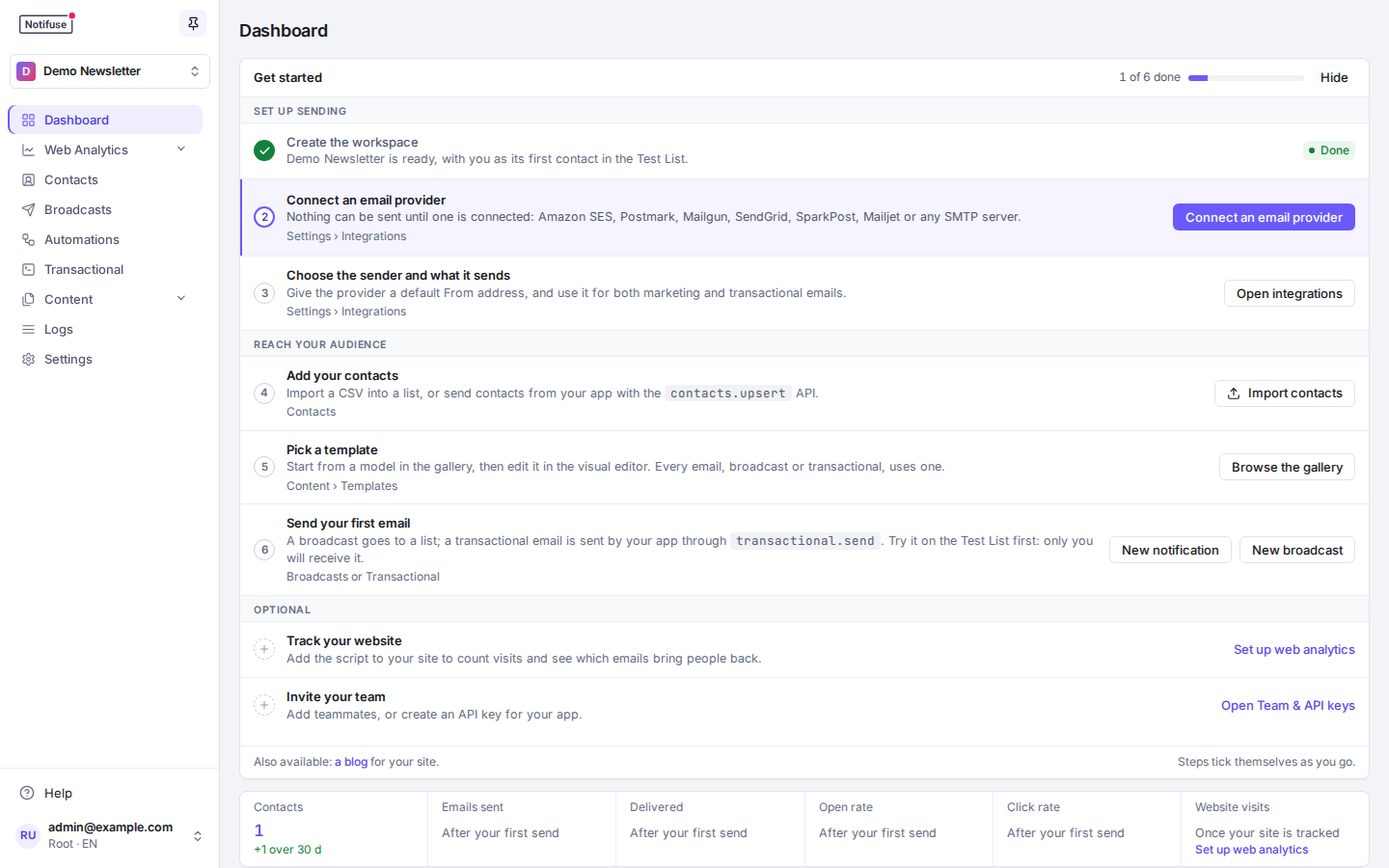
Broadcasts stay blocked until a provider is configured. The Broadcasts page says so explicitly and links to the settings, so there is little risk of sending into the void. We stopped at that point: we did not connect a real provider or send a campaign, so we cannot say anything about deliverability or send speed from our own testing.
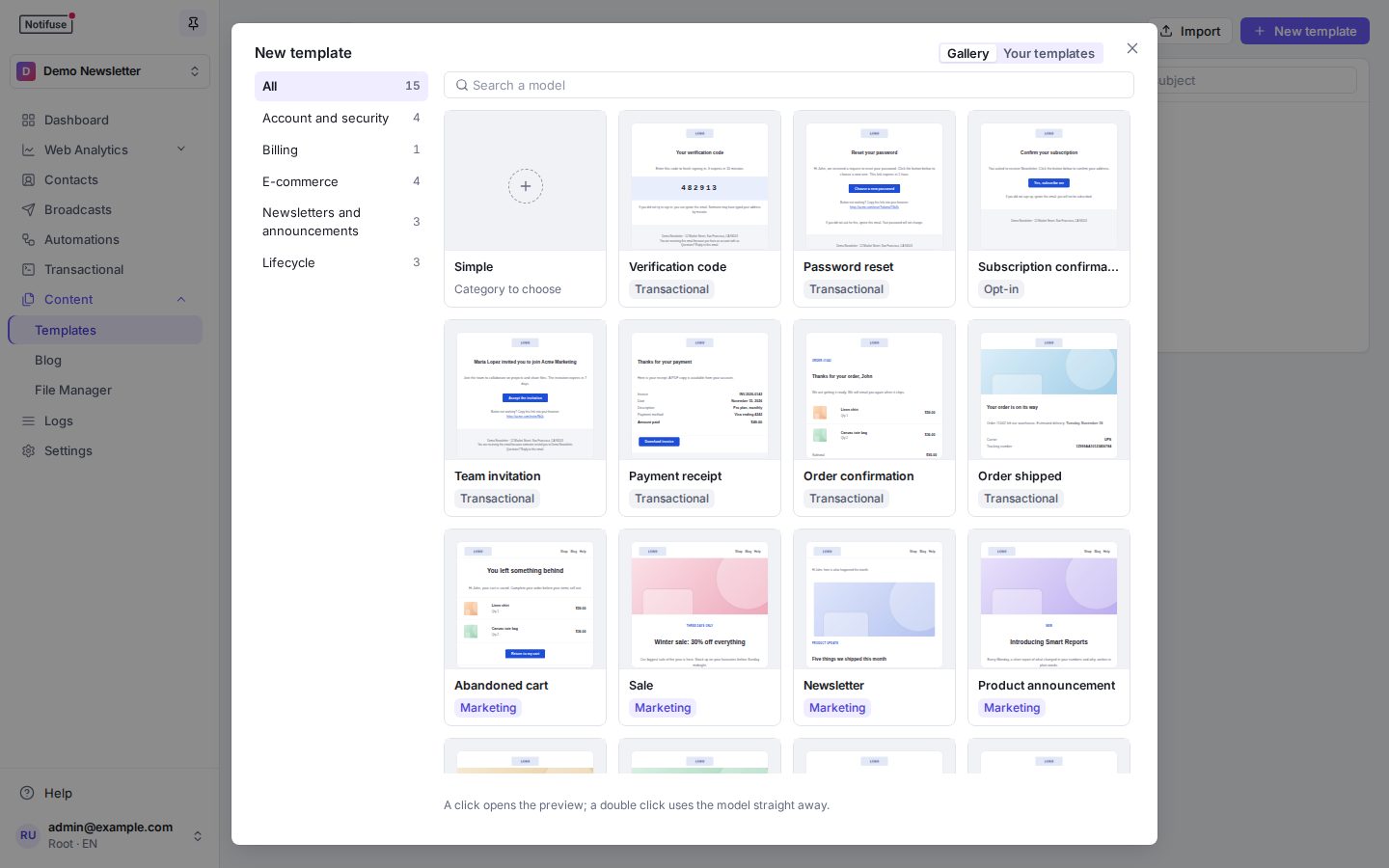
If you pick New template under Content, you land in a gallery with 15 ready-made models, split into account and security mails, billing, e-commerce, newsletters and lifecycle emails. Each one opens in the visual editor.
Resource usage
We looked at docker stats on the idle instance after logging in and creating a workspace. The Notifuse container used about 24 MiB of RAM and PostgreSQL about 75 MiB, with CPU close to zero. That is a snapshot of an empty installation with one contact. It says nothing about a large send or a heavy web analytics load, so size your server for your own volume.
Tips for running it for real
- Put TLS in front of it. Any reverse proxy works. With Caddy, a site block with
reverse_proxy 127.0.0.1:8081for your domain is enough. We have not tested this specific proxy setup in this article, it is the standard pattern. Then set the API endpoint to your public HTTPS address. - Back up every database, not just one. Notifuse keeps a system database and one database per workspace. The header of
compose.yamlcontains a loop that dumpsnotifuse_systemand everynotifuse_ws_*database withpg_dump. It also notes thatpg_dumpalldoes not restore here. KeepSECRET_KEYwith the dumps. - Read the changelog before every upgrade. Change
NOTIFUSE_VERSIONin.envand rundocker compose up -dagain. The v44.0 release notes list several things to check first. The server refuses to start on PostgreSQL older than 17, the upgrade builds indexes on message history while sending and tracking wait, and Liquid output in email HTML is now HTML-escaped, which means templates that inject HTML need the newrawfilter. - Do not skip the PostgreSQL upgrade notes. If you ever run this file on top of an older PostgreSQL 17 volume, the
pg-upgradehelper copies the data to a backup volume first and needs free disk space for that. The upgrade guide covers rollback. - Mind the telemetry switches. They are on by default in the wizard. You can change them later in the system settings.
Limits and security notes
Be clear about what you are taking on. The license is source-available with a time-delayed switch to AGPL, not open source in the strict sense, and the six gated features are a real boundary if you grow into them. The project does not accept pull requests according to its README, only issues, so this is a one-vendor project rather than a community one. The project is also young: the stars are in the low thousands and the major version number is already 44.
On the technical side, the Notifuse container runs with no-new-privileges and PostgreSQL is published on 127.0.0.1 only, which is good. The plain HTTP default and the port 587 line without a bind address are the two things to fix yourself, as shown above. And since sign-in depends on email, a broken SMTP configuration can lock you out of your own console, so test it before you rely on it.
Notifuse compared with the alternatives
The closest self-hosted relative is listmonk, which we covered in a separate guide. It is AGPL-3.0 licensed and focused on newsletters and mailing lists. If all you need is a mailing list manager under a license that is unambiguously open source, listmonk is the simpler pick. Notifuse is aimed at a wider job: it combines campaigns, an automation builder, a transactional API and web analytics, and it can host several workspaces on one installation, at the price of the BSL terms described above. Hosted services like Mailchimp or Brevo remove the operations work entirely, but then your contacts and your bill live with them.
Conclusion
Notifuse v44.0 installed cleanly for us. Two containers, a handful of lines in .env, a wizard, and about 100 MiB of RAM at idle. The stumbling blocks were all about configuration, namely the API endpoint and the email-based login, not about Docker. If you want automations and a transactional API in one self-hosted tool and you are fine with a source-available license, it deserves a place on your shortlist. If you care most about a pure open source license, start with listmonk instead.
Sources
- Notifuse repository on GitHub
- Notifuse v44.0 release notes
- LICENSE (v44.0)
- LICENSING.md (v44.0)
- compose.yaml (v44.0)
- env.example (v44.0)
- notifuse/notifuse on Docker Hub
- Notifuse docs: Upgrading PostgreSQL
- Notifuse licence features
- Self-Host Weekly, 20 November 2026
- selfhostedworld.com weekly recap, 6 to 13 November 2026
- listmonk on GitHub