wallabag 2.6.19: Self-Host Your Own Read-It-Later App (Pocket Alternative) with Docker Compose
wallabag saves web articles as clean, distraction-free copies on your own server. After a busy November with security releases and the first 2.7 alphas, here is what it does and how to run 2.6.19 with Docker Compose.
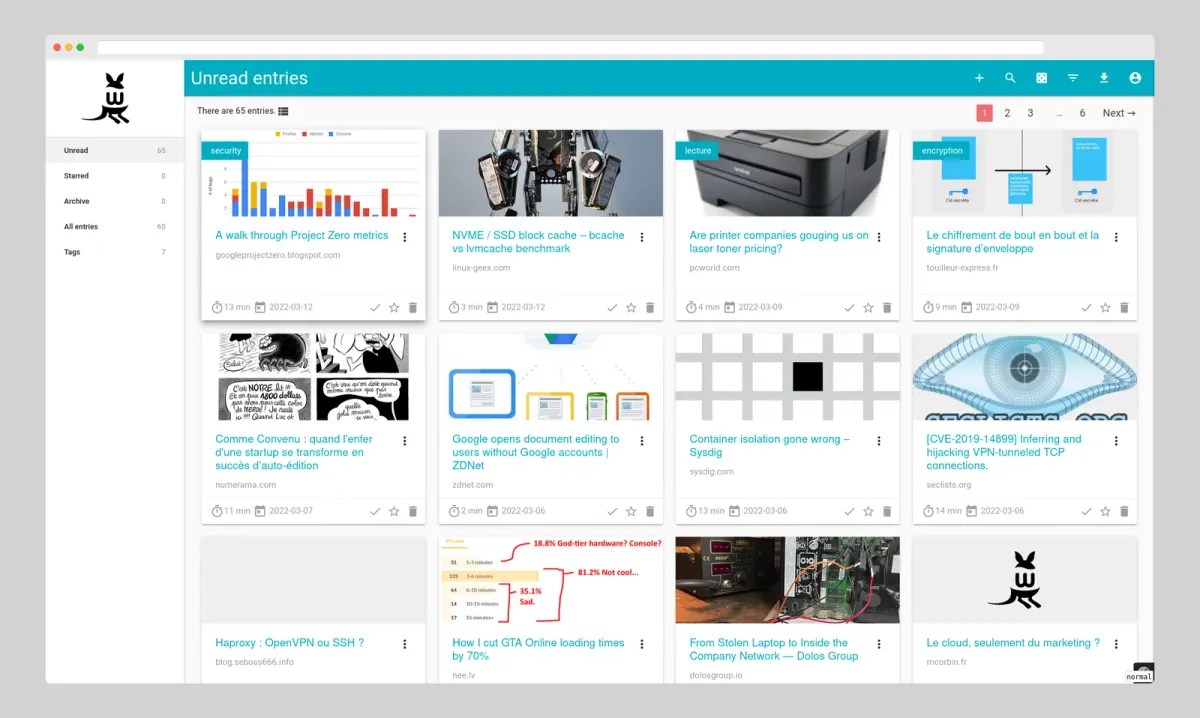
Most of us have the same habit: you find an interesting long read, you don't have time right now, so it ends up in an open tab, a chat with yourself or a "read later" service. For years Pocket was the default for that, until Mozilla shut it down in 2025. If you'd rather keep your reading list on hardware you control, there is a project that has been doing exactly this for more than a decade: wallabag.
And wallabag is having a very busy month. Between 28 October and 24 November 2026 the team shipped seven releases: the stable versions 2.6.15 to 2.6.19, two security releases among them, plus 2.7.0-alpha.1 and 2.7.0-alpha.2, which preview the biggest update the project has seen in years. Reason enough to take a closer look.
What is wallabag?
wallabag is a self-hostable web application for saving web pages to read later. When you save a link, wallabag fetches the page, extracts the actual article text and images, and stores a clean, distraction-free copy in its database. You then read it in the web app, on your phone or on an e-reader, whenever you have time.
A few basics:
- License: MIT (the repository's
COPYING.md). - Stack: PHP (Symfony) with SQLite, MariaDB/MySQL or PostgreSQL, and optional Redis or RabbitMQ for asynchronous imports.
- Clients: official Android and iOS apps and the wallabagger browser extension.
- Hosting: self-host it, or use the paid hosted service wallabag.it run by the project, which also helps fund development.
One small but official detail from the README: the name is wallabag, all lowercase, always. We'll stick to that.
Key features
Here is what you get with the current stable 2.6.19, checked against the source code and documentation:
- Clean article extraction: wallabag strips ads, pop-ups and navigation and stores the readable content, including an estimated reading time.
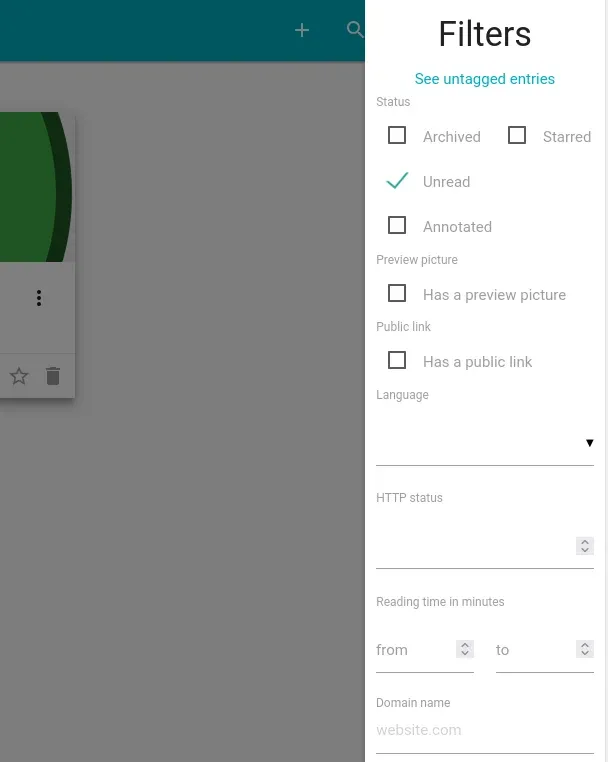
- Unread, starred and archive lists, plus tags and a powerful filter panel (reading time, domain, language, HTTP status, annotated, public link and more).
- Tagging rules: tag new articles automatically with rules such as
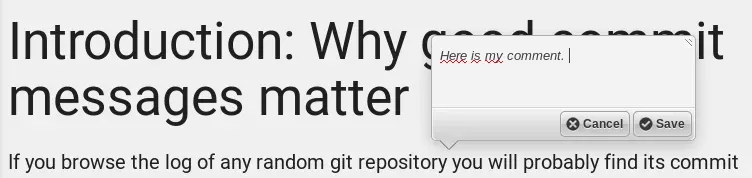
readingTime <= 3ordomainName = "www.php.net". - Annotations: highlight passages and add comments to them.
- Public share links for single articles.
- Exports per article or per list in EPUB, PDF, JSON, CSV, XML and TXT (MOBI still exists in 2.6 but is disabled by default and is removed in 2.7).
- Imports from Pocket (CSV and HTML exports), Instapaper, Readability, Pinboard, Delicious, Shaarli, Omnivore, elCurator, Firefox and Chrome bookmarks, and other wallabag instances.
- Per-user RSS/Atom feeds of your unread, starred or archived articles, protected by a personal token.
- REST API with OAuth clients, which the mobile apps and the browser extension use.
- Two-factor authentication via email codes or an authenticator app, including backup codes.
- Multi-user with optional public registration (disabled by default in the Docker image).
Why it's trending: a month of security fixes and the road to 2.7
Release activity was quiet for a while (2.6.14 shipped in October 2025), and then November 2026 happened.
Security releases. wallabag 2.6.16 (13 November) and 2.6.18 (19 November) each fix four security issues, all published as GitHub security advisories. According to the project's own summaries, they include:
- stored HTML/JavaScript through the author field of a saved article,
- the "download images locally" feature fetching images from your internal network,
- users being able to add annotations to other users' articles,
- failed import files staying in a public folder,
- imported tagging rules that could be used to run commands on the server,
- JavaScript links on the public share page,
- the EPUB export reading local files or calling other addresses,
- SVG images running JavaScript when images are downloaded locally.
If you run wallabag and are on anything older than 2.6.18, update now. Note two manual follow-ups from the release notes: after 2.6.16, delete the contents of the old web/uploads/import folder (imports now live in var/import), and after 2.6.18, clear the cache and review your users' tagging rules. A small detail that helps Docker users: the official image's entrypoint deletes var/cache on every container start, so a restart takes care of the cache.
2.6.19 (24 November) is a bugfix release: it fixes a Pocket HTML import crash, an EPUB export crash and slow pagination in the API's entry list.
2.7.0-alpha.1 and alpha.2 preview a much bigger release. Highlights from the release notes:
- Subscribe to RSS and Atom feeds directly in wallabag, with manual review or automatic import of new articles.
- Save articles by email: each user gets a private address, and a periodic command reads a dedicated IMAP mailbox.
- OPDS 1.2 catalog to browse and download your articles as EPUB from e-reader apps such as KOReader.
- Markdown export, font and font-size selectors, optional CAPTCHA on sign-up, a compromised-password check, and import of plain URL lists.
- An opt-in hostname deny-list for outgoing fetches, and release packages signed with minisign.
- Breaking changes: PHP 8.2 or later is required, configuration moves to environment variables (
APP_SECRETis mandatory), MOBI export, the Pocket API import and the demo mode are removed.
Alongside alpha.2 the team also introduced wallabin, a single-file PHP tool meant to replace make install and make update for non-Docker installs. The developers are clear that 2.7 alphas are not for production. Docker images tagged 2.7.0-alpha.1 and 2.7.0-alpha.2 exist on Docker Hub, but the latest, 2 and 2.6 tags all point to 2.6.19, which is what we'll use below.
Why use wallabag?
- Your reading list stays yours. Pocket's shutdown showed how quickly a hosted service can disappear. With wallabag, articles live in your database, and you can export them in open formats at any time.
- It saves the content, not just the link. If the original page changes or disappears, your copy is still there.
- It fits into an RSS workflow. Many feed readers can send articles to wallabag. If you run FreshRSS or Miniflux, you can skim feeds there and push the long reads to wallabag.
- Mature and boring in a good way. The project has been around for more than ten years, has official mobile apps and a browser extension, and is translated via Weblate.
Installing wallabag with Docker Compose
The official image is wallabag/wallabag on Docker Hub (also published to GHCR as ghcr.io/wallabag/docker) and is built for amd64, arm64 and 32-bit ARM. Inside the container, nginx and PHP-FPM listen on port 80.
The simplest setup uses SQLite. For a long-lived instance with several users, the MariaDB variant from the official Docker README is a good default. Below is a version of that setup with pinned versions, named volumes and a health check dependency.
1. Create a project folder
mkdir -p ~/wallabag && cd ~/wallabag
2. Create a .env file
Generate strong random values and keep them out of your compose file:
cat > .env <<EOT
DB_ROOT_PASSWORD=$(openssl rand -hex 24)
DB_PASSWORD=$(openssl rand -hex 24)
APP_SECRET=$(openssl rand -hex 32)
EOT
chmod 600 .env
3. Create compose.yaml
services:
  wallabag:
    image: wallabag/wallabag:2.6.19
    restart: unless-stopped
    environment:
      # Root password is only needed for the first start (database creation)
      - MYSQL_ROOT_PASSWORD=${DB_ROOT_PASSWORD}
      - SYMFONY__ENV__DATABASE_DRIVER=pdo_mysql
      - SYMFONY__ENV__DATABASE_HOST=db
      - SYMFONY__ENV__DATABASE_PORT=3306
      - SYMFONY__ENV__DATABASE_NAME=wallabag
      - SYMFONY__ENV__DATABASE_USER=wallabag
      - SYMFONY__ENV__DATABASE_PASSWORD=${DB_PASSWORD}
      - SYMFONY__ENV__DATABASE_CHARSET=utf8mb4
      - SYMFONY__ENV__SECRET=${APP_SECRET}
      - SYMFONY__ENV__DOMAIN_NAME=https://wallabag.example.com
      - SYMFONY__ENV__SERVER_NAME=My wallabag
      - SYMFONY__ENV__MAILER_DSN=smtp://user:pass@smtp.example.com:587
      - SYMFONY__ENV__FROM_EMAIL=wallabag@example.com
      - SYMFONY__ENV__TWOFACTOR_SENDER=wallabag@example.com
      - SYMFONY__ENV__FOSUSER_REGISTRATION=false
    ports:
      - "8080:80"
    volumes:
      - wallabag-images:/var/www/wallabag/web/assets/images
    depends_on:
      db:
        condition: service_healthy
      redis:
        condition: service_healthy

  db:
    image: mariadb:11
    restart: unless-stopped
    environment:
      - MYSQL_ROOT_PASSWORD=${DB_ROOT_PASSWORD}
    volumes:
      - wallabag-db:/var/lib/mysql
    healthcheck:
      test: ["CMD", "/usr/local/bin/healthcheck.sh", "--innodb_initialized"]
      interval: 20s
      timeout: 3s

  redis:
    image: redis:7-alpine
    restart: unless-stopped
    healthcheck:
      test: ["CMD", "redis-cli", "ping"]
      interval: 20s
      timeout: 3s

volumes:
  wallabag-images:
  wallabag-db:
A few notes on the variables:
SYMFONY__ENV__DOMAIN_NAMEmust be the exact URL your users open, includinghttps://. Wrong values are a classic cause of broken CSS and images.SYMFONY__ENV__SECREThas a hard-coded default in the image. Always set your own.SYMFONY__ENV__MAILER_DSNis used for registration mails and email-based two-factor codes. Replace the example with your own SMTP details, or leave it out if you don't need mail.- Public registration is already disabled by default; setting it explicitly makes the intent obvious.
4. Start the stack
docker compose up -d
docker compose logs -f wallabag
On the first start, the entrypoint waits for the database, creates the wallabag database and user with the root password, and runs the installer. Once you see wallabag is ready!, open http://<your-server>:8080.
5. Change the default login immediately
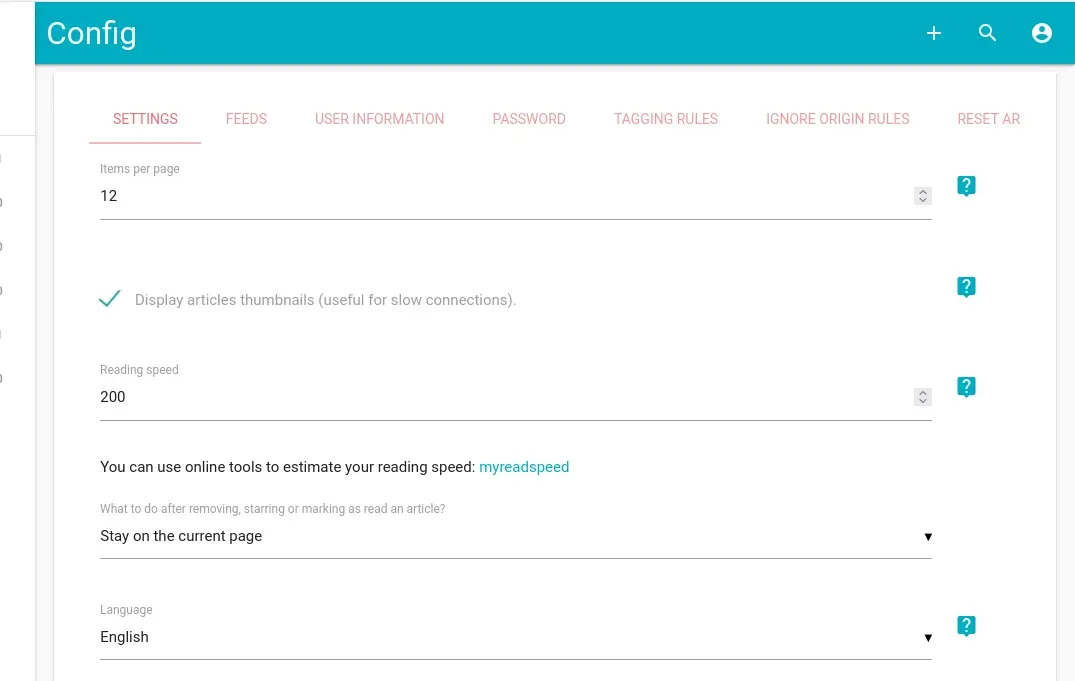
The installer creates a user wallabag with the password wallabag. Log in, go to Config → Password and change it right away, and consider enabling two-factor authentication under Config → User information. You can create additional users from the admin menu.
After the first successful start, the entrypoint only needs the root password to create the database. The image itself prints a warning to remove it once the database exists, so you can drop the MYSQL_ROOT_PASSWORD line from the wallabag service (keep it on the db service).
6. Put it behind a reverse proxy
Expose wallabag over HTTPS through your reverse proxy of choice (Caddy, Traefik, Nginx Proxy Manager or Nginx UI) and forward the usual X-Forwarded-Proto and X-Forwarded-For headers. With Caddy, it's as short as:
wallabag.example.com {
    reverse_proxy 127.0.0.1:8080
}
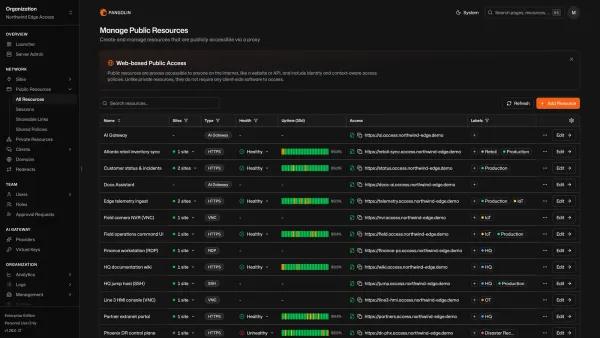
If you only use wallabag yourself, consider keeping it on your VPN instead of the public internet. If you do expose it, an extra layer like Pangolin can help, but keep in mind that the mobile apps and the browser extension talk to the wallabag API directly, so an auth wall in front of it may break them.
Configuration tips
Connect the apps. For the Android/iOS apps and the wallabagger extension, create an API client under API clients management in wallabag and enter the client ID and secret in the app together with your instance URL and login.
Use tagging rules early. A few rules like readingTime <= 3 → quick read or domainName = "github.com" → dev keep a growing list manageable without manual work.
Migrating from Pocket or another service. Use Import in the user menu. For big imports, wallabag can process imports asynchronously with Redis or RabbitMQ. The Redis container above is already there; enable "import with Redis" in the internal settings and run a worker with the image's import <type> command (for example pocket, instapaper or firefox), as described in the Docker README and the asynchronous tasks documentation.
Updates. Since the image tags follow the releases (2.6.19, 2.6, 2, latest), bump the tag in compose.yaml, then:
docker compose pull
docker compose up -d
docker compose exec wallabag /var/www/wallabag/bin/console doctrine:migrations:migrate --env=prod --no-interaction
Always read the release notes first: the November security releases came with manual steps, and 2.7 will bring breaking changes.
Backups. Back up three things: your .env/compose files (configuration), the database (mariadb-dump or a volume snapshot of wallabag-db) and the wallabag-images volume with locally stored pictures. A monitored nightly job with Healthchecks makes sure you notice when it silently stops.
Monitoring. The image ships a Docker health check that calls /api/info. Point Uptime Kuma at the same endpoint to get alerts when your instance goes down.
Honest limitations
- Extraction is not perfect. Paywalls, logins and JavaScript-heavy pages can produce incomplete or empty articles. wallabag offers a "Re-fetch content" button, site configs and credentials for restricted sites, but some pages simply won't work.
- It's a reader, not an archive. wallabag keeps the extracted article, not a pixel-perfect snapshot of the page. If you need full-page archives (HTML, PDF, screenshots), look at ArchiveBox or Linkwarden.
- No built-in single sign-on. There's no OIDC/SSO login in 2.6 or in the current 2.7 development branch, so it won't plug into a provider like Pocket ID. Local accounts with 2FA it is.
- A migration is coming. 2.7 changes configuration, requires PHP 8.2+ and drops MOBI export and the Pocket API import. For Docker users the image should handle most of this, but expect to review your environment variables when 2.7.0 final ships.
- The security backlog. The project itself acknowledged that some of the November fixes took a long time to ship. They're fixed now, but it's a good reminder to keep the instance updated and not expose it more than needed.
How does it compare?
| wallabag | Linkwarden | Karakeep | |
|---|---|---|---|
| Main focus | Reading articles later | Bookmarks + page preservation | "Save everything" inbox: links, notes, images |
| License | MIT | AGPL-3.0 | AGPL-3.0 |
| Stores a full-page snapshot | No (extracted article) | Yes (screenshot, PDF, HTML) | Optional |
| EPUB export for e-readers | Yes (OPDS catalog coming in 2.7) | – | – |
| Official mobile apps | Android, iOS | Android, iOS | Android, iOS |
If your main goal is reading long articles later, especially on an e-reader, wallabag is the most focused tool of the three. If you mostly want to collect and preserve links, Linkwarden or Karakeep fit better.
Conclusion
wallabag is one of those self-hosted classics that quietly does its job, and after the Pocket shutdown it's more relevant than ever. The November release wave makes this a good moment to look at it: if you already run it, update to 2.6.19 and do the manual post-upgrade steps; if you don't, the Docker Compose setup above gets you a private read-it-later service in a few minutes. And with feed subscriptions, save-by-email and OPDS on the way in 2.7, it's turning into a pretty complete reading hub. Just keep the alphas on a test instance for now.
Looking for more reading tools? Check out our posts tagged RSS and Self-Hosted.
Sources
- wallabag on GitHub (README,
COPYING.md, source code at tag 2.6.19) - wallabag releases on GitHub (2.6.15 – 2.6.19, 2.7.0-alpha.1, 2.7.0-alpha.2)
- wallabag 2.6.16 release post
- wallabag 2.6.18 release post
- wallabag 2.7.0-alpha.2 and wallabin
- wallabag Docker image repository and README
- wallabag/wallabag on Docker Hub
- wallabag documentation (source in the
doc/folder of the main repository)