DanB/RSS: A Quiet, Self-Hosted Feed Reader That Lives in One Text File
DanB/RSS is a small, opinionated feed reader by BookStack's developer: one container, feeds in a plain text file, four layouts and no accounts. Here's a tested Docker Compose setup for v2.2.4, what we noticed on a fresh VM, and why you shouldn't expose it without a proxy.
Most feed readers want to become your inbox. They count unread items, sync read state across devices, offer starring, folders, filters and a plugin system. That's great if you treat RSS as a to-do list. It's a bit much if you just want to scroll through what your favourite projects and blogs published this week.
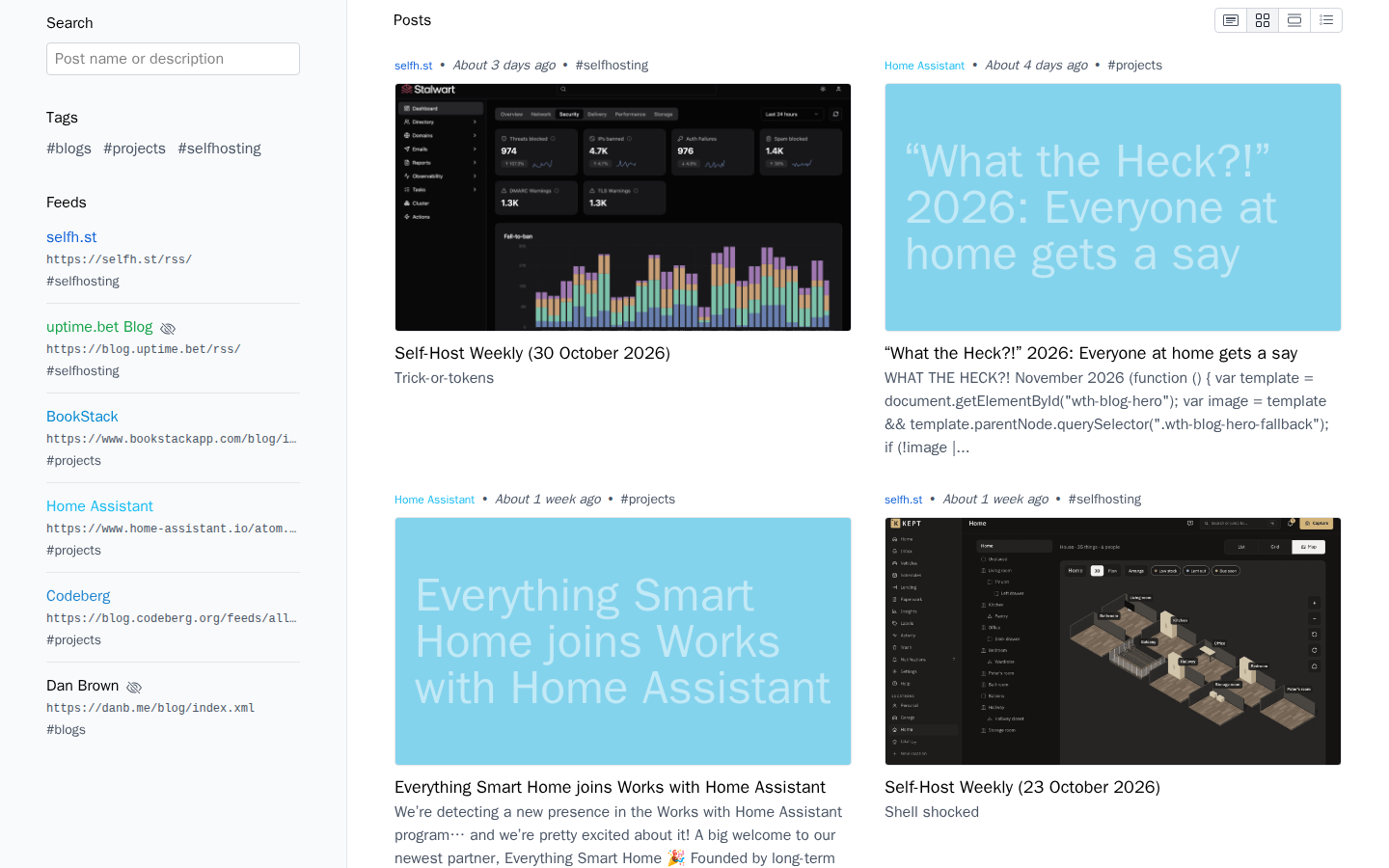
DanB/RSS goes the other way. It's a small web app by Dan Brown, the developer behind BookStack, that pulls in RSS and Atom feeds and shows them as a timeline that looks more like a social feed than a mail client. There are no accounts, no unread counters and no feed management in the UI. Your subscriptions live in one plain text file. The project was the Content Spotlight in Self-Host Weekly on 30 October, and version 2.2.4 shipped on 21 October with a rebuilt container image that picks up the fixes for the critical PHP vulnerabilities announced that day.
I ran it with Docker Compose on a fresh Ubuntu 24.04 test VM (2 vCPU, about 1.8 GB RAM). Below is the exact setup I used, what I noticed along the way, and where the deliberately narrow scope will bite you.
What DanB/RSS does
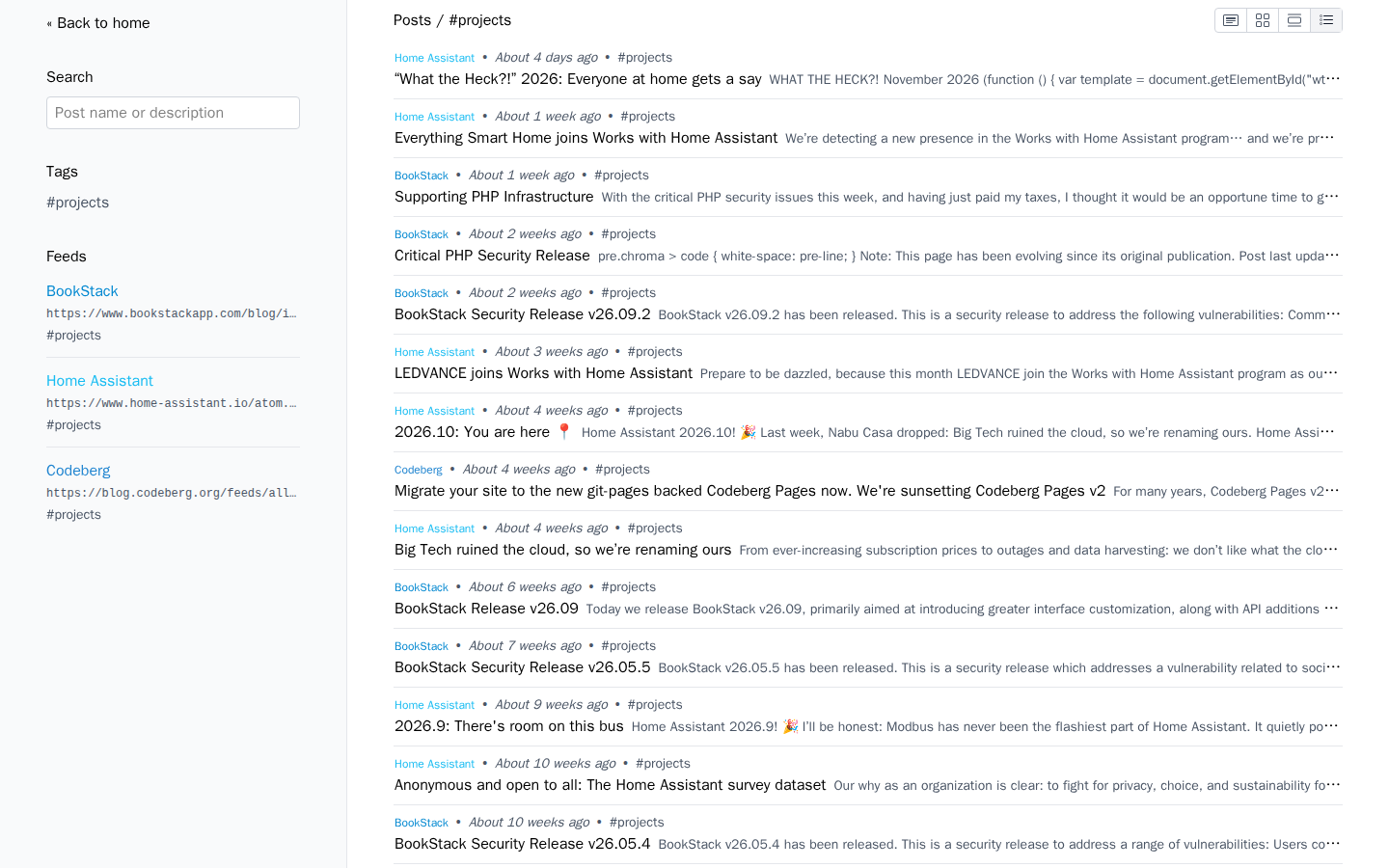
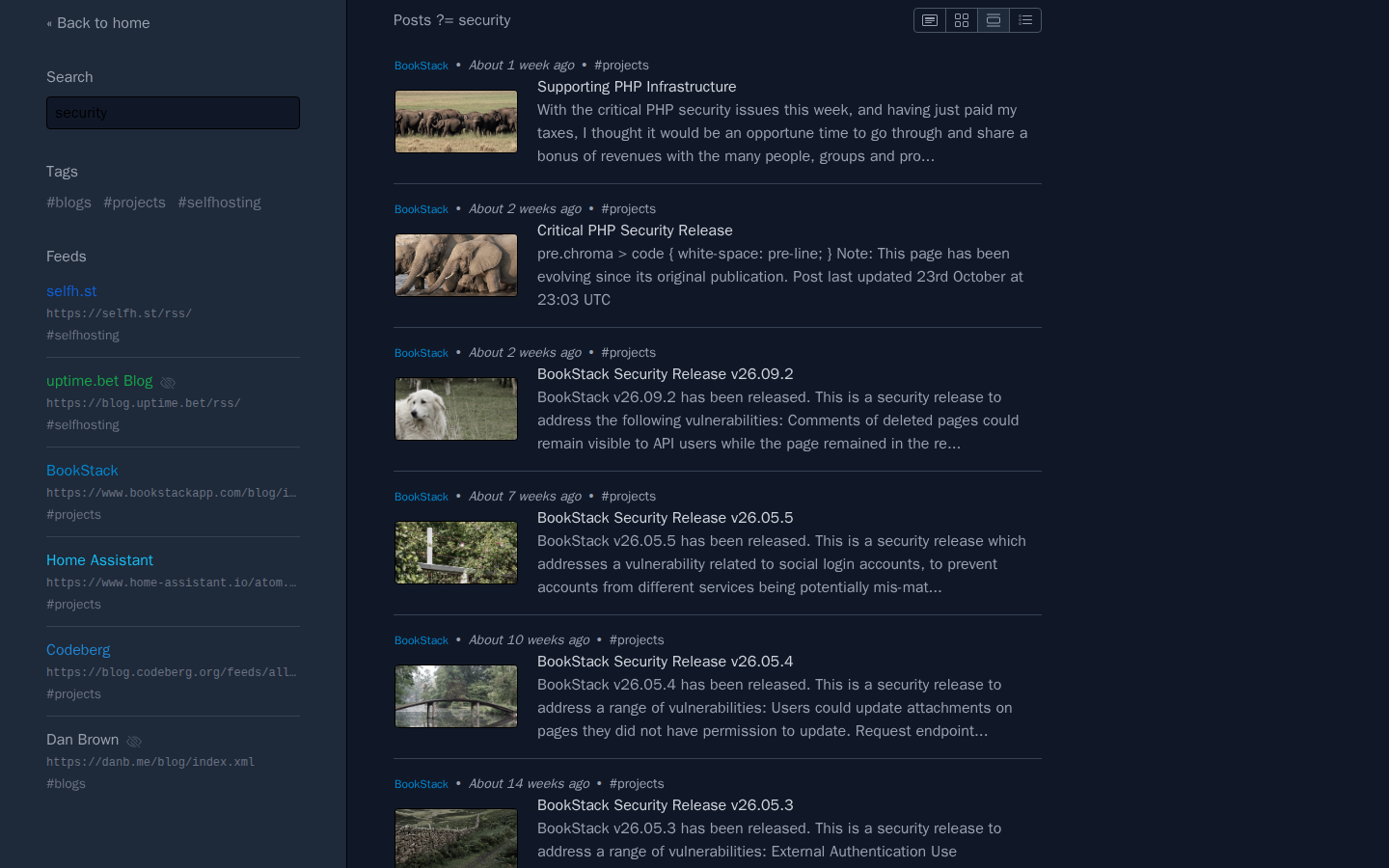
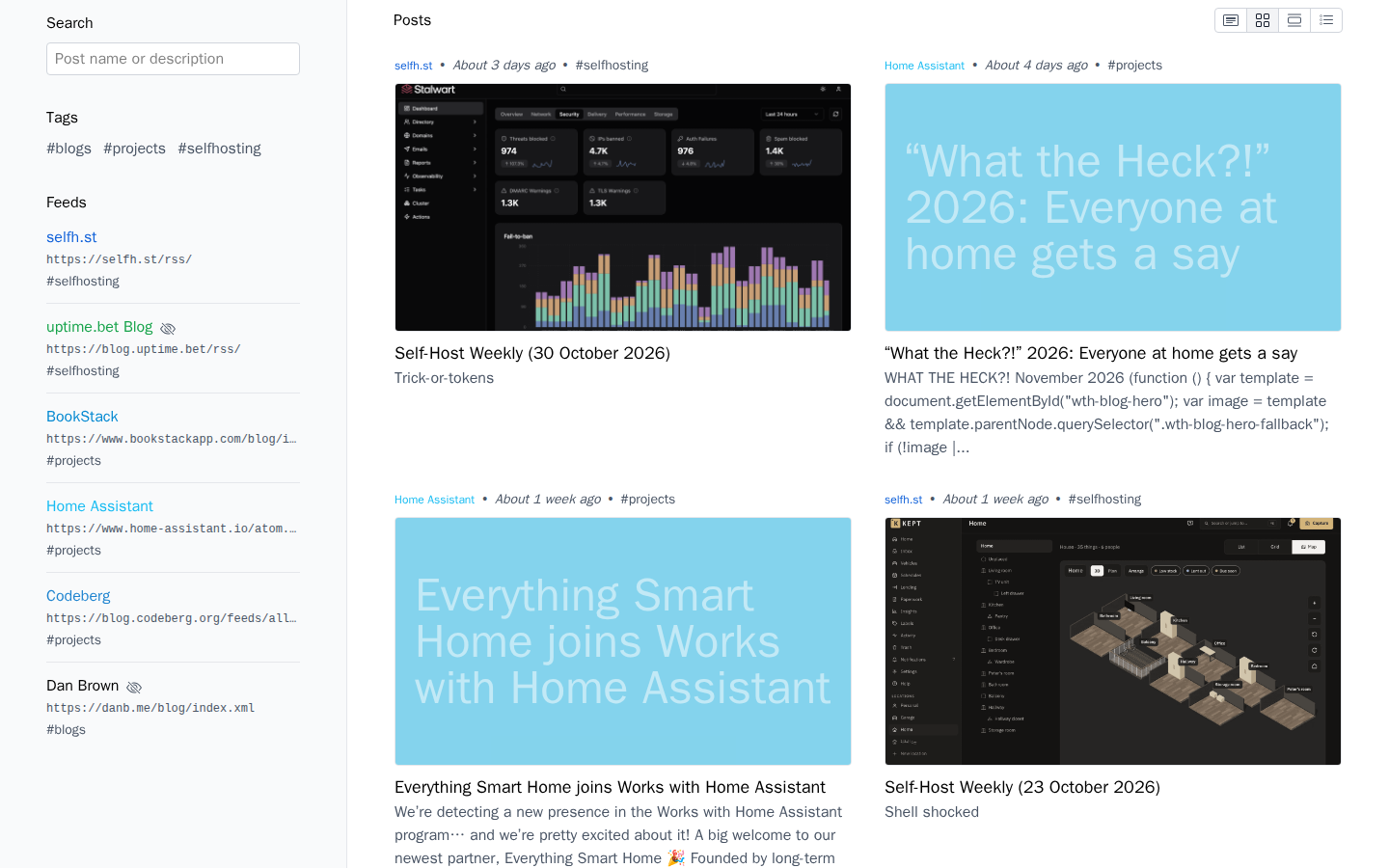
The feature list is short on purpose. The app fetches RSS and Atom feeds, stores the posts in SQLite and shows them newest first. For each feed you can set a display name, a colour and one or more tags. Clicking a tag or a feed name in the sidebar filters the timeline, and a search box looks through post titles and descriptions.
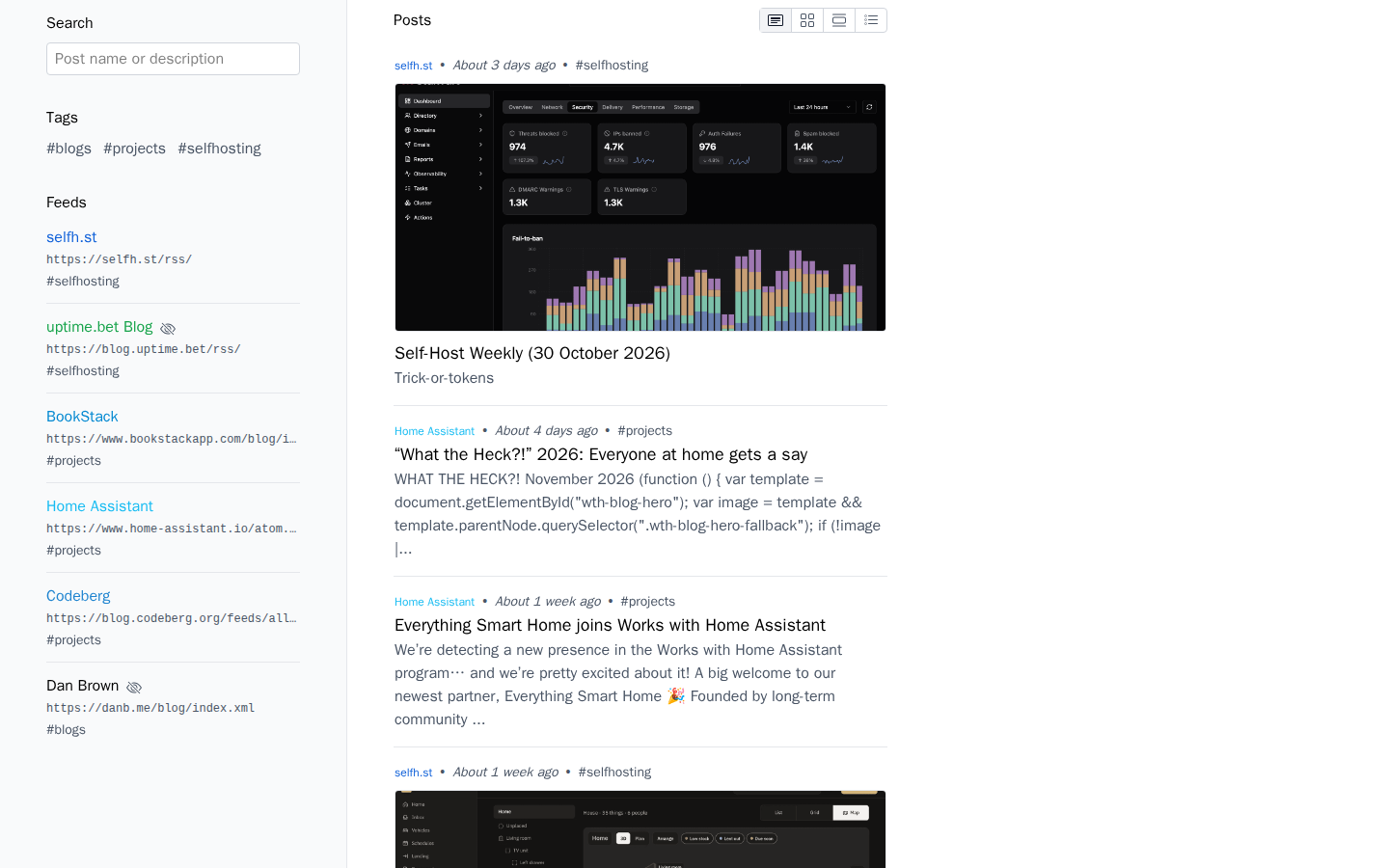
You get four layouts: card (big thumbnail above each post), grid, list (small thumbnail on the left) and compact (one line per post). The theme follows your system's light or dark setting. If a post doesn't ship an image in the feed, the app tries to grab the page's Open Graph image and caches it locally, which you can switch off.
Feeds can also be marked as hidden. Their posts don't appear on the home timeline, but they do show up as soon as you filter by tag, by that feed, or search. I used that for a couple of high-volume feeds I only want to look at occasionally.
How and when feeds are refreshed
This is worth understanding before you tune anything. Inside the container, cron runs Laravel's scheduler every minute, and the scheduler checks for outdated feeds every five minutes. A feed counts as outdated once its last fetch is older than APP_FEED_UPDATE_FREQUENCY minutes, which defaults to 60. Opening a page in the browser also queues a refresh for any outdated feed you're looking at. The README describes the five minute scheduler interval as the practical lower limit in the Docker setup, so setting the frequency below 5 won't make things faster.
What you need
- A Linux host with Docker Engine and the Compose plugin. My test ran on x86_64.
- Very little RAM. On my test VM the container used about 127 to 132 MiB according to
docker stats, with six feeds and thumbnails enabled. - Around 300 MB of disk for the image, plus space for cached thumbnails.
- A reverse proxy with authentication or a VPN if you want to reach it from outside your LAN. More on that below, because the app itself has no login.
Installing DanB/RSS with Docker Compose
1. Create a project folder
mkdir -p ~/rss/rss-files
cd ~/rss
Everything the app stores (SQLite database, feed list, cached thumbnails) ends up in rss-files, which is mounted to /app/storage in the container.
2. Write your feed list
Create rss-files/feeds.txt. Each line holds a feed URL, a name and optional tags. Underscores in names become spaces, a colour goes in square brackets after the name, and a leading - hides the feed from the home timeline. Lines starting with # are comments. This is the file I used for the test:
# Self-hosting news
https://selfh.st/rss/ selfh.st[#0f60d9] #selfhosting
- https://blog.uptime.bet/rss/ uptime.bet_Blog[#16a34a] #selfhosting

# Projects
https://www.bookstackapp.com/blog/index.xml BookStack[#0288d1] #projects
https://www.home-assistant.io/atom.xml Home_Assistant[#18bcf2] #projects
https://blog.codeberg.org/feeds/all.atom.xml Codeberg[#2185d0] #projects

# Hidden by default, only visible via filters
- https://danb.me/blog/index.xml Dan_Brown #blogs
If you skip this step the container creates an empty feeds.txt on first start, and you just get an empty timeline until you add lines.
3. Create docker-compose.yml
This is based on the Compose example from the README, with two changes: the image is pinned to v2.2.4 instead of latest, and the port is bound to 127.0.0.1 so the app isn't reachable from your network by accident. The obsolete version key and the fixed container name are left out.
services:
  rss:
    image: codeberg.org/danb/rss:v2.2.4
    environment:
      - APP_NAME=RSS
      - APP_FEED_UPDATE_FREQUENCY=60
      - APP_PRUNE_POSTS_AFTER_DAYS=30
    volumes:
      - ./rss-files:/app/storage
    ports:
      - "127.0.0.1:8080:80"
    restart: unless-stopped
A quick word on the environment variables, all of which are documented in the README:
APP_NAMEonly changes the browser tab title.APP_FEED_UPDATE_FREQUENCYis the age in minutes after which a feed is fetched again (default 60).APP_PRUNE_POSTS_AFTER_DAYSdeletes posts older than this many days, based on their publish date, once a day. Pruning is off by default. I turned it on because some feeds deliver their entire history: the BookStack feed alone brought in posts going back years.APP_LOAD_POST_THUMBNAILS=falsestops the app from downloading thumbnails, if you'd rather save disk space and outgoing requests.
There is also SERVER_PORT, which changes the port the web server listens on inside the container (default 80). That's meant for rootless setups such as Podman. If you change it, note that the image's built-in healthcheck in the Dockerfile still probes port 80.
4. Start it
docker compose up -d
docker compose ps
On my VM the image pull took about 20 seconds, and the container reported healthy roughly 30 seconds after starting, which matches the healthcheck interval. Open http://127.0.0.1:8080 on the host, or tunnel the port over SSH with ssh -L 8080:127.0.0.1:8080 user@your-server if the server is headless.
There's no setup wizard and nothing to log into. The first page load triggers the initial fetch, so give it a moment and reload. In my logs, thumbnail jobs ran one after another at about a second each, so images trickled in over the first minute or two.
Tips from the test run
You don't need to restart after editing feeds.txt. I changed one feed to hidden while the container was running, and the next page load reflected it.
File ownership changes on first start. The startup script runs chown on the app directory, including the mounted storage folder. Afterwards, everything in rss-files belonged to UID 101, the www user inside the container. Editing feeds.txt from the host then needs sudo (or matching permissions), so don't be surprised by a "permission denied" from your editor.
Plan for thumbnails. After a few minutes with six feeds, the storage folder had grown to about 36 MB. The SQLite database was only around 750 KB of that, so almost all of it was downloaded images and cache. If you subscribe to many image-heavy feeds, either keep pruning on or disable thumbnails.
Updating is a tag change. Check the release list on Codeberg, bump the tag in docker-compose.yml, then run docker compose pull && docker compose up -d. The container runs database migrations on start. Recent releases have mostly been dependency updates, and 2.2.4 was explicitly cut to ship the PHP security fixes, so it's worth keeping up.
Behind a reverse proxy, forward the usual X-Forwarded-* headers. If you serve it under a sub-path such as /rss/, the README has an nginx example that also sets X-Forwarded-Prefix so links are generated correctly.
Limitations and security
The README is unusually upfront about what's missing, and it's worth taking at face value. This is a low maintenance project: the author built it for his own use, accepts bug reports and fixes, but doesn't want pull requests that widen the scope. Don't expect these to arrive later:
- No authentication or authorization of any kind, and no user accounts.
- No feed management in the browser. Everything goes through
feeds.txt. - No full-text article import. You see the title, the description the feed provides and a link to the original.
- No read/unread state, no starring, no sync API for mobile apps.
- Limited error handling. If a feed breaks, the UI probably won't tell you clearly.
The missing login is the important one. Anyone who can reach the port can see your feed list and read your timeline. That's harmless on a LAN for a list of public blogs, but don't publish it to the internet as-is. Keep the 127.0.0.1 binding and either put a reverse proxy with authentication in front (basic auth, Authelia, Authentik, whatever you already use) or reach it only over a VPN like WireGuard or Tailscale. The app doesn't do HTTPS itself either; the README points to a proxy for that.
Two smaller things I noticed. First, the image generates Laravel's application key at build time rather than on first start, so by default every container started from the same image tag shares it. With no logins or stored secrets that matters less than it would elsewhere, but it's another reason to keep the app private. Second, descriptions are shown exactly as feeds deliver them. The Home Assistant and BookStack feeds both had stray CSS or script snippets at the start of some descriptions, and posts from hidden feeds showed up in a home-page search without their feed name and tag. Cosmetic, but you'll see it.
How it compares to other self-hosted feed readers
FreshRSS (AGPL-3.0) is the full-featured option: multiple users, its own login, managing feeds in the browser, and APIs that mobile apps can sync against. If you want read state on your phone and laptop, that's the one to look at.
Miniflux (Apache-2.0) is minimalist in its interface but still a proper reader with accounts, unread tracking and integrations. It needs a PostgreSQL database alongside it.
CommaFeed (Apache-2.0) gives you a classic Google Reader layout. We covered it here recently.
DanB/RSS sits below all of them in features, and that's the point. It's one container, no database server, no accounts, and a config file you can keep in Git next to your Compose file. If you mostly skim and click through, it's pleasant. If you want to manage reading, it will frustrate you.
Conclusion
DanB/RSS is a small, honest piece of software. It took under a minute to get running, used about 130 MiB of RAM, and the text-file approach to subscriptions felt natural once I stopped looking for an "add feed" button. The lack of authentication isn't a bug to be fixed later, it's a design decision, so plan your access around it from day one. If that fits how you read the web, it's a refreshingly quiet alternative to the inbox-style readers.