Kept 1.14: A Self-Hosted Home Inventory with a 3D Map, QR Labels and Docker Compose
Kept is a new AGPL-licensed home inventory with rooms, boxes, QR labels, a 3D map, lending and warranties. I installed Kept 1.14.5 with Docker Compose on a fresh VM: here is the setup, what I saw and what to watch out for.
Every homelab eventually grows a drawer of mystery cables, a box of spare parts nobody can find and a warranty card for something that broke last week. Kept is a new open-source app that tries to fix that: a self-hosted inventory of everything you own and where it is, from the house down to the shelf and the box on that shelf.
It has been moving fast. The GitHub repository was created at the end of September, had just over 500 stars when I wrote this, and shipped three releases in eight days (1.14.3 on 29 October, 1.14.4 on 3 November and 1.14.5 on 5 November). It even made a cameo in last week's Self-Host Weekly, in a PSA asking developers to stop naming their apps after Google Keep. To be clear about which one this is: this article covers keptinventory/kept, the home inventory, licensed under AGPL-3.0.
I installed Kept 1.14.5 with Docker Compose on a fresh Ubuntu 24.04 VM, went through the setup wizard, created a demo house and added a few things. Here is what it does, how to set it up and what I'd watch out for.
What Kept does
The data model is simple once you see it. A location is a home, a garage, a storage unit or an office. Inside it are places (rooms, shelves, spots), boxes and finally the things themselves. Move a box and everything in it moves with it. Things can carry photos, receipts, manuals, warranty dates, serial numbers, tags and custom fields.
On top of that sit the features that make it more than a spreadsheet:
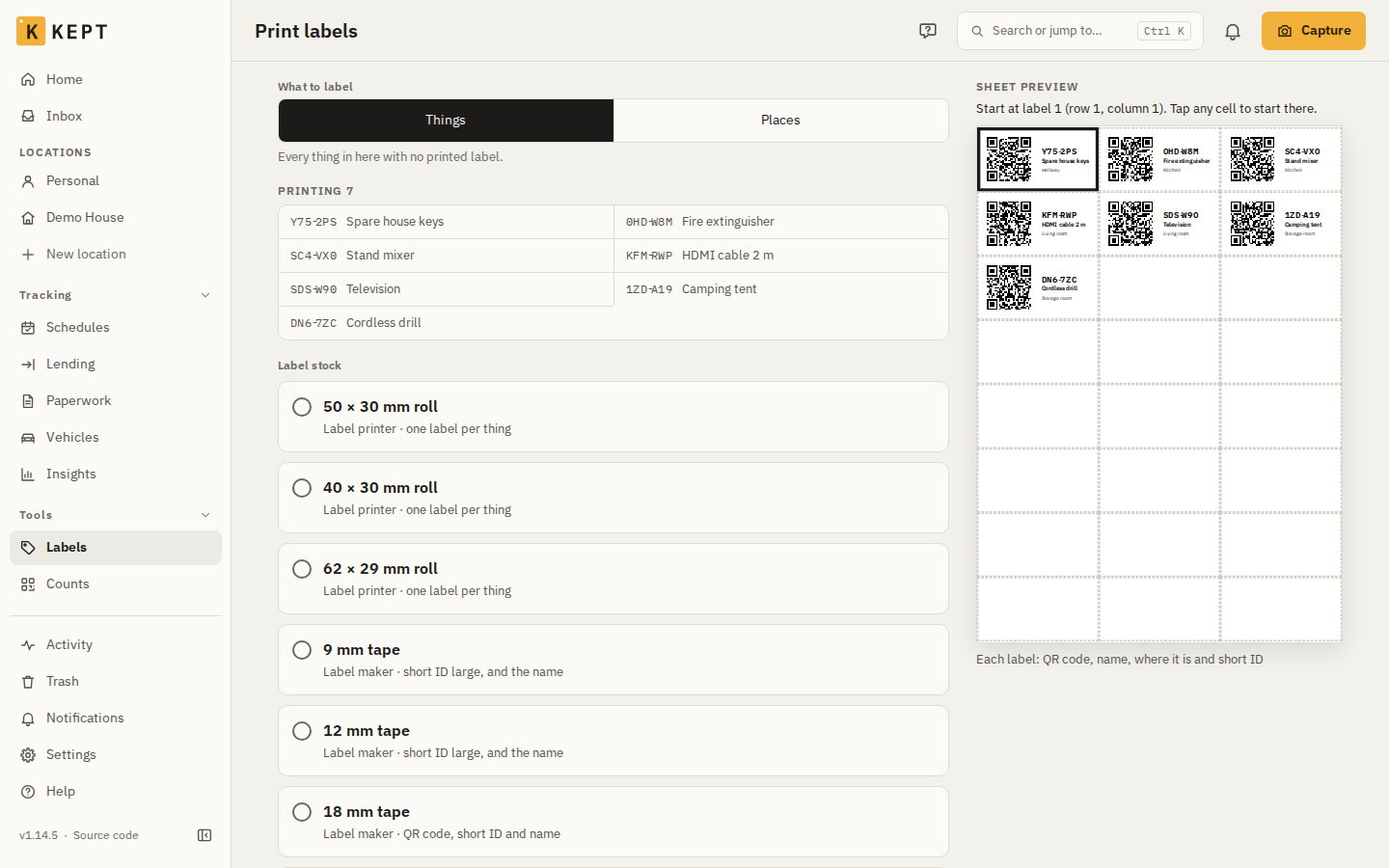
- Labels with QR codes. Every thing and place gets a short ID. Kept prints label sheets for office printers or rolls for label printers, and scanning a label opens the box or thing.
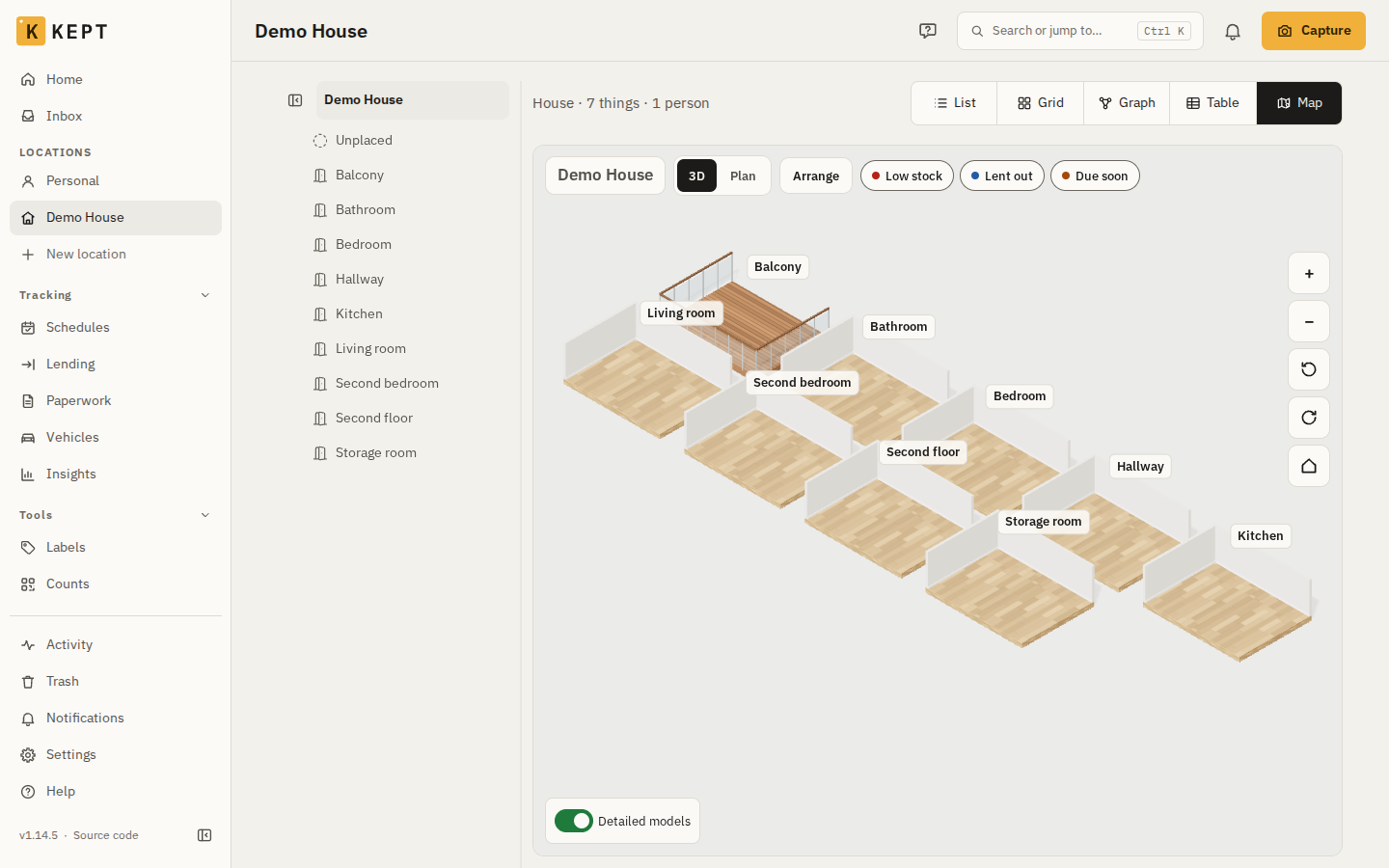
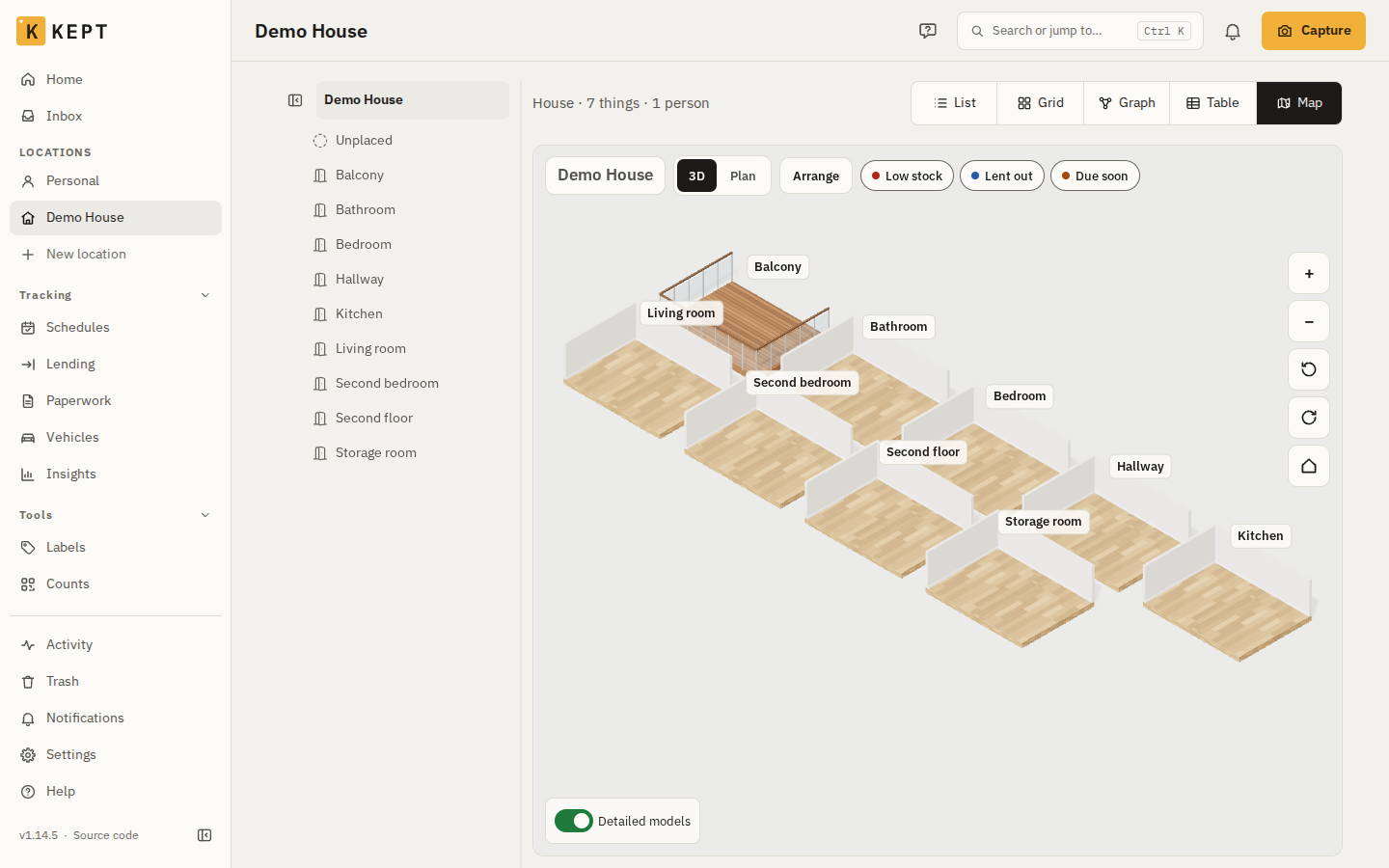
- A 3D map and a graph. Each location can be shown as an isometric map of its rooms, either arranged by you or laid out by Kept, plus a 2D/3D graph of places and things.
- Household features. Lending (who has your drill and when it's due back), reminders for warranties and services, vehicles with meter readings, moving-house mode with numbered boxes, condition reports and an insurance report.
- Integrations. Imports from Homebox, LubeLogger and CSV, links to Paperless-ngx documents, a Home Assistant app and integration, notifications by email, web push, ntfy, Telegram and Apprise, OIDC and passkey sign-in, and a calendar feed.
- Optional AI. You can connect your own provider (OpenAI, Anthropic, Google, OpenRouter, Groq or an OpenAI-compatible server such as Ollama) for photo capture and an assistant, and AI clients can connect to Kept's MCP server at
/mcp. Without a provider you simply type things in.
The project is also unusually explicit about privacy defaults. According to the README there is no telemetry and the update check is off by default. The configuration docs add that barcode lookup (which asks Open Food Facts and its sister sites) stays off until an admin enables it.
Requirements
You need a Linux host with Docker and the Compose plugin. The official docs say Kept was tested on a machine with 1 GB of RAM and one CPU core, and that Kept plus its database use roughly 200 to 400 MB. My numbers below started in that range and ended a bit above it after some use.
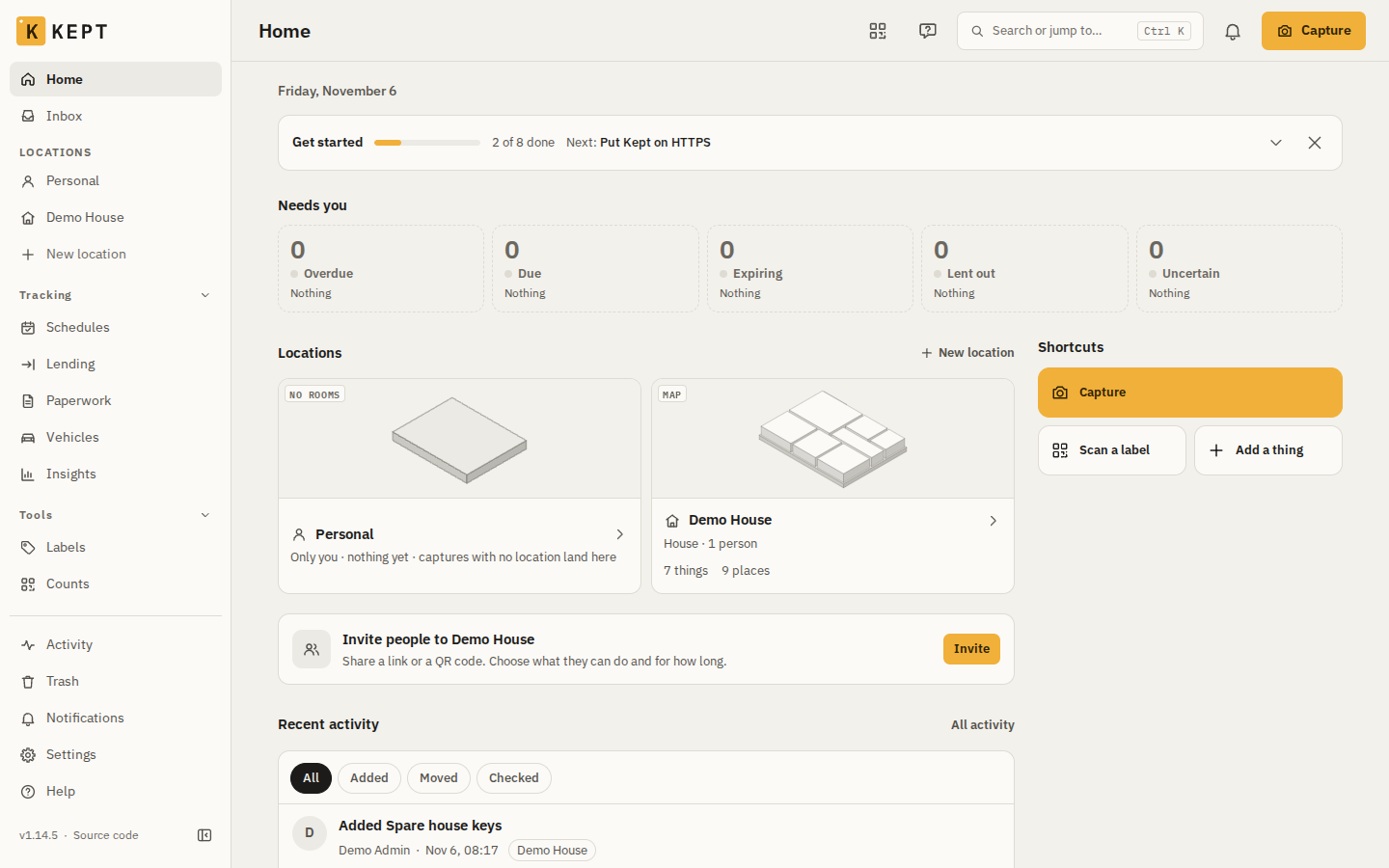
Plan for HTTPS from the start if you want the phone features. Over plain HTTP, browsers block the camera, installing Kept as an app, push notifications and location. In my test, Kept pointed this out with a banner at the top of the app and a card on the Home screen.
Installing Kept with Docker Compose
The official install is four commands, and you don't need to clone the repository or invent any passwords. I'm using the 1.14.5 release and kept.example.com as the hostname; replace it with the name you'll actually use.
1. Download the pinned Compose file
mkdir kept && cd kept
curl -fsSLO https://raw.githubusercontent.com/keptinventory/kept/v1.14.5/compose.yaml
Download the file from the release tag rather than from main. The file names the image it was published with (ghcr.io/keptinventory/kept:1.14.5), and Kept never publishes a latest tag, only 1, 1.14 and 1.14.5. The same signed images are also on Docker Hub as keptinventory/kept.
2. Write the .env file with init
docker compose run --rm init --url http://kept.example.com:8080The init service is a small one-shot container with no network that writes .env next to compose.yaml. It records the public address (KEPT_PUBLIC_URL), the host port taken from that address (KEPT_HTTP_PORT), the image (KEPT_IMAGE) and a setup code (KEPT_SETUP_CODE), and prints the code. Without --url it asks for the address interactively.
Take the address seriously. Links and the QR codes on printed labels are built from it, and it has to match exactly what your browser shows. The docs recommend a hostname rather than an IP address, because labels you've stuck on boxes would otherwise point nowhere after your router hands out a new IP.
3. Start the stack
docker compose up -dCompose starts Postgres 18 with pgvector and waits until it is healthy. Then two one-shot services run in order: bootstrap creates Kept's four database logins and extensions (and generates their passwords into a volume on the first start), and migrate applies the database migrations. Only after both have exited successfully does the kept container start, listening on port 8080 inside the container.
4. Finish setup in the browser
Open http://kept.example.com:8080. The setup wizard has three steps: enter the setup code, create the first account (which becomes the instance admin), and choose whether anyone with the address may create an account. Kept suggests leaving sign-up off for a household and inviting people instead.
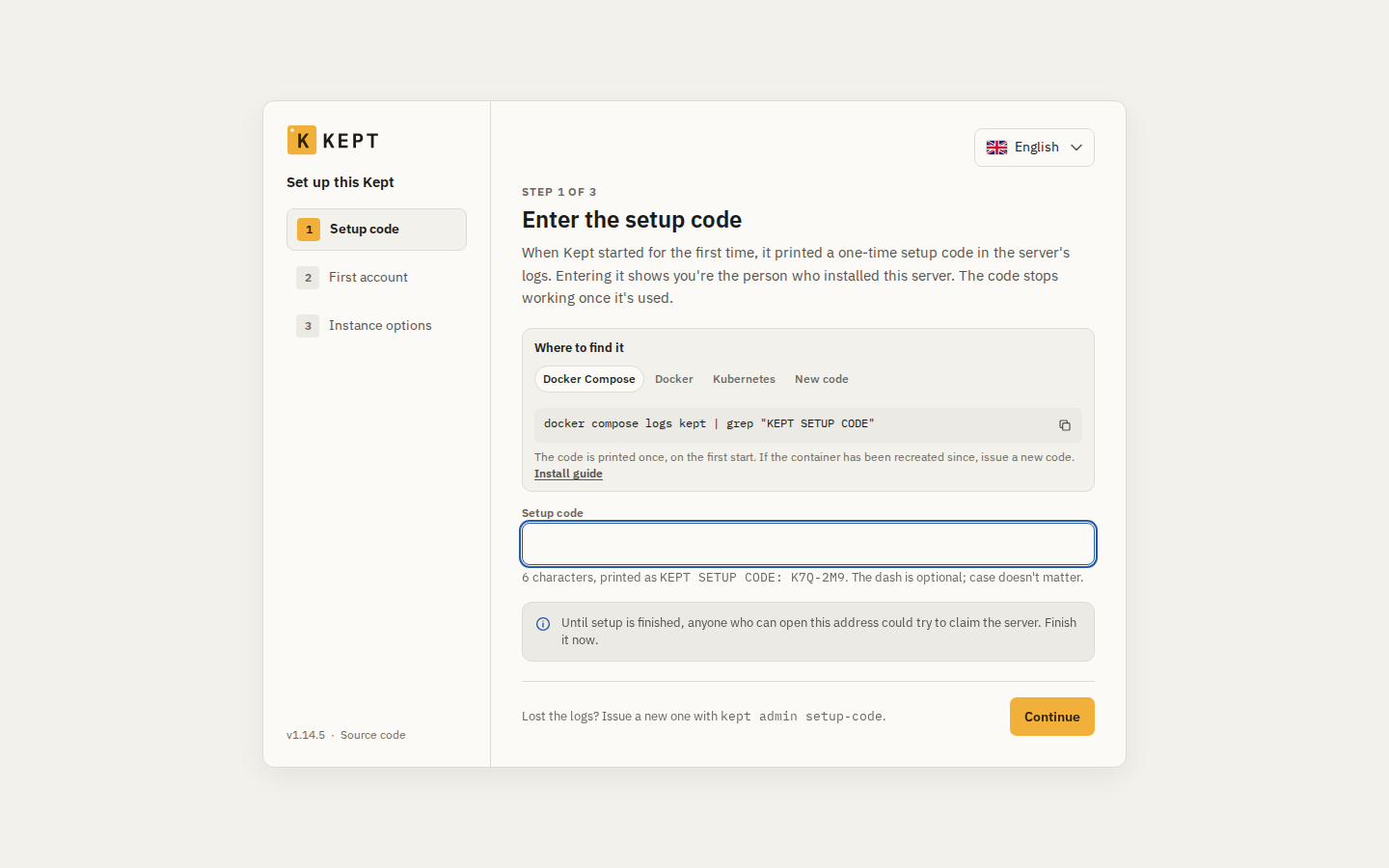
If you lost the code, it's also in the log on the first start, and you can issue a new one:
docker compose logs kept | grep "KEPT SETUP CODE"
docker compose run --rm migrate admin setup-code
5. Save the recovery kit
docker compose exec kept kept admin recovery-kitDon't skip this one. On the first start Kept generates KEPT_SECRET_KEY and KEPT_AUTH_SECRET into the kept-config volume. The secret key seals every secret value (AI keys, passwords you store in Kept), so a backup without it restores everything except those values. The command prints both keys plus restore notes; put the output in your password manager, not on the same server. Kept also asks you to acknowledge the kit under Admin → Status before you can store the first secret value, AI key or backup setting.
The Compose file at a glance
This is the exact file from the v1.14.5 tag, with its comments removed so it fits on screen. The original comments are worth reading, they explain nearly every line.
name: kept
x-kept-image: &kept-image
  image: ${KEPT_IMAGE:-ghcr.io/keptinventory/kept:1.14.5}
  read_only: true
  tmpfs: [/tmp]
  cap_drop: [ALL]
  security_opt: [no-new-privileges:true]
x-ops-env: &ops-env
  KEPT_BACKUP_DIR: ${KEPT_BACKUP_DIR:-}
  KEPT_BACKUP_PASSWORD: ${KEPT_BACKUP_PASSWORD:-}
  KEPT_BACKUP_S3_BUCKET: ${KEPT_BACKUP_S3_BUCKET:-}
  KEPT_BACKUP_S3_PREFIX: ${KEPT_BACKUP_S3_PREFIX:-}
  KEPT_BACKUP_S3_ENDPOINT: ${KEPT_BACKUP_S3_ENDPOINT:-}
  KEPT_BACKUP_S3_REGION: ${KEPT_BACKUP_S3_REGION:-}
  KEPT_BACKUP_S3_ACCESS_KEY_ID: ${KEPT_BACKUP_S3_ACCESS_KEY_ID:-}
  KEPT_BACKUP_S3_SECRET_ACCESS_KEY: ${KEPT_BACKUP_S3_SECRET_ACCESS_KEY:-}
  KEPT_BACKUP_S3_FORCE_PATH_STYLE: ${KEPT_BACKUP_S3_FORCE_PATH_STYLE:-}
  KEPT_BACKUP_SFTP: ${KEPT_BACKUP_SFTP:-}
  KEPT_BACKUP_SFTP_KEY_FILE: ${KEPT_BACKUP_SFTP_KEY_FILE:-}
  KEPT_BACKUP_SFTP_KNOWN_HOSTS: ${KEPT_BACKUP_SFTP_KNOWN_HOSTS:-}
  KEPT_BACKUP_TIME: ${KEPT_BACKUP_TIME:-}
  KEPT_BACKUP_KEEP_DAILY: ${KEPT_BACKUP_KEEP_DAILY:-}
  KEPT_BACKUP_KEEP_WEEKLY: ${KEPT_BACKUP_KEEP_WEEKLY:-}
  KEPT_BACKUP_KEEP_MONTHLY: ${KEPT_BACKUP_KEEP_MONTHLY:-}
  KEPT_SECRET_KEY: ${KEPT_SECRET_KEY:-}
  KEPT_AUTH_SECRET: ${KEPT_AUTH_SECRET:-}
  KEPT_ALLOW_DOWNGRADE: ${KEPT_ALLOW_DOWNGRADE:-}
services:
  db:
    image: pgvector/pgvector:0.8.6-pg18-bookworm@sha256:2ba9ca5f2e7daa0f0e7723cba1ee9167bab54efd3640516a44ac1a928dd67e7a
    restart: unless-stopped
    entrypoint:
      - sh
      - -c
      - >-
        if [ -z "$$POSTGRES_PASSWORD" ]; then
        POSTGRES_PASSWORD=$$(od -An -N32 -tx1 /dev/urandom | tr -d ' \n'); export POSTGRES_PASSWORD;
        fi; exec docker-entrypoint.sh "$$@"
      - db
    command: [postgres]
    environment:
      POSTGRES_USER: postgres
      POSTGRES_PASSWORD: ${KEPT_DB_SUPERUSER_PASSWORD:-}
      POSTGRES_DB: kept
      TZ: UTC
    volumes:
      - kept-db:/var/lib/postgresql
    healthcheck:
      test: ["CMD-SHELL", "pg_isready -h 127.0.0.1 -U postgres -d kept"]
      interval: 5s
      timeout: 5s
      retries: 30
    networks: [kept]
  bootstrap:
    <<: *kept-image
    entrypoint: ["kept"]
    command: ["bootstrap"]
    restart: "no"
    network_mode: service:db
    environment:
      PGHOST: 127.0.0.1
      PGPORT: "5432"
      PGUSER: postgres
      PGDATABASE: kept
      PGPASSWORD: ${KEPT_DB_SUPERUSER_PASSWORD:-}
      KEPT_DB_OWNER_PASSWORD: ${KEPT_DB_OWNER_PASSWORD:-}
      KEPT_DB_APP_PASSWORD: ${KEPT_DB_APP_PASSWORD:-}
      KEPT_DB_AUTH_PASSWORD: ${KEPT_DB_AUTH_PASSWORD:-}
      KEPT_DB_SYSTEM_PASSWORD: ${KEPT_DB_SYSTEM_PASSWORD:-}
      KEPT_DB_OWNER_PASSWORD_FILE: /owner/kept_owner
      KEPT_DB_APP_PASSWORD_FILE: /config/database/kept_app
      KEPT_DB_AUTH_PASSWORD_FILE: /config/database/kept_auth
      KEPT_DB_SYSTEM_PASSWORD_FILE: /config/database/kept_system
    volumes:
      - kept-config:/config
      - kept-owner:/owner
    healthcheck:
      disable: true
    depends_on:
      db:
        condition: service_healthy
  migrate:
    <<: *kept-image
    entrypoint: ["kept"]
    command: ["migrate"]
    restart: "no"
    environment:
      <<: *ops-env
      KEPT_OWNER_DATABASE_URL: postgres://kept_owner:${KEPT_DB_OWNER_PASSWORD:-}@db:5432/kept
      KEPT_DB_OWNER_PASSWORD_FILE: /owner/kept_owner
      KEPT_PUBLIC_URL: ${KEPT_PUBLIC_URL:-}
      KEPT_SMTP_URL: ${KEPT_SMTP_URL:-}
      KEPT_SMTP_FROM: ${KEPT_SMTP_FROM:-}
      KEPT_UPGRADE_SNAPSHOT: ${KEPT_UPGRADE_SNAPSHOT:-}
    volumes:
      - kept-data:/data
      - kept-config:/config:ro
      - kept-owner:/owner:ro
    healthcheck:
      disable: true
    depends_on:
      db:
        condition: service_healthy
      bootstrap:
        condition: service_completed_successfully
    networks: [kept]
  kept:
    <<: *kept-image
    restart: unless-stopped
    environment:
      <<: *ops-env
      KEPT_DATABASE_URL: postgres://kept_app:${KEPT_DB_APP_PASSWORD:-}@db:5432/kept
      KEPT_AUTH_DATABASE_URL: postgres://kept_auth:${KEPT_DB_AUTH_PASSWORD:-}@db:5432/kept
      KEPT_SYSTEM_DATABASE_URL: postgres://kept_system:${KEPT_DB_SYSTEM_PASSWORD:-}@db:5432/kept
      KEPT_DB_APP_PASSWORD_FILE: /config/database/kept_app
      KEPT_DB_AUTH_PASSWORD_FILE: /config/database/kept_auth
      KEPT_DB_SYSTEM_PASSWORD_FILE: /config/database/kept_system
      KEPT_PUBLIC_URL: ${KEPT_PUBLIC_URL:-}
      KEPT_TRUSTED_PROXIES: ${KEPT_TRUSTED_PROXIES:-}
      KEPT_HSTS: ${KEPT_HSTS:-}
      KEPT_HTTP_SIGN_IN_DAYS: ${KEPT_HTTP_SIGN_IN_DAYS:-}
      KEPT_EXTRA_ADDRESSES: ${KEPT_EXTRA_ADDRESSES:-}
      KEPT_SMTP_URL: ${KEPT_SMTP_URL:-}
      KEPT_SMTP_FROM: ${KEPT_SMTP_FROM:-}
      KEPT_LOG_LEVEL: ${KEPT_LOG_LEVEL:-info}
      KEPT_LOG_FORMAT: ${KEPT_LOG_FORMAT:-json}
      KEPT_SETUP_CODE: ${KEPT_SETUP_CODE:-}
      KEPT_SIGNUP_OPEN: ${KEPT_SIGNUP_OPEN:-}
      KEPT_MAX_FILE_MB: ${KEPT_MAX_FILE_MB:-}
      KEPT_IMAGE_CONCURRENCY: ${KEPT_IMAGE_CONCURRENCY:-}
      KEPT_STORAGE: ${KEPT_STORAGE:-local}
      KEPT_S3_ENDPOINT: ${KEPT_S3_ENDPOINT:-}
      KEPT_S3_PUBLIC_ENDPOINT: ${KEPT_S3_PUBLIC_ENDPOINT:-}
      KEPT_S3_REGION: ${KEPT_S3_REGION:-}
      KEPT_S3_BUCKET: ${KEPT_S3_BUCKET:-}
      KEPT_S3_ACCESS_KEY_ID: ${KEPT_S3_ACCESS_KEY_ID:-}
      KEPT_S3_SECRET_ACCESS_KEY: ${KEPT_S3_SECRET_ACCESS_KEY:-}
      KEPT_S3_FORCE_PATH_STYLE: ${KEPT_S3_FORCE_PATH_STYLE:-}
      KEPT_BARCODE_LOOKUP: ${KEPT_BARCODE_LOOKUP:-}
      KEPT_BARCODE_CONTACT: ${KEPT_BARCODE_CONTACT:-}
      KEPT_VAPID_PUBLIC_KEY: ${KEPT_VAPID_PUBLIC_KEY:-}
      KEPT_VAPID_PRIVATE_KEY: ${KEPT_VAPID_PRIVATE_KEY:-}
      KEPT_VAPID_SUBJECT: ${KEPT_VAPID_SUBJECT:-}
      KEPT_EMBEDDINGS: ${KEPT_EMBEDDINGS:-}
      KEPT_OIDC_ISSUER: ${KEPT_OIDC_ISSUER:-}
      KEPT_OIDC_CLIENT_ID: ${KEPT_OIDC_CLIENT_ID:-}
      KEPT_OIDC_CLIENT_SECRET: ${KEPT_OIDC_CLIENT_SECRET:-}
      KEPT_OIDC_NAME: ${KEPT_OIDC_NAME:-}
      KEPT_OIDC_AUTOPROVISION_DOMAINS: ${KEPT_OIDC_AUTOPROVISION_DOMAINS:-}
      KEPT_OIDC_AUTOPROVISION_GROUPS: ${KEPT_OIDC_AUTOPROVISION_GROUPS:-}
      KEPT_OIDC_GROUPS_CLAIM: ${KEPT_OIDC_GROUPS_CLAIM:-}
      KEPT_OIDC_SCOPES: ${KEPT_OIDC_SCOPES:-}
      KEPT_GOOGLE_CLIENT_ID: ${KEPT_GOOGLE_CLIENT_ID:-}
      KEPT_GOOGLE_CLIENT_SECRET: ${KEPT_GOOGLE_CLIENT_SECRET:-}
      KEPT_UPDATE_CHECK: ${KEPT_UPDATE_CHECK:-}
      OTEL_EXPORTER_OTLP_ENDPOINT: ${OTEL_EXPORTER_OTLP_ENDPOINT:-}
      KEPT_METRICS_TOKEN: ${KEPT_METRICS_TOKEN:-}
    volumes:
      - kept-data:/data
      - kept-config:/config
    ports:
      - "${KEPT_HTTP_PORT:-8080}:8080"
    depends_on:
      db:
        condition: service_healthy
      migrate:
        condition: service_completed_successfully
    networks: [kept]
  init:
    profiles: [init]
    image: ${KEPT_IMAGE:-ghcr.io/keptinventory/kept:1.14.5}
    entrypoint: ["kept", "init"]
    user: "0:0"
    read_only: true
    tmpfs: [/tmp]
    cap_drop: [ALL]
    cap_add: [CHOWN, DAC_OVERRIDE]
    security_opt: [no-new-privileges:true]
    network_mode: none
    working_dir: /install
    volumes:
      - .:/install
    restart: "no"
    healthcheck:
      disable: true
networks:
  kept:
    ipam:
      config:
        - subnet: 172.29.72.0/24
          ip_range: 172.29.72.0/25
volumes:
  kept-db: {}
  kept-data: {}
  kept-config: {}
  kept-owner: {}
A few things stand out. The database has no published port and its superuser password is random and stored nowhere; you reach it only from inside its container with docker compose exec db psql -U postgres. Kept's own containers run as a non-root user (uid 10001) with a read-only root filesystem, every capability dropped and no-new-privileges. The init service is the one exception: it runs as root with only CHOWN and DAC_OVERRIDE, no network, and only when you call it.
First steps after the install
After the wizard you land on Home, which already contains a Personal location for things you carry around. The obvious next step is "Create your first home". That's another short wizard: a name and a kind (house, apartment, garage, storage unit, office, vacation home or other), a list of rooms from a template that you can rename or trim, and a preset for what the location should track. Essentials covers rooms, boxes, labels and search; Household adds receipts and warranties, reminders, lending, paperwork and vehicles; Complete adds consumables, moving house, stored passwords and the ChatGPT/Claude connector. Single modules can be switched later in the location settings.
Adding things is fast: open a room, click Thing, type a name and optionally type, quantity, brand, model, serial number, a photo and purchase details. Once a few things exist, Print labels lists everything without a printed label and previews the sheet. You can pick between A4-style sheets, several label-printer roll sizes and 9, 12 or 18 mm label-maker tape.
What I saw on the test VM
The test machine was a fresh Ubuntu 24.04 VM with 2 vCPUs, 1.8 GB of RAM and 4 GB of swap. The two images are about 350 MB to download (roughly 1.5 GB unpacked). Once they were pulled, docker compose up -d --wait went from nothing to a healthy kept container in about 20 seconds, including the bootstrap and migration runs.
Memory use stayed modest. Right after the start, docker stats showed about 171 MiB for Kept and 179 MiB for Postgres. After the setup wizard, a new location and a handful of things, Kept sat at around 405 MiB and Postgres at around 96 MiB. That's comfortable on a small VM, but not something I'd squeeze onto a 512 MB box.
A few small observations from clicking through:
initwith--urldidn't ask any questions. It wrote.env, printed the setup code and exited.- The 3D map rendered without problems even in a headless browser and laid out the template rooms by itself.
- The HTTPS card on Home also has a "Staying on my home network" button next to the how-to link, for when plain HTTP inside your LAN is a deliberate choice. I didn't need it for the test.
Tips and gotchas
Behind a reverse proxy
If Caddy, Traefik or nginx already terminates TLS on the same host, bind Kept to loopback by setting the port in .env, for example KEPT_HTTP_PORT=127.0.0.1:8080. The example env file documents a similar loopback binding for the bundled HTTPS profile. Set KEPT_PUBLIC_URL to the HTTPS address and add your proxy's address as Kept sees it to KEPT_TRUSTED_PROXIES. Without that, Kept doesn't believe any X-Forwarded-For header, so sign-in rate limits would treat all visitors as one.
Check the network subnet
The Compose file pins the internal network to 172.29.72.0/24. If that range clashes with your LAN or VPN, change the subnet and ip_range together. With compose.full.yaml, Caddy's fixed ipv4_address has to move as well, and so does any proxy address you listed in KEPT_TRUSTED_PROXIES.
Caddy and Ollama moved in 1.14.5
Since 1.14.5, compose.yaml runs only Kept and Postgres. The bundled Caddy (HTTPS) and Ollama (local AI) setups now live in compose.full.yaml. If you used either, download that file and set COMPOSE_FILE=compose.full.yaml in .env before upgrading. Otherwise Caddy users end up with Kept on plain HTTP, and the bundled Ollama service is no longer started.
Upgrades and backups
For updates, download the compose.yaml of the new release instead of only bumping KEPT_IMAGE; the release notes point out that new settings need the new file. Then run docker compose pull and docker compose up -d. Backups are nightly restic snapshots to a directory, S3 or SFTP, configured under Admin → Backups or via the KEPT_BACKUP_* variables. One catch: the nightly backup runs as the database owner, so the kept service needs KEPT_OWNER_DATABASE_URL from a compose.override.yaml, as described on the docs' Backups page. With a backup target configured, migrate also takes a snapshot before migrating a populated database.
Limitations and security notes
Kept is young. The repository is about six weeks old and releases come every few days. That pace is great for features and less great if you like to set things up once and forget them. Pin the version, read the release notes before you upgrade, and keep the recovery kit somewhere safe. Rolling back is not a casual operation either: the KEPT_ALLOW_DOWNGRADE switch exists, but the project describes it as something for a restore runbook only.
The phone features really do depend on HTTPS. If you only want to look things up from your desktop, plain HTTP on your LAN works, but capture with the camera, installing the app and push won't.
The AI and MCP features are optional, and I didn't test them. If you enable them, remember what they mean: photos and inventory details go to whichever provider you configure, unless you point Kept at a local model. The README says assistant changes wait for your confirmation; MCP tokens can be limited to specific locations.
Finally, licensing. Kept itself is AGPL-3.0, but contributors sign a CLA adapted from the Apache individual CLA, which grants the maintainer broad rights over contributions. That's common practice and says nothing about future plans, but after the license changes we covered in October it's worth knowing before you build your household's records on top of it.
Kept compared to the alternatives
Homebox (maintained by sysadminsmedia, AGPL-3.0) is the established choice for home inventory and is noticeably simpler. If you just want items, locations, labels and warranties, it may be all you need. Kept ships an importer for Homebox, so moving over later is an option.
Snipe-IT (AGPL-3.0) is built for IT asset management in organizations: laptops, licenses, check-ins and check-outs. It's powerful, but it feels like work software in a living room.
Kept sits between the two. It's clearly built for households, with rooms, boxes, lending and moving house, but it goes further than Homebox with the 3D map, presets per location, restic backups that stay readable without Kept, and the Home Assistant and Paperless-ngx integrations.
Conclusion
Kept is one of the more thoughtful new self-hosted apps I've tried this year. The Compose setup is genuinely easy, the defaults are conservative (no telemetry, update check off, hardened containers, generated database passwords), and the app has a clear idea of who it's for. The 3D map is the eye-catcher, but the boring parts are what make it useful: short IDs, printed labels and the question "where did I put that?" answered in two seconds.
The main caveats are its age and its release pace. If you're comfortable pinning versions, reading release notes and storing the recovery kit properly, it's well worth an afternoon.
Sources
- Kept on GitHub
- Kept 1.14.5 release notes
- Kept docs: Install with Docker Compose
- compose.yaml at v1.14.5
- compose.env.example at v1.14.5
- Kept docs: Put Kept on HTTPS
- Kept docs: The recovery kit
- Kept docs: Backups
- Kept docs: Integrations
- Kept license (AGPL-3.0)
- Kept contributor license agreement
- Self-Host Weekly, 30 October 2026
- Homebox on GitHub
- Snipe-IT on GitHub