Floci 2.4: A Free MIT-Licensed LocalStack Alternative You Can Run with Docker Compose
Floci is a free, MIT-licensed local AWS emulator that speaks the same wire protocol as LocalStack on port 4566. Version 2.4.0 shipped on 31 October. Here is how to run it with Docker Compose, migrate from LocalStack, and what to watch out for.
If you write software that talks to AWS, you already know the awkward middle ground: you need S3, SQS, DynamoDB or Lambda in your tests, but you do not want every CI run to create real cloud resources, spend money or risk leaking credentials into a sandbox. For years the default answer was LocalStack. In March 2026 LocalStack finished consolidating its Community edition into a single authenticated image, and a lot of teams started looking for a no-token, truly open alternative.
Floci is that alternative. It is a free, MIT-licensed local AWS emulator that listens on the familiar port 4566, accepts the usual dummy credentials, and claims drop-in compatibility with LocalStack Community workflows. The latest stable release, 2.4.0, landed on 31 October 2026. The repository has crossed 30,000 stars on GitHub and is still being updated daily.
In this guide I'll walk through what Floci is, how to run it with Docker Compose, how to migrate from LocalStack, and where the honest caveats are.
What is Floci?
Floci (named after floccus, the popcorn-looking cloud) is a local AWS service emulator for development, testing and CI. Point your AWS SDK, AWS CLI, Terraform, CDK, OpenTofu or test suite at http://localhost:4566 and keep the same client code you already use against real AWS.
The project is written primarily in Java (Quarkus / GraalVM native image), ships as a Docker image floci/floci on Docker Hub, and is licensed under MIT. According to the README and the project site, Floci aims to cover a broad set of AWS APIs (the site currently lists 128 AWS services) without requiring an AWS account, an auth token or a paid feature gate.
Floci is also the AWS member of a small family of local cloud emulators from the same org: floci (AWS, :4566), floci-az (Azure, :4577), floci-gcp (GCP, :4588) and floci-oci (OCI, :4599). This article focuses on the AWS emulator.
Why Floci exists (and why it is trending)
LocalStack's own blog post The Road Ahead for LocalStack (updated March 2026) explained the shift: Community and Pro were unified into one image, an account/auth token became required for current releases, and the old Community image stopped receiving regular security updates. Hobbyists can still pin an older tag, but that freezes you out of patches.
Floci's README positions itself as the no-strings-attached answer. The comparison table they publish (figures as stated by the project) looks like this:
| Capability | Floci | LocalStack Community (post-change) |
|---|---|---|
| Auth token required | No | Yes |
| Security updates | Active | Frozen for the old Community line |
| Startup time | ~24 ms | ~3.3 s |
| Idle memory | ~13 MiB | ~143 MiB |
| Docker image size | ~90 MB | ~1.0 GB |
| Licence | MIT | Restricted / account-based product |
I verified the Docker Hub tag floci/floci:2.4.0 myself: the published image is about 94 MB, which matches the "~90 MB" claim. Startup and memory figures above come from Floci's own README; treat them as project-reported benchmarks, not independent lab measurements.
Key features
Going by the README and official docs:
- Local AWS without an account. No signup, no auth token, no paid tier. Any non-empty credentials work unless you turn on stricter signature checks.
- Drop-in port 4566. Same endpoint pattern as LocalStack Community; existing SDKs and CLI commands usually need only
AWS_ENDPOINT_URL. - Real Docker where fidelity matters. Lambda, RDS, Neptune, ElastiCache, MSK, ECS, EC2, EKS, OpenSearch, CodeBuild and Managed Service for Apache Flink can run against real containers instead of shallow mocks (Docker socket required).
- Configurable persistence. Storage modes
memory,persistent,hybridandwalviaFLOCI_STORAGE_MODE. - Web console. Optional browser UI at
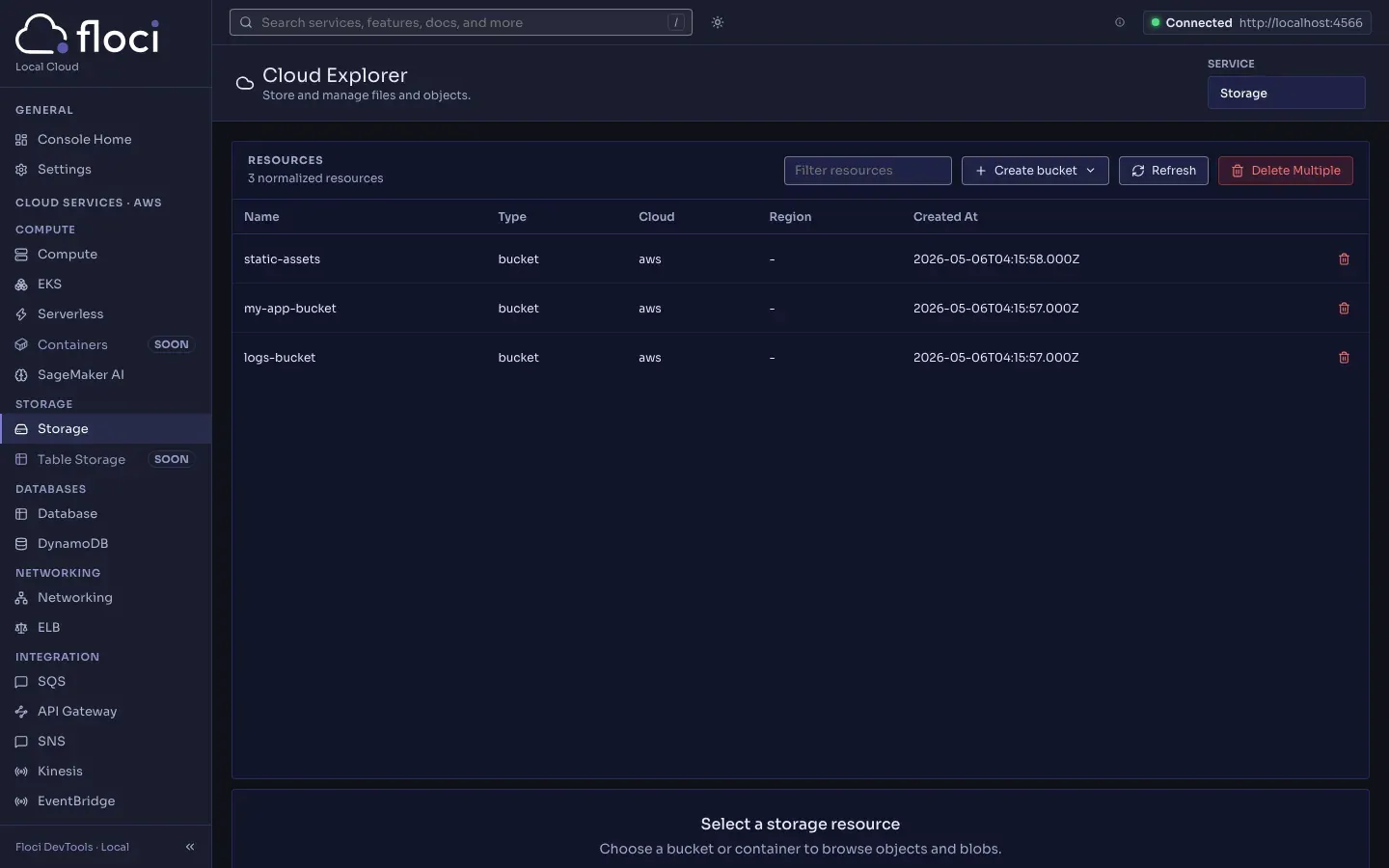
http://localhost:4566/_floci/ui(sidecar imagefloci/floci-ui). - LocalStack parity helpers. Many LocalStack env vars are translated automatically;
/_localstack/healthand/etc/localstack/init/paths still work. - Init hooks. Scripts in
/etc/floci/init/{boot,start,ready,stop}.d(or the LocalStack-compat paths). - Native binary option. Releases also ship a standalone
floci-awsbinary if you do not want Docker for the emulator itself. - CI-friendly. Small image, fast start, no credits or quotas claimed by the project.
Installing Floci with Docker Compose
The official image is floci/floci on Docker Hub. Pin a version for reproducible builds; use latest only if you deliberately want floating releases. Below is a practical Compose file based on the project's documented persistent setup, with the web port bound to localhost so a reverse proxy can sit in front if you ever expose it on a shared machine.
Step 1: Create a project folder
mkdir -p ~/floci && cd ~/floci
Step 2: Write docker-compose.yml
services:
  floci:
    image: floci/floci:2.4.0
    container_name: floci
    ports:
      - "127.0.0.1:4566:4566"
    volumes:
      - floci-data:/app/data
      # Uncomment if you use Lambda, RDS, ElastiCache, MSK, ECS, etc.
      # - /var/run/docker.sock:/var/run/docker.sock
    environment:
      FLOCI_HOSTNAME: floci
      FLOCI_STORAGE_MODE: hybrid
      FLOCI_STORAGE_PERSISTENT_PATH: /app/data
      FLOCI_DEFAULT_REGION: us-east-1
    restart: unless-stopped

volumes:
  floci-data:
Notes:
FLOCI_HOSTNAME: flocimakes generated URLs (for example SQS queue URLs) use the Compose service name instead oflocalhost, which matters when other containers talk to Floci.hybridkeeps state across restarts with periodic flushes; usememoryfor throwaway CI jobs andpersistentorwalwhen you want stronger durability.- Mount the Docker socket only when you need Docker-backed services. Without it, core APIs like S3, SQS, SNS and DynamoDB still work.
If your init scripts call aws or boto3 inside the container, switch the image to floci/floci:2.4.0-compat (or latest-compat).
Step 3: Start it
docker compose up -d
docker compose logs -f floci
Wait until the container is healthy. With LocalStack parity enabled (the default), the log also ends with a LocalStack-style Ready. line, which helps Testcontainers and similar wait strategies.
Step 4: Point the AWS CLI at Floci
export AWS_ENDPOINT_URL=http://localhost:4566
export AWS_DEFAULT_REGION=us-east-1
export AWS_ACCESS_KEY_ID=test
export AWS_SECRET_ACCESS_KEY=test

aws s3 mb s3://demo-bucket
aws s3 ls
aws sqs create-queue --queue-name demo-queue
aws dynamodb list-tables
The same endpoint works for SDKs. In Python, for example, configure your boto3 client with endpoint_url="http://localhost:4566". In a multi-container Compose stack, use http://floci:4566 from sibling services.
Step 5 (optional): Open the web console
With the Docker socket mounted, visit:
http://localhost:4566/_floci/ui
Floci pulls and starts the floci/floci-ui sidecar on first request. You can pin the UI image with FLOCI_SERVICES_UI_IMAGE (README default at the time of writing: floci/floci-ui:0.7.0) and restrict the published host port with FLOCI_SERVICES_UI_BIND_ADDRESS=127.0.0.1.
Migrating from LocalStack
For most Community setups the migration is an image swap. From the official migration guide:
# Before
image: localstack/localstack

# After
image: floci/floci:2.4.0
# or floci/floci:2.4.0-compat if init scripts need aws/boto3
Keep port 4566 and dummy credentials. Floci auto-translates common LocalStack variables unless you set LOCALSTACK_PARITY=false:
| LocalStack | Floci equivalent |
|---|---|
LOCALSTACK_HOST |
FLOCI_HOSTNAME |
PERSISTENCE=1 |
FLOCI_STORAGE_MODE=persistent |
LAMBDA_DOCKER_NETWORK |
FLOCI_SERVICES_LAMBDA_DOCKER_NETWORK |
LAMBDA_REMOVE_CONTAINERS=1 |
FLOCI_SERVICES_LAMBDA_EPHEMERAL=true |
DEBUG=1 |
QUARKUS_LOG_LEVEL=DEBUG |
Init scripts under /etc/localstack/init/ still run. Health endpoints /_localstack/init and /_localstack/health still answer. One path change to remember: LocalStack's data directory was /var/lib/localstack; Floci uses /app/data.
Known differences called out by the docs: Floci always runs Lambda in Docker (no LAMBDA_EXECUTOR switch), LAMBDA_REMOTE_DOCKER is not supported (use hot-reload via S3Bucket=hot-reload instead), and there is no SERVICES= allow-list because Floci starts its emulators without that selection step.
Config tips for a safer lab setup
- Do not expose port 4566 to the public internet. This is a local emulator, not a hardened multi-tenant cloud. Bind to
127.0.0.1or keep it on a private Docker network. - Turn on signature checks when you care.
FLOCI_AUTH_VALIDATE_SIGNATURES=trueverifies SigV4 signatures. Default is off for convenience. - Pin image tags in CI. Prefer
floci/floci:2.4.0overlatestso a floating tag cannot break a green pipeline overnight. - Pair it with your existing notification stack. When a CI job that depends on Floci fails, send a push through ntfy or Gotify, or watch the job with Healthchecks.
- Persist only what you need. Ephemeral
memorymode is perfect for PR checks;hybridorpersistentis better on a developer laptop where you want buckets and queues to survive a reboot.
Limitations to keep in mind
- Young project. The
floci-io/flocirepository was created in February 2026. It is moving very fast (many releases, large feature surface), which is great for coverage and also a sign that behaviour can still change between minors. Pin versions and run your own smoke tests. - Emulation is not AWS. No local emulator matches every edge case of real IAM, networking, quotas and regional quirks. Use Floci for fast feedback; keep a real (isolated) AWS account for contract tests that must match production.
- Fidelity varies by service. Core services are the everyday path. Docker-backed engines (RDS, EKS, MSK, …) need the socket, extra ports and more RAM. Check the Services Overview for the APIs you actually call.
- Benchmark claims are vendor-reported. Startup time, idle memory and the LocalStack comparison numbers come from Floci's README/site. Independently verify for your workload.
- Not a production AWS replacement. The project is aimed at development and CI. Do not treat it as a way to run customer workloads "on AWS" without AWS.
Floci vs LocalStack (short, verified)
| Floci 2.4 | LocalStack (unified, from March 2026) | |
|---|---|---|
| Licence / model | MIT, no auth token | Account + auth token for current image; free tier exists with its own terms |
| Docker image (example) | floci/floci:2.4.0 (~94 MB on Docker Hub) |
localstack/localstack (much larger; see vendor docs) |
| Default endpoint | http://localhost:4566 |
http://localhost:4566 |
| Drop-in migration | Documented image swap + env translation | — |
| Best fit | Teams that want a free, MIT local emulator with no token in CI | Teams that want the commercial product, support and advanced platform features |
If you already pay for LocalStack and like the console/collaboration features, there is no need to switch. If you were pinning an abandoned Community tag just to avoid auth tokens, Floci is the cleaner long-term option to evaluate.
Conclusion
Floci is one of the clearest "why is everyone starring this?" answers of late 2026: LocalStack's Community sunset created a gap, and an MIT-licensed emulator that keeps port 4566, dummy credentials and a ~90 MB image fills that gap well. Version 2.4.0 is straightforward to run with Docker Compose, migrates from many LocalStack Community setups with an image swap, and gives you a local AWS-shaped sandbox for S3, queues, tables, Lambdas and more without cloud bills.
Treat it like any young infrastructure tool: pin the tag, write a small smoke test for the APIs you rely on, and keep real AWS for the checks that must be real. Used that way, Floci is an excellent addition next to the rest of a homelab or developer workstation.
Are you still on a pinned LocalStack Community tag, or have you already moved your local AWS tests somewhere else? Let me know.
Sources
- Floci on GitHub (README, features, comparison table)
- Floci releases (2.4.0)
- Floci documentation: Docker Compose
- Floci documentation: Migrate from LocalStack
- Floci documentation: Services overview
- Floci project site
- floci-ui on GitHub (console screenshot)
- LocalStack blog: The Road Ahead for LocalStack
- Docker Hub: floci/floci