Immich v3: Self-Host Your Own Google Photos Alternative with Docker Compose
Immich is the AGPL-licensed, self-hosted photo and video platform that feels like Google Photos: automatic phone backup, face recognition, smart search and shared albums. Here is how to run Immich v3.3.6 with Docker Compose, what changed in v3, and how to back it up properly.
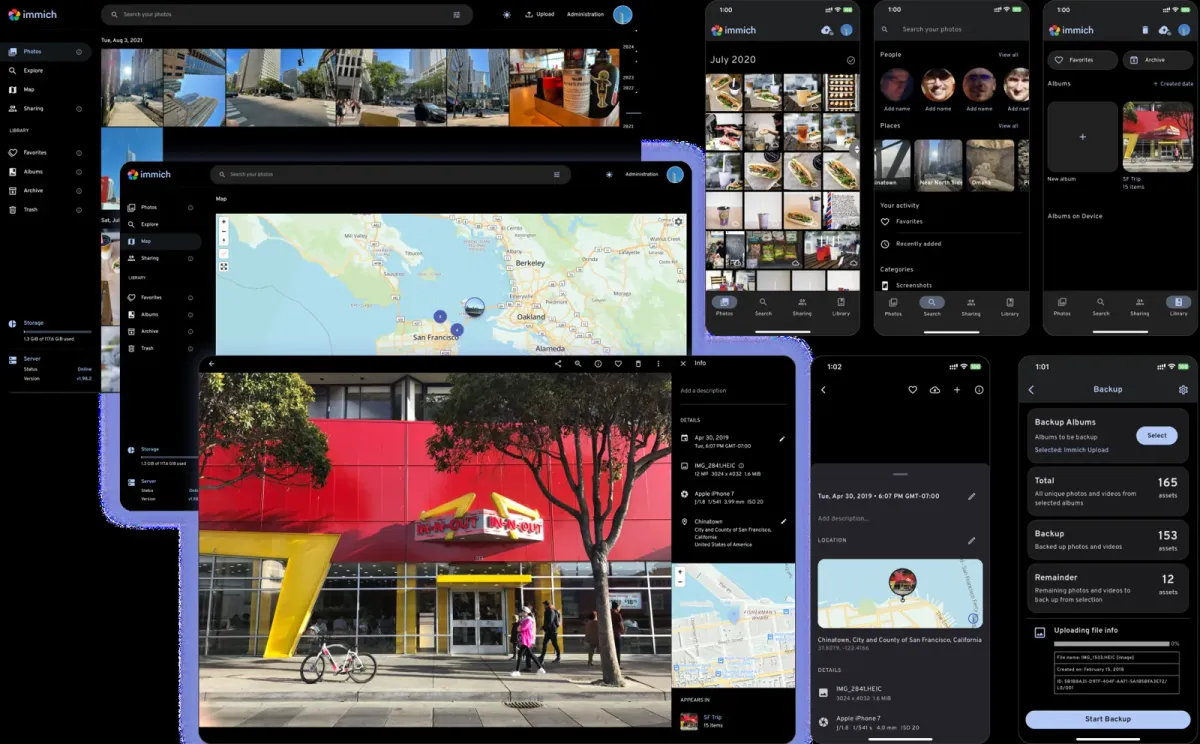
If there is one app that convinces people to start a homelab, it is probably a photo library. Phones produce thousands of pictures a year, cloud storage plans keep creeping up in price, and your family memories end up on someone else's servers, scanned by someone else's algorithms.
Immich is the project most self-hosters point to when you ask for a Google Photos replacement. With close to 119,000 GitHub stars, an AGPL-3.0 license and an extremely active release cycle (v3.3.6 shipped on 4 November 2026 and the v3.4 release candidates are already out), it is one of the most popular self-hosted projects, full stop.
In this guide I'll explain what Immich does, what changed with the v3 series, how to install it with Docker Compose, and what you need to know about hardware, reverse proxies and backups before you trust it with your photos.
What is Immich?
Immich describes itself as a "high performance self-hosted photo and video management solution". In practice you get:
- a server that stores your photos and videos and serves a polished web app,
- mobile apps for Android and iOS that back up your camera roll automatically,
- a separate machine learning container that powers face recognition, smart (CLIP) search and OCR, all running locally on your own hardware.
The server sits on PostgreSQL (with the VectorChord extension for vector search) and Valkey (a Redis fork) for its job queues. The project is backed by FUTO and funded partly through optional product keys, but there is no feature paywall: everything below is available when you self-host.
If you want to try it before installing anything, the project runs a public demo instance with the demo credentials listed in the README.
Key features
According to the README and documentation, Immich supports:
- Automatic backup from the mobile apps, including background backup and selective albums.
- Duplicate prevention, RAW formats, Live Photos/Motion Photos and 360° images (web).
- Multi-user support, shared albums, partner sharing and public share links.
- Facial recognition and clustering, plus search by metadata, objects, faces and CLIP ("dog on a beach", for example).
- Memories ("x years ago"), a global map, archive, favorites, tags, stacked photos and a folder view.
- OAuth/OIDC login, API keys and a user-defined storage template for how files land on disk.
- External libraries, so Immich can index an existing photo folder without moving files.
What's new in the v3 series
Immich v3.0.0 landed in July 2026. For most users the upgrade was just changing IMMICH_VERSION to v3, but it did drop support for the old pgvecto.rs extension, so very old installs had to migrate to VectorChord first. Highlights of v3.0 included non-destructive editing on mobile, a preview of workflows (automation rules), integrity checks, HLS and real-time video transcoding (preview) and big timeline performance gains.
The point releases since then have been just as busy:
- v3.1 (July) added EXIF and file-path filters for workflows and syncs the OIDC admin role on every login.
- v3.2 (September) brought a new search UI, a new search API and the official Docker Compose builder.
- v3.3 (October) added people sharing between users, birthday memories, auto-stacking of photos edited on the phone, sharper thumbnails, new PP-OCRv6 models and opt-in machine learning optimizations.
- v3.3.5 (21 October) shipped dependency updates in response to a certificate authority compromise plus Node.js security patches, and the project recommended updating as soon as possible.
- v3.3.6 (4 November) disabled telemetry that the onnxruntime library had quietly enabled by default, which had caused the ML container to send anonymous metrics to Microsoft. The team apologized openly and fixed it fast, which is reassuring.
The current v3.4 release candidates add passkey support to the mobile app. They are prereleases, so stay on the stable channel unless you want to help test.
Hardware requirements
Immich is not a tiny app, and the official requirements are worth reading before you start:
| Resource | Minimum | Recommended |
|---|---|---|
| RAM | 6 GB | 8 GB |
| CPU | 2 cores | 4 cores |
| Platform | amd64 or arm64 | Linux 64-bit with Docker Engine |
A few details that trip people up:
- On amd64, the ML container needs an x86-64-v2 CPU since v3. Most CPUs from roughly 2012 onwards qualify, but in a VM you may need to set a CPU type that exposes it.
- With only 4 GB of RAM, the docs suggest running Immich with machine learning disabled.
- Put the Postgres data on local SSD storage, never on a network share. The database is typically 1 to 3 GB.
- Thumbnails and transcoded videos add roughly 10 to 20% on top of your library size.
- A full VM is recommended. Docker inside an LXC container is possible but not recommended by the project.
Installing Immich with Docker Compose
You need Docker Engine with the Compose plugin (docker compose, not the deprecated docker-compose).
1. Download the official files
Always use the files attached to the latest release, not the ones on the main branch:
mkdir immich-app && cd immich-app
wget -O docker-compose.yml https://github.com/immich-app/immich/releases/latest/download/docker-compose.yml
wget -O .env https://github.com/immich-app/immich/releases/latest/download/example.env
2. Edit the .env file
The defaults look like this (comments shortened):
UPLOAD_LOCATION=./library
DB_DATA_LOCATION=./postgres
# TZ=Etc/UTC
IMMICH_VERSION=v3
DB_PASSWORD=postgres
DB_USERNAME=postgres
DB_DATABASE_NAME=immich
What I'd change:
- Point
UPLOAD_LOCATIONat a disk with plenty of space. This is where all originals, thumbnails and database dumps live. - Keep
DB_DATA_LOCATIONon an SSD. - Uncomment
TZand set your timezone, for exampleTZ=Europe/Berlin. - Replace
DB_PASSWORDwith a random value. The docs recommend onlyA-Za-z0-9characters, for example generated withopenssl rand -hex 24orpwgen. IMMICH_VERSION=v3follows the v3 series automatically. If you prefer explicit upgrades, pin a release such asv3.3.6.
3. Look at the Compose file
The stack has four services:
services:
  immich-server:
    image: ghcr.io/immich-app/immich-server:${IMMICH_VERSION:-release}
    volumes:
      - ${UPLOAD_LOCATION}:/data
      - /etc/localtime:/etc/localtime:ro
    env_file:
      - .env
    ports:
      - '2283:2283'
    depends_on:
      - redis
      - database
    restart: always

  immich-machine-learning:
    image: ghcr.io/immich-app/immich-machine-learning:${IMMICH_VERSION:-release}
    volumes:
      - model-cache:/cache
    env_file:
      - .env
    restart: always

  redis:
    image: docker.io/valkey/valkey:9@sha256:...   # pinned digest in the official file

  database:
    image: ghcr.io/immich-app/postgres:14-vectorchord0.4.3-pgvectors0.2.0@sha256:...
    environment:
      POSTGRES_PASSWORD: ${DB_PASSWORD}
      POSTGRES_USER: ${DB_USERNAME}
      POSTGRES_DB: ${DB_DATABASE_NAME}
      POSTGRES_INITDB_ARGS: '--data-checksums'
    volumes:
      - ${DB_DATA_LOCATION}:/var/lib/postgresql/data
    shm_size: 128mb

volumes:
  model-cache:
This is a shortened excerpt for orientation. Use the downloaded file as-is: the database and Valkey images are pinned by digest on purpose, and the comments explain where to switch on hardware acceleration.
If your database lives on a spinning disk, uncomment DB_STORAGE_TYPE: 'HDD' in the database service.
4. Start it
docker compose up -d
docker compose ps
Open http://<your-server>:2283, click Getting Started and create the first account. The first user to register becomes the admin, so do this right away, before you expose the instance anywhere.
5. First steps after installing
- Create accounts for family members under Administration > Users.
- Decide on a storage template (Administration > Settings > Storage Template) before you upload thousands of photos. The default is
Year/Year-Month-Day/Filename.Extension, and a migration job can re-apply a new template later. - Install the mobile app, enter your server URL and enable backup for the albums you care about.
- Coming from Google Photos? The community tool immich-go (AGPL-3.0, not part of the official project) is popular for importing Takeout archives.
Putting Immich behind a reverse proxy
Immich must run on the root of a (sub)domain, such as photos.example.com; sub-paths like /immich are not supported. The reverse proxy docs list a few requirements:
- forward the
Host,X-Real-IP,X-Forwarded-ProtoandX-Forwarded-Forheaders, - allow large uploads and WebSockets,
- raise timeouts, because long video uploads otherwise get cut off.
For Caddy, it really is this short:
photos.example.com {
    reverse_proxy http://immich-server:2283
}
For Traefik v3, add labels to immich-server and raise the timeouts of the entrypoint. The default 60 seconds will break large video uploads:
# traefik.yml (static config)
entryPoints:
  websecure:
    address: :443
    transport:
      respondingTimeouts:
        readTimeout: 600s
        idleTimeout: 600s
# docker-compose.yml, immich-server service
    labels:
      traefik.enable: true
      traefik.http.routers.immich.entrypoints: websecure
      traefik.http.routers.immich.rule: Host(`photos.example.com`)
      traefik.http.services.immich.loadbalancer.server.port: 2283
Remember to attach immich-server to the Docker network Traefik uses. Once a proxy is in front, you can also drop the public 2283 port mapping or bind it to 127.0.0.1.
Want single sign-on? Immich supports OAuth/OIDC, and since v3.1 it can sync the admin role from your identity provider on every login. It pairs nicely with Pocket ID if you want passkey logins for the whole family.
Machine learning tips
- Since v3.3, setting
MACHINE_LEARNING_MODEL_REVISION=v2on the machine learning container opts you into re-exported, optimized models. The release notes say they are faster, use less memory and produce numerically equivalent results, so no jobs need re-running. The team plans to make this the default later. - Hardware acceleration is available for ML (ARM NN, CUDA, ROCm, OpenVINO, RKNN) and for video transcoding (NVENC, Quick Sync, RKMPP, VAAPI) via the
hwaccel.ml.ymlandhwaccel.transcoding.ymlfiles from the release. See the ML hardware acceleration docs. - The first import is the heavy part. Expect high CPU usage for a while as thumbnails, faces and embeddings are generated; it settles down afterwards.
Backups: don't skip this part
The README is blunt about it: follow a 3-2-1 backup plan for your photos. Immich is not a backup on its own; it is where your only copy may end up living.
Two things need backing up:
- The database. Immich does not rescan your library folder to rebuild itself, so the database (paths, albums, faces, metadata) is essential. Immich creates automatic database dumps daily at 2:00 AM and keeps the last 14 by default, stored in
UPLOAD_LOCATION/backups. You can adjust this under Administration > Settings, and you can restore a dump from the web UI (Administration > Maintenance) or right from the onboarding screen of a fresh install. - The files in
UPLOAD_LOCATION, which contain your originals and also those database dumps.
So in practice: back up the whole UPLOAD_LOCATION folder with a real backup tool (restic, Borg, Proxmox Backup Server, whatever you already use) to a second disk and an off-site location. A Healthchecks ping at the end of that job tells you when it silently stops working. And if you want to know when your Immich instance goes down, Uptime Kuma can watch it.
Updating
Read the release notes first, especially for minor versions, and make sure your backup is current. Then:
docker compose pull && docker compose up -d
If you pinned a version, bump IMMICH_VERSION in .env before pulling. Immich can also notify you about new versions in the admin UI, and you can switch that check between the stable and release candidate channels.
Limitations and honest notes
- It's resource hungry compared to simpler galleries: 6 GB of RAM minimum is a real requirement on small boxes.
- Development is fast. Releases arrive almost weekly, and there were breaking API changes in v3 that affected third-party tools. Read the notes before upgrading.
- External libraries have caveats. Metadata you add in Immich (albums, descriptions) is not written back to the files, and moving files inside an external library loses that metadata on rescan, as the docs point out.
- No sub-path hosting, so you need a dedicated (sub)domain.
- The onnxruntime telemetry episode shows that even privacy-focused projects depend on upstream libraries. It was fixed within days, but keeping your instance updated matters.
Immich vs. the alternatives
The obvious comparison is Google Photos or iCloud Photos: Immich gives you a very similar experience (timeline, faces, search, sharing, phone backup) while the data stays on your hardware, at the cost of running and backing it up yourself. Among self-hosted options, Immich's strength is clearly the mobile backup experience and the polish of its apps; if you only need a lightweight web gallery for an existing folder structure, a simpler tool may be enough.
Conclusion
Immich has grown from "promising project" into the default answer for self-hosted photos, and the v3 series keeps adding genuinely useful features like people sharing, workflows and better ML performance. Give it enough RAM, keep the database on an SSD, put it behind a proper reverse proxy with generous timeouts, and above all, back up UPLOAD_LOCATION off-site. Do that, and you can finally cancel that cloud storage upgrade.
Are you running Immich already? Let me know which hardware you use for the machine learning part.
Sources
- Immich on GitHub (README, AGPL-3.0 license)
- Immich releases (v3.0.0, v3.1.0, v3.2.0, v3.3.0, v3.3.5, v3.3.6, v3.4.0-rc.3)
- Requirements
- Docker Compose installation
- Post installation steps
- Reverse proxy
- Backup and restore
- External libraries
- immich-go (community tool)