PHP2Shell: How to Check and Patch Every PHP Container in Your Homelab
PHP2Shell (CVE-2026-109618 and CVE-2026-109619) is all over Hacker News. Here's a tested script to find every PHP runtime in your containers, what the popular images ship now, and how to update safely.
If you spent any time on Hacker News last week, you couldn't miss it. The PHP security advisory hit 1,561 points, the PHP 8.2.35 release thread another 1,107, and someone apologised publicly for leaking the news before the embargo ended. By the weekend there was a "Steal My Bitcoin" challenge daring people to actually exploit the bug. Wiz gave the whole thing a name, PHP2Shell, and that name stuck.
Behind the noise are two critical bugs in PHP itself, CVE-2026-109618 and CVE-2026-109619, fixed on 21 October 2026. For a homelab the interesting question isn't "is PHP broken" but "where is PHP hiding in my stack". Nextcloud, WordPress, Firefly III, BookStack, Matomo and plenty of other self-hosted apps bring their own PHP inside the container, and you probably never think about it. So this post is mostly practical: find every PHP runtime you run, check whether it's patched, and update what isn't.
What PHP2Shell actually is
Both bugs live in the PHP engine, not in any application. Roughly speaking:
- CVE-2026-109618 is about out-of-memory handling. If a request runs out of memory at exactly the wrong moment, PHP can leave half-initialised internal data behind and later treat it as valid.
- CVE-2026-109619 is about state that survives a request. After certain fatal errors, internal pointers can still reference memory from the previous request, and the next request handled by the same worker may use it.
The PHP project rates both as CVSS 4.0 9.2 and says every PHP installation that serves web requests is at risk: PHP-FPM, Apache with mod_php, php-cgi, FrankenPHP and LiteSpeed. It considers mod_php the riskiest, because there an unauthenticated request can trigger the attack before any application code runs. Wiz says it demonstrated unauthenticated remote code execution against the official wordpress, drupal and joomla images and, separately, reading other requests' data out of worker memory. According to Wiz, every PHP version going back to 5.4 is affected by at least one of the issues.
The fixed upstream releases are:
- PHP 8.2.35
- PHP 8.3.36
- PHP 8.4.27
- PHP 8.5.12
PHP 8.1 and older get no upstream releases. The security team published source backport branches for 7.4, 8.0 and 8.1, and some distributions shipped their own fixes, but if you're on one of those branches the real answer is to move to a supported version. Also worth knowing: PHP 8.2 reaches end of life on 31 December 2026.
Is it really that bad?
That's the part people are arguing about. Amazon reported an exploitation attempt against its MadPot honeypots dated 17 October, four days before disclosure, followed by broad exploitation attempts once the patch was out. It also says it's unclear whether those attempts would have worked on real systems. On the other side, a widely shared post titled "There isn't an easy exploit for this PHP vulnerability" points out that many of the public "proof of concept" scripts only work against servers that were already broken in some other way. The author's own conclusion is still to patch.
My take: you don't need to win that argument. The fix is a routine image update, so do it and move on.
Step 1: Find every PHP runtime in your containers
Here's a small shell script that walks through all running containers, asks each one whether it has a php binary, and prints the version. It also tries to tell upstream builds (like the official php image) apart from distro packages, because the version number means different things for those two.
#!/bin/sh
# php2shell-check.sh: list running containers that ship PHP and show which build they run.
# Upstream fixed releases for CVE-2026-109618 / CVE-2026-109619 (PHP2Shell):
#   8.2.35, 8.3.36, 8.4.27, 8.5.12. Older branches only get fixes from distro/LTS vendors.

min_for() {
  case "$1" in
    8.2.*) echo 8.2.35 ;;
    8.3.*) echo 8.3.36 ;;
    8.4.*) echo 8.4.27 ;;
    8.5.*) echo 8.5.12 ;;
  esac
}

printf '%-20s %-8s %-40s %s\n' CONTAINER PHP BUILD STATUS
for id in $(docker ps -q); do
  name=$(docker inspect --format '{{.Name}}' "$id" | cut -c2-)
  info=$(docker exec "$id" sh -c '
    p=$(command -v php) || exit 0
    v=$(php -r "echo PHP_VERSION;")
    real=$(readlink -f "$p")
    if command -v dpkg-query >/dev/null 2>&1 && pkg=$(dpkg -S "$real" 2>/dev/null); then
      pkg=${pkg%%:*}
      echo "$v deb:$pkg=$(dpkg-query -W -f="\${Version}" "$pkg")"
    elif command -v apk >/dev/null 2>&1 && pkg=$(apk info -q --who-owns "$real" 2>/dev/null) && [ -n "$pkg" ]; then
      echo "$v apk:$pkg"
    else
      echo "$v upstream"
    fi' 2>/dev/null)
  [ -n "$info" ] || continue
  ver=${info%% *}
  build=${info#* }
  if [ "$build" = upstream ]; then
    min=$(min_for "$ver")
    if [ -z "$min" ]; then
      status="UNSUPPORTED branch, upgrade or ask your vendor"
    elif [ "$(printf '%s\n%s\n' "$min" "$ver" | sort -V | head -n1)" = "$min" ]; then
      status="ok"
    else
      status="UPDATE (needs $min or newer)"
    fi
  else
    status="distro build, check your distro's advisory"
  fi
  printf '%-20s %-8s %-40s %s\n' "$name" "$ver" "$build" "$status"
done
Save it as php2shell-check.sh on your Docker host and run it:
chmod +x php2shell-check.sh
sudo ./php2shell-check.sh
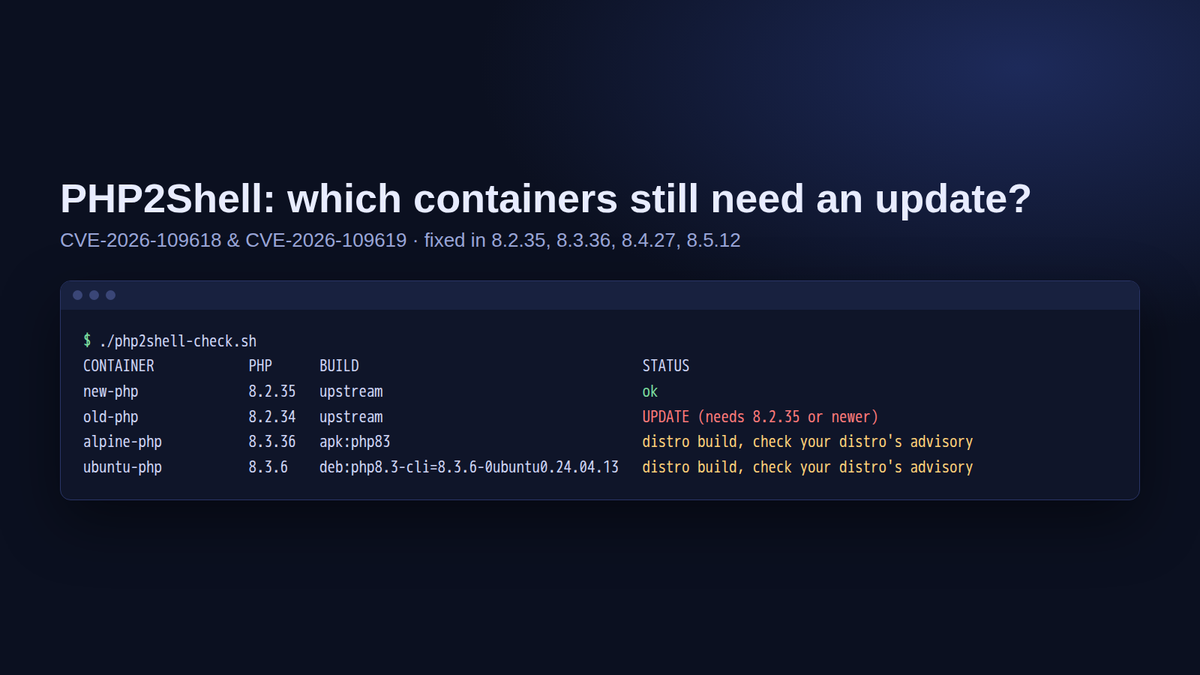
I tested it on a fresh Ubuntu 24.04 VM with four demo containers: an outdated php:8.2.34-apache, a current php:8.2-apache, an Alpine 3.22 container with the distro's php83 package and an Ubuntu 24.04 container with php8.3-cli from the Ubuntu archive. The output looked like this:
CONTAINER            PHP      BUILD                                    STATUS
new-php              8.2.35   upstream                                 ok
old-php              8.2.34   upstream                                 UPDATE (needs 8.2.35 or newer)
alpine-php           8.3.36   apk:php83                                distro build, check your distro's advisory
ubuntu-php           8.3.6    deb:php8.3-cli=8.3.6-0ubuntu0.24.04.13   distro build, check your distro's advisory
The Ubuntu line is the reason the script doesn't just compare version numbers. Ubuntu 24.04 still reports PHP 8.3.6, but the package 8.3.6-0ubuntu0.24.04.13 is exactly the build Ubuntu lists as fixed for this CVE. A naive "8.3.6 is lower than 8.3.36" check would flag a patched system as vulnerable. For distro builds, compare the package version with your distro's advisory instead (more on that below).
A few honest limits of the script:
- It only sees running containers. Stopped stacks you start once a month are not included.
- Images without a shell (distroless and similar) are skipped silently.
- It looks for a binary called
php. Some images only shipphp83,php-fpmor embed PHP in another server such as FrankenPHP, so a container missing from the list doesn't automatically mean "no PHP". If you know an app is written in PHP, check it by hand. - It tells you about versions, not about compromise. More on that further down.
Step 2: What the popular images ship right now
On 27 October 2026 I pulled a few common images on the test VM and asked each one for its PHP version with docker run --rm --entrypoint php <image> -r 'echo PHP_VERSION;'. All of them already carried a fixed build:
php:8.2-apache: 8.2.35php:8.3-fpm: 8.3.36php:8.4-fpm-alpine: 8.4.27php:8.5-cli: 8.5.12wordpress:latest: 8.3.36nextcloud:latest: 8.5.12drupal:latest: 8.5.12joomla:latest: 8.4.27
So the upstream images did their part within a day or two. The catch is that your container only gets the fix when you actually pull and recreate it. If you pin tags (which you should), check whether your pinned tag was rebuilt. Run the script again after updating, that's the quickest way to find out.
Step 3: Update and recreate
For anything running with Docker Compose, the update is the usual two commands in the stack's directory:
docker compose pull
docker compose up -d
A plain docker compose restart is not enough. It restarts the old container from the old image. up -d recreates containers whose image changed. If the script still shows an old version afterwards, your tag wasn't rebuilt, so move to a newer tag of that app.
Two things to watch while you're at it. Apps with their own upgrade steps (Nextcloud's occ upgrade, for example) may want attention if the pull also brings a new app version, so read the app's release notes before jumping several versions. And clean up old images afterwards with docker image prune once you're happy.
PHP installed directly on the host
If PHP runs straight on a VM or an LXC container, your distribution's package is what matters. According to the Ubuntu and Debian security trackers, these package versions contain the fix for CVE-2026-109618:
- Ubuntu 24.04 LTS:
php8.38.3.6-0ubuntu0.24.04.13 - Ubuntu 22.04 LTS:
php8.18.1.2-1ubuntu2.28 - Debian 12 bookworm:
php8.28.2.35-1~deb12u1 (DLA-4848-1) - Debian 13 trixie:
php8.48.4.27-1~deb13u1 (DSA-6574-1)
Check what you have installed and update:
dpkg -l 'php*' | grep '^ii'
sudo apt update && sudo apt upgrade
Then restart whatever actually runs PHP, for example sudo systemctl restart php8.3-fpm or sudo systemctl restart apache2 when you use mod_php. Long-running workers keep the old code in memory until they're restarted. If you use a third-party repository for newer PHP versions, check that repository's packages rather than the distro tracker.
If you can't patch today
The PHP advisory lists some stopgaps, and it's very clear that they reduce exposure to specific attack paths without making anything safe. In short:
- Set
session.upload_progress.enabled=0inphp.inior the FPM pool (not viaini_set()or.user.ini) and restart every worker. - On PHP 8.5, set
fatal_error_backtraces=0and restart. - Keep
post_max_sizelow, and enforce request size limits in your reverse proxy as well. - Use container memory limits as a safety net, but don't use
RLIMIT_ASorRLIMIT_DATA, which the advisory warns can trigger the vulnerable path.
The advisory also suggests memory_limit=-1 for the out-of-memory bug. On a small homelab box that trades one problem for another, so I'd only consider it together with a container memory limit.
There's a follow-up from 23 October too. PHP recommends keeping session.upload_progress.enabled=0 until the next regular bugfix release, even on patched versions, because of an unlikely third vector (CVE-2026-115560). It only matters for apps that switch the session serializer at runtime, but if you already set it, leave it in place. Check afterwards that file uploads in your apps still behave as expected.
If you expose PHP apps through Cloudflare, Cloudflare says it deployed WAF rules for these vulnerabilities. That's a nice extra layer, not a replacement for the update.
Did anyone get in?
This is harder to answer than the version question, and I won't pretend a script can do it. Some pointers from the people who looked at real traffic:
- Amazon recommends starting any investigation from 17 October, not from the disclosure date.
- Wiz suggests looking for unusual multipart requests followed by memory-limit errors or bursts of HTTP 500 responses, oddly large or malformed
PHPSESSIDcookies, and PHP workers restarting without an obvious reason. - Amazon mentions POST requests with
PHP_SESSION_UPLOAD_PROGRESSin form uploads. Normal access logs don't contain request bodies, so you'll only see that if your proxy or WAF logs bodies.
A cheap first check is counting PHP out-of-memory errors in your app's logs since 17 October:
docker compose logs --since 2026-10-17T00:00:00 2>&1 | grep -c 'Allowed memory size'A handful can be normal for apps like Nextcloud. A sudden spike, especially together with 500 errors, is worth a closer look. If something seems off, the boring advice applies: check for unexpected processes and modified files in the container, rotate the app's secrets and database passwords, and redeploy from a clean image instead of trying to clean up in place.
The bigger picture
Two side stories made this more than a patch-Tuesday item. The PHP Foundation openly called the long delay in fixing the out-of-memory issue a structural failure, caused by its decision process and lack of resources. It first spotted signs of the problem in 2024 and only treated it as top priority after outside researchers reported a working RCE in August 2026. And Wiz says AI models were a big part of turning a decade-old flaw into a working exploit, while Amazon argues that AI-assisted analysis makes it cheaper for many more attackers to turn a patch into an exploit. Whether or not you buy the "turning point" framing, the gap between patch and exploit attempts was measured in hours this time.
For a homelab, the lesson is simple: know which runtimes your containers bring along, and have a routine for pulling updates that doesn't depend on you reading Hacker News.
Conclusion
PHP2Shell is serious, the exploitability debate is real, and the fix is boring: update to 8.2.35, 8.3.36, 8.4.27 or 8.5.12, or the matching distro package, and recreate your containers. Run the script before and after, check your host packages, and switch off session upload progress if you can live without it. Ten minutes now beats an evening of forensics later.
Sources
- PHP security advisory: critical remote code execution vulnerabilities (21 Oct 2026)
- PHP informational advisory: session upload progress (23 Oct 2026)
- GHSA-w8hw-w9fx-j79w (CVE-2026-109618)
- GHSA-6wmf-4rv5-p3rp (CVE-2026-109619)
- The PHP Foundation: Today's PHP Security Release, and How We're Strengthening PHP Security
- Wiz Research: PHP2Shell
- Amazon Threat Intelligence: PHP2Shell exploitation prior to public disclosure
- Elias Taylor: There isn't an easy exploit for this PHP vulnerability
- Cloudflare: WAF protection for the PHP vulnerabilities
- Ubuntu CVE tracker: CVE-2026-109618
- Debian security tracker: CVE-2026-109618
- Hacker News discussion of the PHP advisory