Sure: Self-Host the Community Fork of Maybe Finance as Your Personal Finance App with Docker Compose
Sure is the AGPL-licensed community fork of Maybe Finance: a self-hosted personal finance app for budgets, net worth, investments and loans. Here is what it can do and how to run it with Docker Compose, including secure secrets, HTTPS and the new built-in backups.
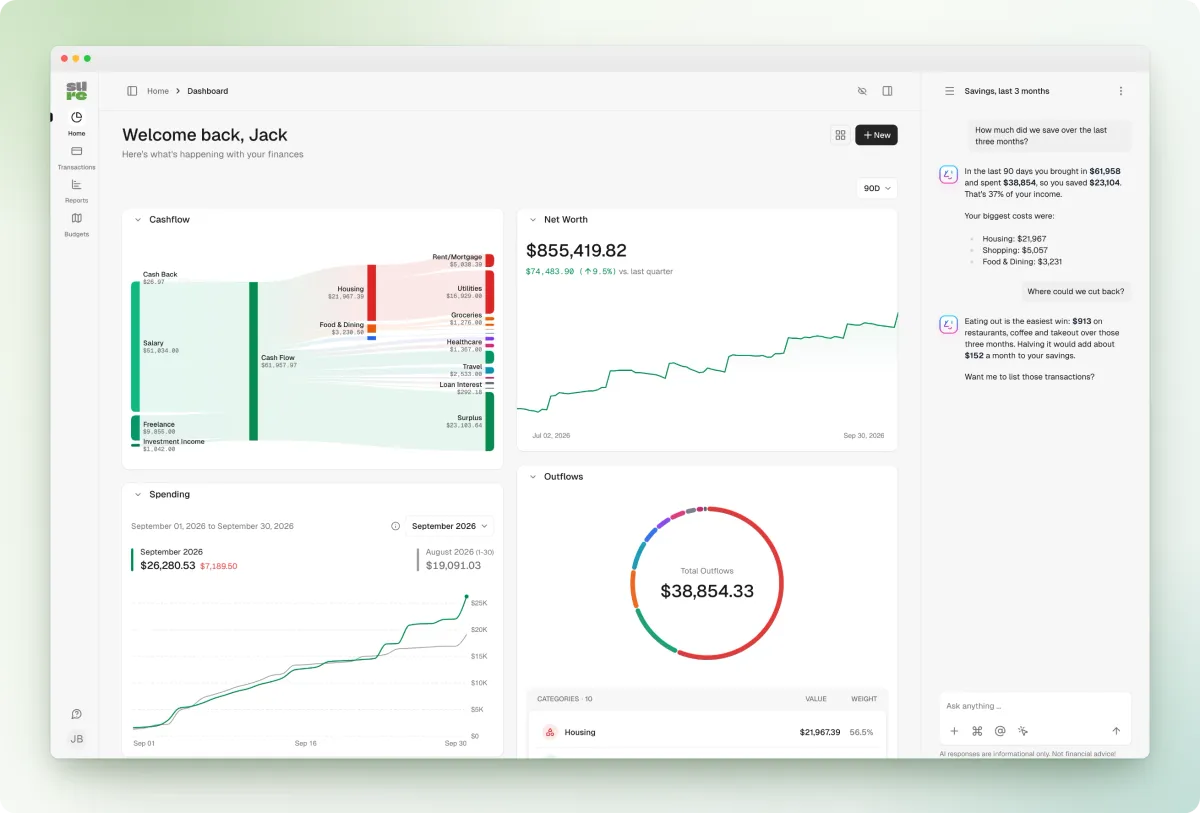
Money apps are one of those categories where "the cloud" feels especially uncomfortable. Your salary, your rent, every coffee and every loan payment end up on someone else's server, and if the company behind it shuts down, your history goes with it. That exact thing happened to a lot of people with Maybe Finance, and the community answer to it is called Sure.
Sure showed up on GitHub's daily trending list this week, has more than 13,000 stars, and ships a new release every month. In this guide we'll look at where Sure comes from, what it can do today, and how to run it on your own server with Docker Compose without falling into the two traps hidden in the default config.
What is Sure?
Sure describes itself as "the personal finance app for everyone (by everyone)". It is a community fork of Maybe Finance, a personal finance and wealth management app whose company stopped development and open-sourced the code. The original Maybe repository is now archived, and Sure keeps the codebase alive under the same AGPL-3.0 license.
Two things worth knowing about the fork:
- Sure is not affiliated with Maybe Finance Inc., and "Maybe" is a trademark of that company. That's why the fork has a new name and logo.
- It is a Ruby on Rails app with PostgreSQL, Redis and a Sidekiq background worker. You use it mainly in the browser; there is also a macOS desktop shell (Tauri), a Flutter mobile companion app for iOS and Android, an HTTP API with an OpenAPI spec, and an MCP endpoint for AI assistants.
Key features
Based on the README, the self-hosting docs and the latest release notes, Sure covers a lot more than a simple expense tracker:
- Dashboard with cashflow and net worth: a Sankey cashflow chart, net worth over time, spending compared to the previous month and an outflows breakdown by category. Widgets can be hidden from a customize mode.
- Accounts of all kinds: bank accounts, credit cards, investments, crypto, property and loans in one place, in multiple currencies.
- Bank and broker connections: the docs and release notes mention providers such as Plaid, Enable Banking, TrueLayer, SnapTrade, Kraken, Trade Republic, Monobank and Fio, plus on-chain wallet tracking. Availability depends on your country and on API keys you bring yourself. CSV imports work without any provider.
- Rules and categorization: an ordered rules list with drag-and-drop, "stop processing" for exceptions, and a token-free Bayes classifier that learns categories from your own history, so you don't need an LLM for auto-categorization.
- Bills, goals and budgets: recurring bills with due dates and overdue states, savings goals across currencies, and budgets (now also read-only in the mobile app).
- Optional AI assistant: chat with your financial data using OpenAI or any OpenAI-compatible endpoint, local models via Ollama, or an external agent through MCP. All of it is optional.
- Proper authentication: email/password, MFA with passkeys and security keys (WebAuthn), and OpenID Connect, SAML and other SSO providers.
- Built-in backups: since 0.7.6 a backup service in the Compose file saves the database, uploaded files and your configuration, with restore and rollback commands.
What's new in 0.7.6
The current stable release is v0.7.6 from 31 October 2026. The highlights from the release notes:
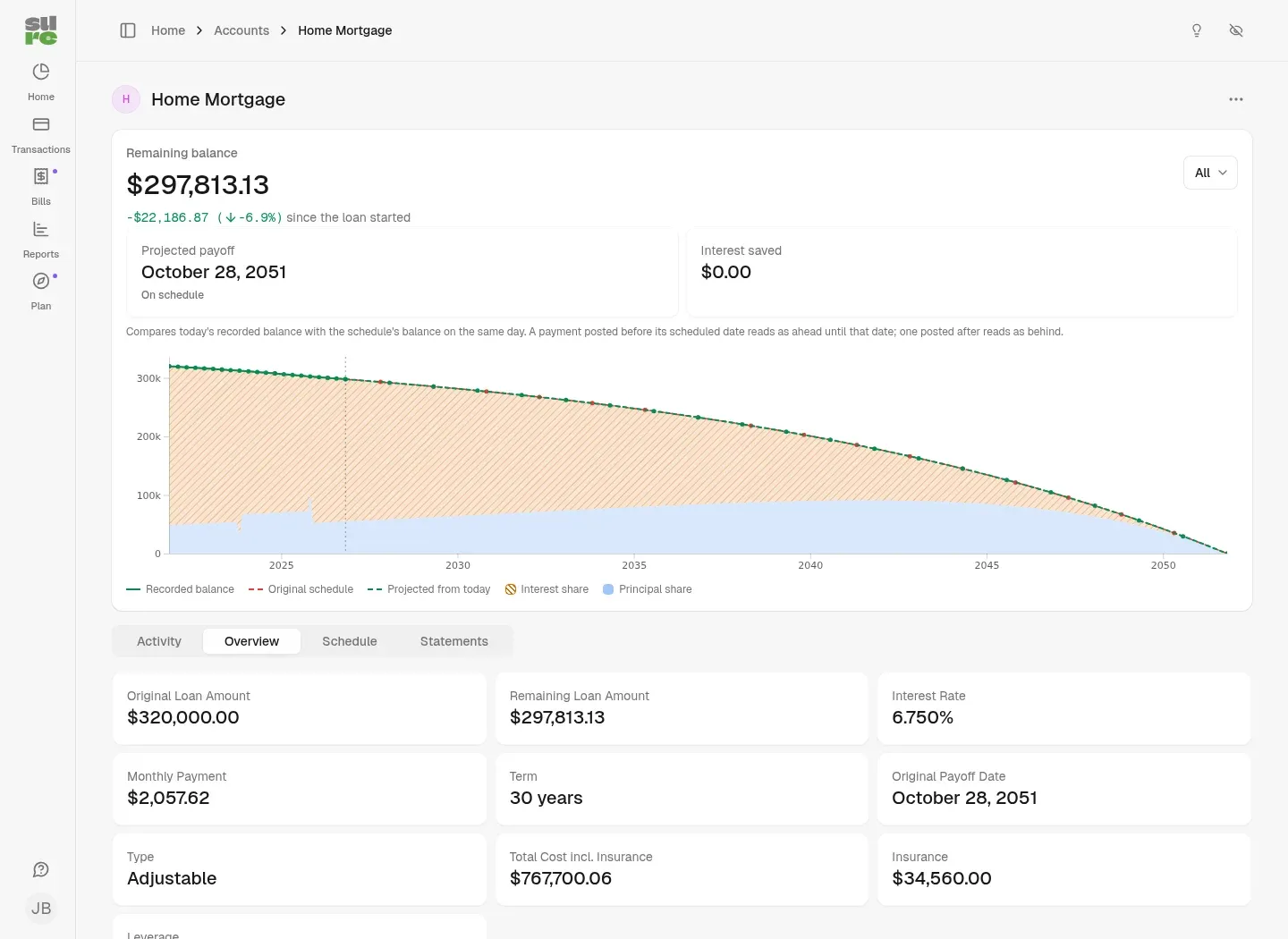
- Loan details: loan accounts now show a chart of the remaining balance against the original repayment schedule and a projection from today, with principal and interest shares, a payment-by-payment schedule, and support for rate changes on adjustable-rate loans.
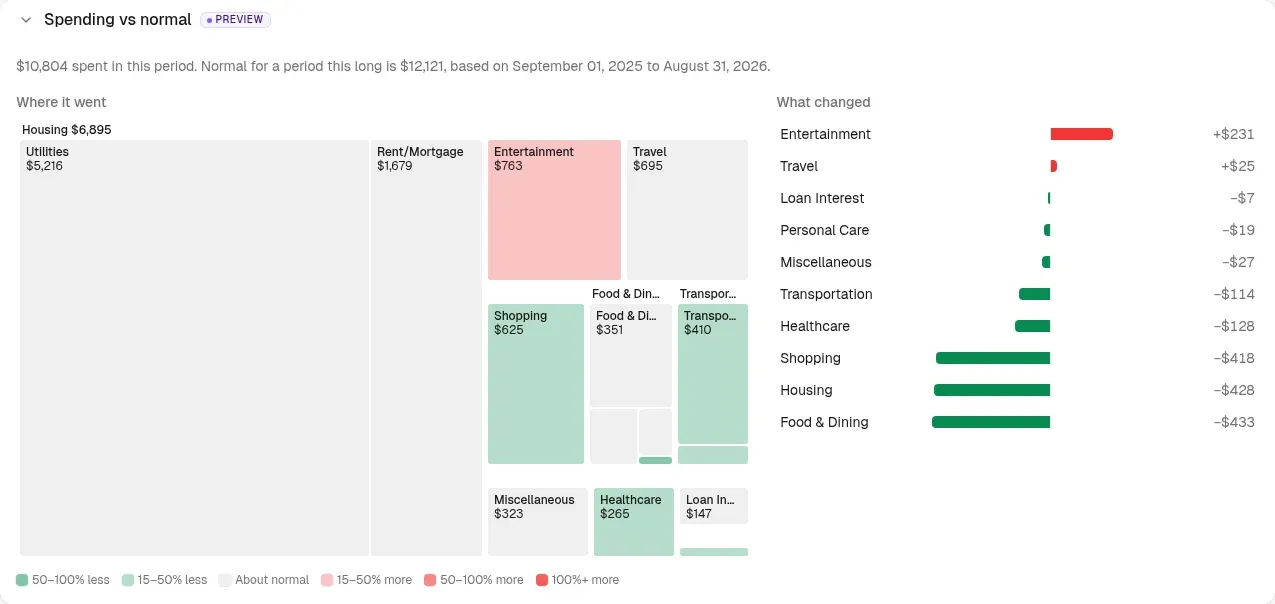
- "Spending vs normal" (preview feature): a treemap and ranked list that compare your spending with your own history, so you see which categories went up or down.
- More control over categorization: the Bayes classifier can be tested and tuned, and merchant matching and classification now take part in the ordered rules list.
- Expanded backup tooling: full backups with restore, rollback, schedules and optional off-site copies, building on the database-only backup sidecar from 0.7.5.
One more point from the same release notes that self-hosters should know: Sure added anonymous product-improvement monitoring to learn how features are used. You can turn it off with POSTHOG_FEEDBACK_ENABLED=false, see the configuration section below.
There are also weekly alpha builds (for example v2026.11.10-alpha). Those are pre-releases; for a finance app you care about, stay on stable.
Why self-host your finances with Sure?
- Your data stays with you. Transactions, balances and documents live in your own PostgreSQL database.
- No subscription, no shutdown risk. The whole reason Sure exists is that a commercial app went away. With AGPL code and your own backups, that can't take your data with it again.
- It looks and feels like a modern product. Maybe was built by a funded team, and Sure inherited that polished interface.
- Active development. A monthly stable release plus frequent alpha builds, and the latest release lists contributions from many different people.
Installing Sure with Docker Compose
Sure's official Docker guide is the reference. Below is the short version with the changes I'd make before exposing anything to a network.
Prerequisites
- A Linux server or VM with Docker Engine and the Docker Compose plugin
- Optional: a domain such as
finance.example.comand a reverse proxy (Traefik, Caddy, Nginx Proxy Manager) for HTTPS - Sure's docs say it runs on hosts with as little as 512 MB of RAM, but give it more if you plan to import a lot of history
Step 1: Create a folder and download the official files
mkdir -p ~/docker-apps/sure && cd ~/docker-apps/sure

curl --fail --location --silent --show-error \
  --output compose.yml \
  https://raw.githubusercontent.com/we-promise/sure/main/compose.example.yml

curl --fail --location --silent --show-error \
  --output .env \
  https://raw.githubusercontent.com/we-promise/sure/main/.env.example
The Compose file defines five services: web (the app on port 3000), worker (Sidekiq for background jobs and email), db (postgres:16), redis, and the optional backup and backup-offsite services. The app image is ghcr.io/we-promise/sure, and its tag comes from SURE_IMAGE_TAG (default: stable).
Step 2: Set your own secrets (don't skip this)
Here are the two traps I mentioned. The example Compose file "runs without any configuration", which is convenient for a quick test, but it does so with fallback values:
SECRET_KEY_BASEfalls back to a fixed key that is printed in the public example file. Sure uses this key to encrypt credentials in the database.POSTGRES_PASSWORDfalls back tosure_password.
Anyone who has read the repository knows both. Generate your own values:
openssl rand -hex 64   # for SECRET_KEY_BASE
openssl rand -hex 24   # for POSTGRES_PASSWORD
Then set them in .env:
SECRET_KEY_BASE="paste-the-64-byte-hex-key-here"
POSTGRES_PASSWORD="paste-your-database-password-here"
SURE_IMAGE_TAG="stable"
Do this before the first start. The database password is set when the PostgreSQL volume is created, and changing SECRET_KEY_BASE later means data encrypted with the old key can no longer be read.
Step 3: Start Sure
docker compose up -d
docker compose ps
docker compose logs -f web
Open http://your-server:3000 and click create your account. The first user becomes the admin of the instance.
Step 4: Close registrations
Right after creating your account, go to Settings > Self-Hosting > Onboarding and pick:
- Open: anyone can register
- Invite-only: sign-ups need an invite code
- Closed: no new self-service sign-ups
For a private household instance, Closed or Invite-only is the right choice. Note that self-hosted Sure never emails invitations; you copy the invite link from the settings and send it yourself.
Running Sure behind a reverse proxy with HTTPS
The container speaks plain HTTP. If your reverse proxy terminates TLS, tell Rails about it by changing this line in the x-rails-env block of compose.yml:
RAILS_ASSUME_SSL: "true"
If the proxy runs on the same host, I'd also stop publishing port 3000 on all interfaces. Change the web port mapping to localhost only (or remove it and put the container on your proxy's Docker network):
services:
  web:
    ports:
      - "127.0.0.1:3000:3000"
Then point your proxy at http://127.0.0.1:3000 and run docker compose up -d again. If you want to use passkeys, also set WEBAUTHN_RP_ID (your registrable domain, e.g. example.com) and WEBAUTHN_ALLOWED_ORIGINS (e.g. https://finance.example.com) as described in the docs before registering keys.
Already run an identity provider such as Pocket ID? Sure supports OIDC login, and its OIDC guide also explains how to disable local password login once SSO works.
Configuration tips
Variables in .env don't automatically reach the app
This catches many people: Docker Compose uses .env only to fill in ${...} placeholders in compose.yml. A variable that compose.yml doesn't list never reaches the containers. Both web and worker merge the shared x-rails-env anchor, so that's where extra settings go. For example, to turn off the product-improvement monitoring and configure email:
x-rails-env: &rails_env
  # ...existing keys...
  POSTHOG_FEEDBACK_ENABLED: "false"
  APP_DOMAIN: ${APP_DOMAIN}
  EMAIL_SENDER: ${EMAIL_SENDER}
  SMTP_ADDRESS: ${SMTP_ADDRESS}
  SMTP_PORT: ${SMTP_PORT:-465}
  SMTP_USERNAME: ${SMTP_USERNAME}
  SMTP_PASSWORD: ${SMTP_PASSWORD}
  SMTP_TLS_ENABLED: ${SMTP_TLS_ENABLED:-true}
Apply changes with docker compose up -d. A plain docker compose restart keeps the old environment. Email is sent by the worker, and is used for password resets, rule notifications and a few other events.
Market data
Sure imports security prices once a day, Monday to Friday, by default at 22:00 UTC. You can change the time under Settings > Self-Hosting or with MARKET_DATA_SYNC_TIME and MARKET_DATA_SYNC_TIMEZONE (for example Europe/Berlin) in the anchor.
AI is opt-in
Without an API key, the AI features stay off. If you want them, Sure has a separate compose.example.ai.yml with optional Ollama and Open WebUI (--profile local-ai) and the Pipelock security proxy in front of external services. If you use a paid provider like OpenAI, set a spend limit first; the Compose file itself warns that AI features incur costs.
Backups and updates
For a finance app, backups are not optional. The new backup service makes this easy:
# Take a backup right now (do this before every upgrade)
docker compose run --rm backup create

# Daily backups at 02:00 UTC, keeping 7 days
docker compose --profile backup up -d backup

# List backups
docker compose run --rm backup list
Each backup lands in ./backups/<version>/<date>-<manual|scheduled>/ and contains a database dump, the uploaded files, your .env and compose.yml, a manifest, checksums and a restore.sh script to bring it up on a new machine. The schedule and retention are set with BACKUP_SCHEDULE and BACKUP_KEEP_DAYS, and the optional backup-offsite service copies everything to any rclone remote every hour.
Two warnings from the docs: the backup contains SECRET_KEY_BASE and your API keys, so keep the folder private and encrypt off-site copies (for example with rclone crypt). And files stored in external object storage (S3 and friends) are not part of the backup.
If you want to know when backups silently stop, a scheduled check with Healthchecks is a good companion, and Uptime Kuma can watch the web UI.
Sure does not update itself. To update:
cd ~/docker-apps/sure
docker compose run --rm backup create
docker compose pull web worker
docker compose up -d
Database migrations run automatically. If something breaks, stop web and worker, run docker compose run --rm backup restore latest, pin the previous version with SURE_IMAGE_TAG in .env and start again.
Limitations and things to keep in mind
- Bank sync isn't plug-and-play. Automatic connections depend on third-party providers, their regional coverage and API keys you obtain yourself. Many self-hosters will start with CSV imports.
- The mobile app is a companion. According to the docs it focuses on login, balances and (new in 0.7.6) read-only budgets. Full management happens in the web app.
- Insecure defaults if you rush. The fallback secret key and database password are fine for a local test, not for anything reachable from a network.
- Telemetry is on by default in 0.7.6 (anonymous, per the release notes) and needs an explicit opt-out.
- It's a Rails stack. Four containers (plus backups) are heavier than a single Go binary, even if Sure fits on small hosts.
Sure vs. Firefly III vs. Actual Budget
A quick orientation, not a full comparison:
| Sure | Firefly III | Actual Budget | |
|---|---|---|---|
| License | AGPL-3.0 | AGPL-3.0 | MIT |
| Focus | Net worth, investments, loans and spending in a modern dashboard | Detailed personal finance manager with double-entry bookkeeping | Local-first envelope budgeting |
| Stack | Rails, PostgreSQL, Redis, Sidekiq | PHP (Laravel) with a database | Node.js, local-first with optional sync server |
If you want strict budgeting, Actual is the specialist. If you love detailed bookkeeping and automation rules, Firefly III has years of maturity. If you want a "wealth overview" app that also tracks investments, property and loans, Sure is the most interesting of the three right now.
Conclusion
Sure is a nice example of open source doing what it promises: a company gave up, the code stayed, and a community turned it into an actively developed product with monthly releases. Version 0.7.6 adds genuinely useful loan views, smarter categorization without an LLM and, most importantly for self-hosters, real backups with restore and rollback.
If you try it, take five minutes for the boring parts: your own SECRET_KEY_BASE and database password, closed registrations, HTTPS, the telemetry opt-out and a daily backup. Then your finances live on your own hardware, and nobody can shut the app down on you.
Do you track your finances in a self-hosted app? Sure, Firefly III, Actual or plain spreadsheets? Let us know.
Sources
- Sure repository and README: github.com/we-promise/sure
- Docker self-hosting guide: docs/hosting/docker.md
- Example Compose file: compose.example.yml
- Sure v0.7.6 release notes: github.com/we-promise/sure/releases/tag/v0.7.6
- Sure clients overview: docs/clients.md
- OIDC/SSO guide: docs/hosting/oidc.md
- MCP endpoint docs: docs/hosting/mcp.md
- Original (archived) Maybe Finance repository: github.com/maybe-finance/maybe
- Firefly III: github.com/firefly-iii/firefly-iii · Actual Budget: github.com/actualbudget/actual