Dagu 2.25: Replace Your Crontab with a Self-Hosted Workflow Scheduler and Docker Compose
Dagu turns scattered cron jobs into YAML workflows with dependencies, retries, run history and a web UI. We tested v2.25.4 with Docker Compose on a small VM and cover setup, security trade-offs and the limits of the free plan.
Every homelab ends up with a crontab nobody wants to look at. A backup script here, a certificate check there, a database dump that runs at 3 a.m. and writes its errors to a log file you never open. Cron is reliable, but it is also blind: no history, no retries, no overview, and no easy way to say "run this only after that finished".
Dagu tries to fix exactly that without dragging in a whole data-engineering platform. You describe your jobs as small YAML files, Dagu schedules them, retries what fails, keeps the logs and shows everything in a web UI. It ships as a single Go binary with no external database, and the project has been releasing at a fast pace: v2.25.1 landed on November 2, 2026 with a redesigned web UI, and v2.25.4 followed on November 4 with fixes for that redesign. We set up v2.25.4 with Docker Compose on a fresh test VM to see how it feels in practice.
What is Dagu?
Dagu describes itself as a local-first workflow engine for operations and internal automation. The code lives on GitHub at dagucloud/dagu (around 4,500 stars at the time of writing) and is licensed under GPL-3.0-or-later. The name comes from DAG, the directed acyclic graph: a workflow is a set of steps, and each step can depend on others.
A few things set it apart from plain cron:
- Workflows as YAML. Each workflow is one file. Steps run shell commands by default, and they can depend on each other, run in parallel or call sub-workflows.
- Scheduling with cron syntax, including time zones, plus manual runs from the UI or the REST API.
- Retries and history. A step can retry with an interval, and every run keeps its logs and status, so you can see what happened last Tuesday.
- No extra services. State is stored in files under one data directory. There is no Postgres, Redis or message broker to babysit.
- More than shell. The docs list built-in actions for HTTP, SSH, mail, SQL, Docker containers, Kubernetes Jobs and more. Recent releases also added LLM and "agent" steps, which you can happily ignore if you just want a better cron.
What's new in 2.25
The headline of v2.25.1 is a redesigned web UI. The same release lets schedules follow business calendars, with a page to manage those calendars and a preview of the next runs for each workflow. Server secrets such as passwords and token secrets can now be read from files, which works well with Docker secrets. v2.25.2 to v2.25.4 followed within two days as smaller releases; v2.25.4 only fixes UI regressions from the redesigned workflow details page.
Before you start: the license situation
The source code is GPL, but the self-hosted server comes in plans. The free Community plan includes the core engine, the web UI, workers and the Docker action. Some features need a paid self-host license, according to the official comparison page and the authentication docs:
- Builtin login and the first administrator are free. Creating, editing or deleting additional users needs a license.
- OIDC/SSO and audit logs are paid features.
- The Community plan allows up to two API keys.
For a one-person homelab this is fine. If you want to give your partner or a colleague their own login, you will hit that wall. The UI also nudges you a few times towards "Dagu Console", the vendor's hosted monitoring service. Connecting to it is optional and the server ran without it in our test.
Requirements
- A Linux host with Docker Engine and the Docker Compose plugin.
- Very little RAM. More on that below, but Dagu itself stayed well under 100 MiB in our test.
- Optional: a reverse proxy with TLS if you want to reach the UI from other machines. We use
dagu.example.comas a placeholder.
The official image ghcr.io/dagucloud/dagu is published for amd64, arm64 and 32-bit ARM. It is based on Ubuntu 24.04 and weighed in at 617 MB on our VM. There is also an Alpine variant (2.25.4-alpine), which we did not test.
Installing Dagu with Docker Compose
We tested every step below on a fresh Ubuntu 24.04 VM with 2 vCPUs and about 1.8 GB of RAM. The only difference to our test setup was the host port.
Step 1: Create the project folder
mkdir -p ~/dagu/dags
cd ~/dagu
sudo chown 1000:1000 dags
The dags folder is where your workflow files will live. The container runs Dagu as a user with UID 1000 (the default for PUID), and Dagu writes to this folder: it seeds six example workflows on the first start and saves edits you make in the web UI. If you change PUID/PGID, adjust the chown accordingly.
Step 2: Generate a token secret
echo "DAGU_AUTH_TOKEN_SECRET=$(openssl rand -hex 32)" > .env
chmod 600 .env
Dagu signs its login sessions (JWTs) with this secret. If you leave it out, Dagu generates one and stores it in the data directory, but setting it explicitly means you know where it lives. The docs recommend at least 32 characters, and 32 random bytes in hex give you 64.
Step 3: Write the Compose file
Create compose.yaml:
services:
  dagu:
    image: ghcr.io/dagucloud/dagu:2.25.4
    container_name: dagu
    restart: unless-stopped
    ports:
      - "127.0.0.1:8080:8080"
    environment:
      - DAGU_TZ=Europe/Berlin
      - DAGU_AUTH_MODE=builtin
      - DAGU_AUTH_TOKEN_SECRET=${DAGU_AUTH_TOKEN_SECRET}
      - PUID=1000
      - PGID=1000
    volumes:
      - dagu-data:/var/lib/dagu
      - ./dags:/var/lib/dagu/dags

volumes:
  dagu-data: {}
A few notes on this file:
- The version is pinned. The official examples use
latest. With a project that ships several releases a week, we'd rather decide ourselves when to upgrade. - The port is bound to 127.0.0.1. Anyone who can log in to Dagu can run shell commands through it, so the UI should sit behind a reverse proxy with TLS, not on a public port.
DAGU_TZsets the time zone for schedules and timestamps. Set it to your own zone. In our test, run times in the UI were shown with the correct offset.DAGU_AUTH_MODE=builtinis the default, we just spell it out. Basic auth is the simpler alternative, and OIDC (a paid feature) plugs into builtin mode.- The image's default command is
dagu start-all, which runs the web server, scheduler and coordinator in one process. You don't need to set it. - Note what is not in the file: the Docker socket. The official "minimal" example in the repository mounts
/var/run/docker.sockand runs as root so that workflows can start containers. You only need that for container steps, and it effectively gives every workflow control over your host's Docker daemon. Leave it out unless you really need it.
Step 4: Start it
docker compose up -d
docker compose logs -f dagu
Once the image was pulled, the container started in about a second on our VM and the web UI answered on the first request. In the logs you should see lines like "Scheduler started" and "Server is starting" with port 8080. The health endpoint is a quick sanity check:
curl -s http://127.0.0.1:8080/api/v1/healthIt returned "status":"healthy" together with the version number.
Step 5: Create the admin account
Open the UI. On a fresh install, Dagu redirects you to /setup, where you pick a username and a password with at least eight characters. After clicking Create account, you are logged in and land on the overview page.
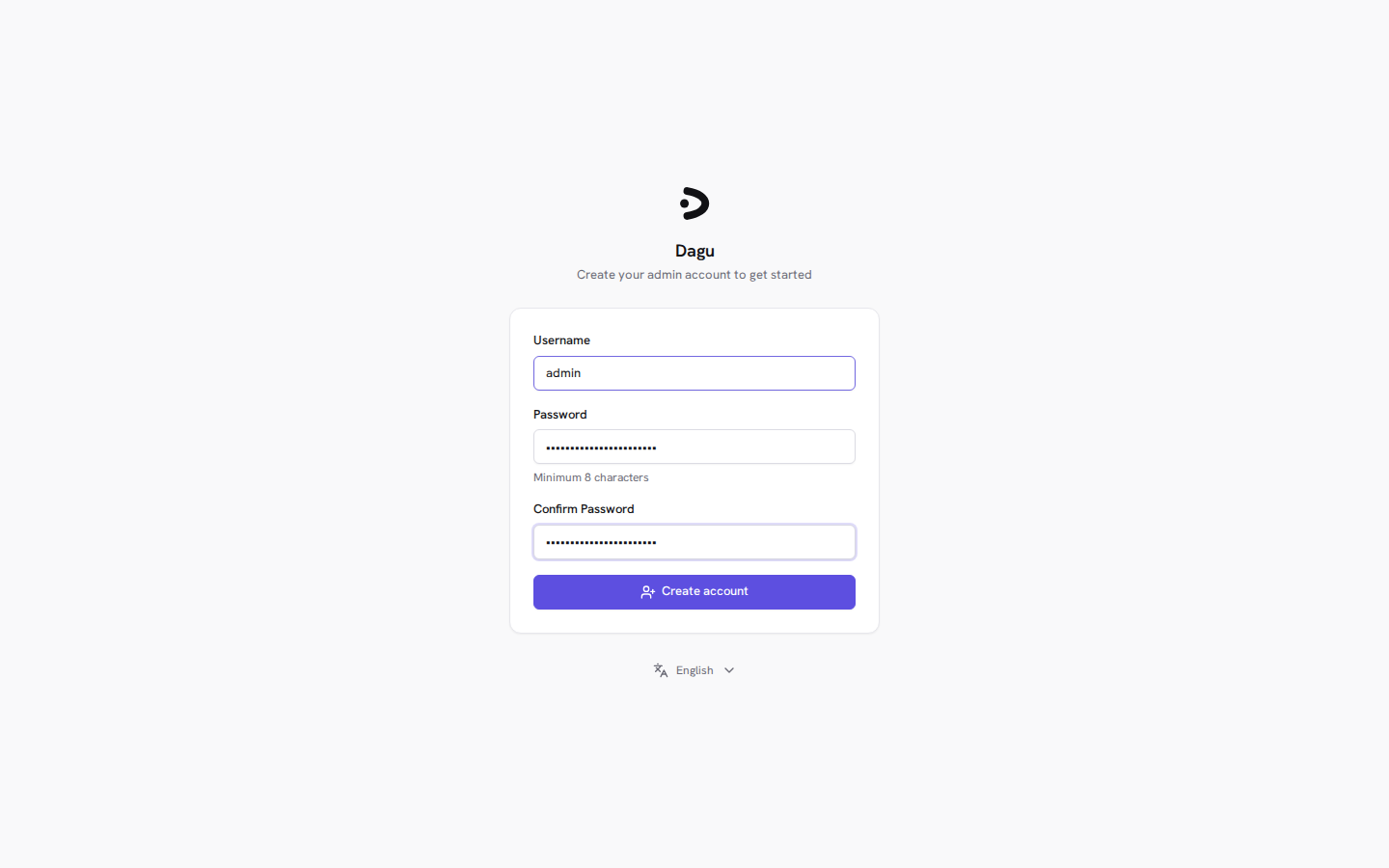
Two alternatives are documented. You can create the admin at startup with DAGU_AUTH_BUILTIN_INITIAL_ADMIN_USERNAME and DAGU_AUTH_BUILTIN_INITIAL_ADMIN_PASSWORD; Dagu only does that when no users exist yet. Or you keep the setup page, as we did. Either way, do it right after the first start, because until an admin exists, whoever reaches the setup page first gets to create one.
We restarted the container afterwards to make sure the account survived. It did, since users live in the dagu-data volume.
Your first workflow
The six seeded examples are worth a look: sequential steps, parallel steps, a scheduled workflow with typed parameters, nested workflows, templates and a retry demo. To write your own, drop a YAML file into the dags folder. Here is the small demo we used on the test VM:
description: Archive the DAG folder, keep the newest 7 archives, report disk usage
type: graph
schedule: "30 3 * * *"
hist_retention_days: 30

steps:
  - id: archive
    run: |
      mkdir -p /var/lib/dagu/backups
      tar -czf /var/lib/dagu/backups/dags-$(date +%F-%H%M%S).tar.gz -C /var/lib/dagu dags
    retry_policy:
      limit: 2
      interval_sec: 10

  - id: prune
    run: ls -1t /var/lib/dagu/backups/*.tar.gz | tail -n +8 | xargs -r rm --
    depends: [archive]

  - id: disk_report
    run: df -h /var/lib/dagu
    depends: [prune]
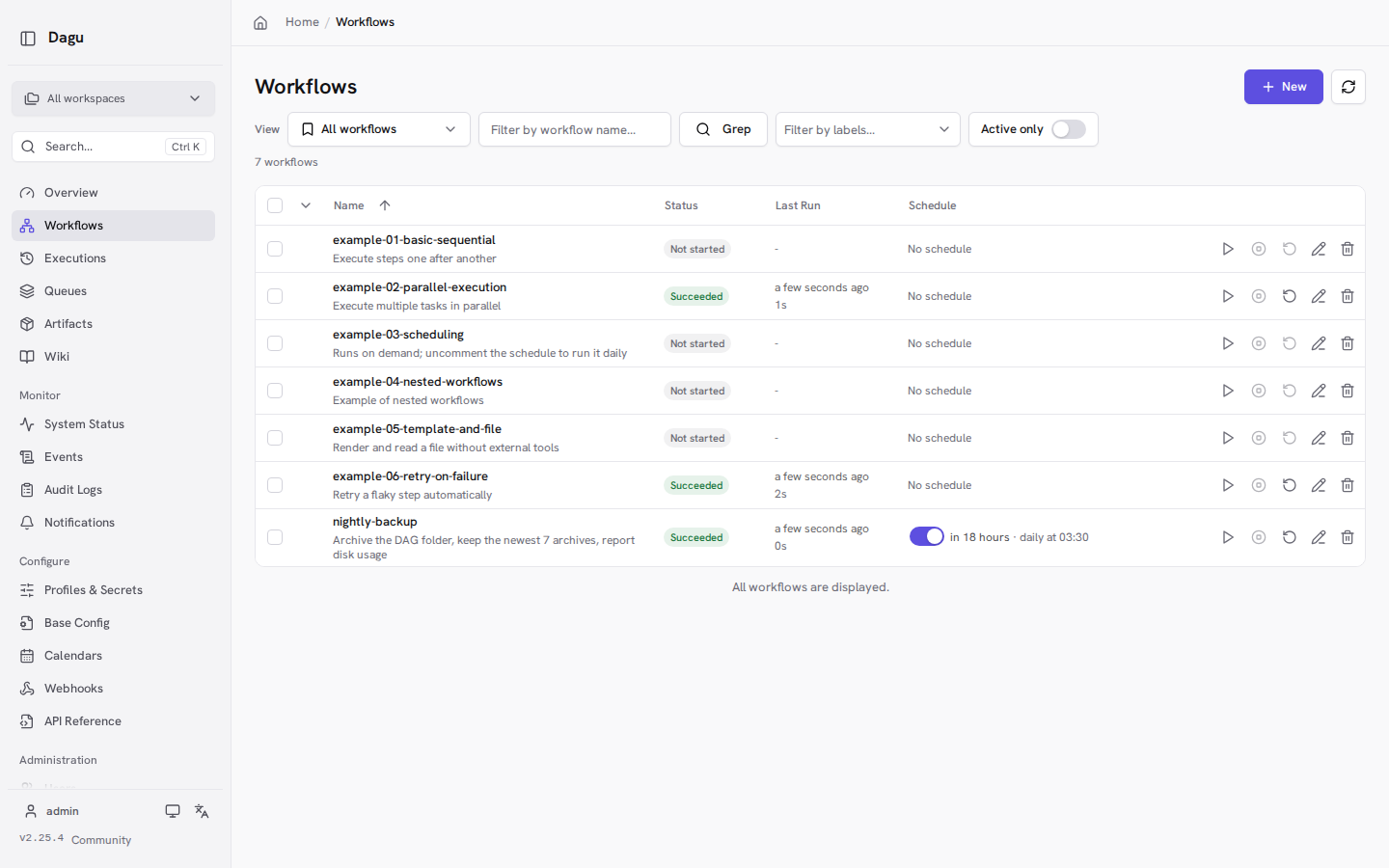
Save it as dags/nightly-backup.yaml. Dagu picked the file up within a few seconds, without a restart, and the workflow list showed the schedule as "daily at 03:30" with the time until the next run. The type: graph and depends syntax mirrors the examples Dagu seeds itself, so if you are ever unsure about the format for your version, look at those files.
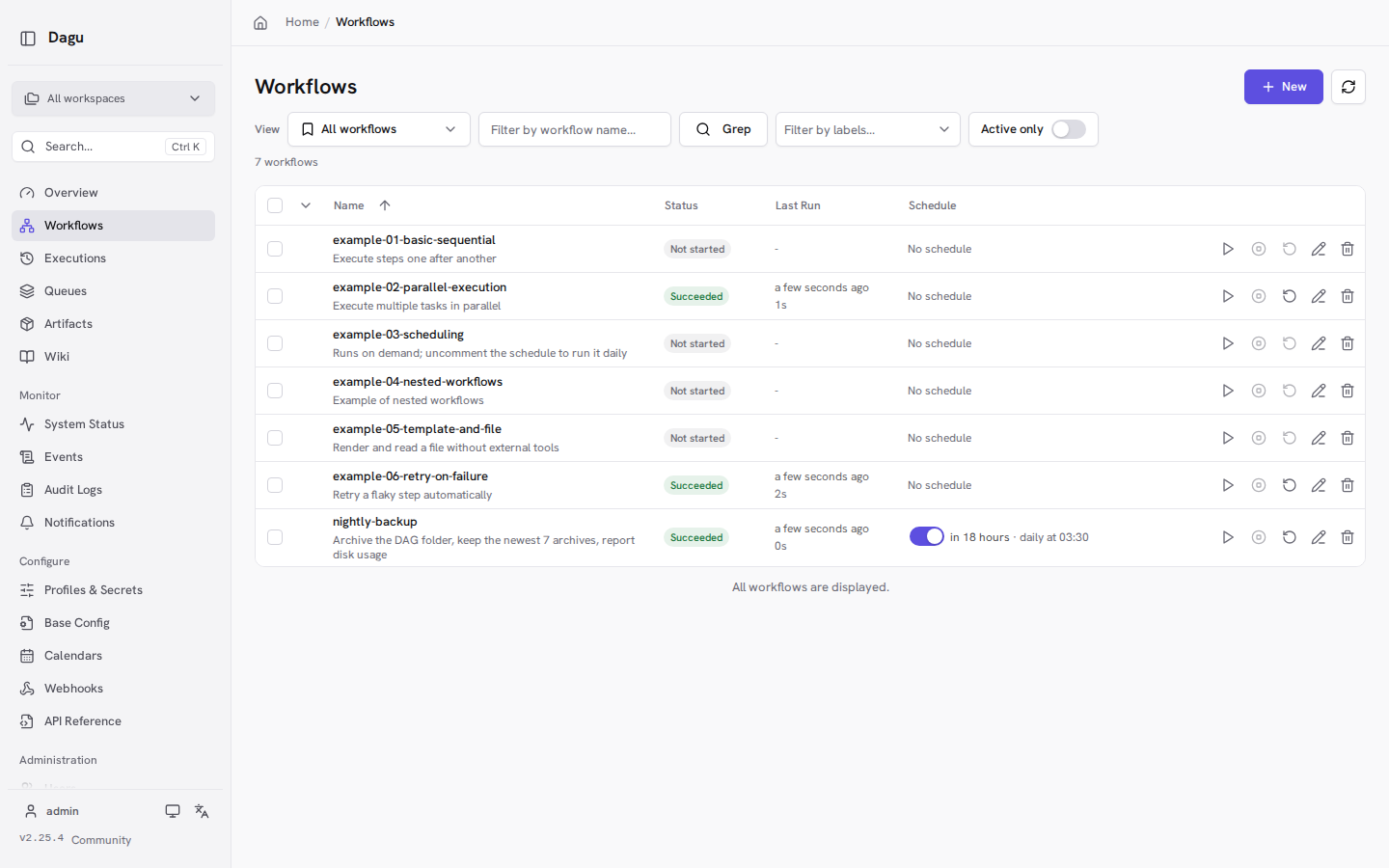
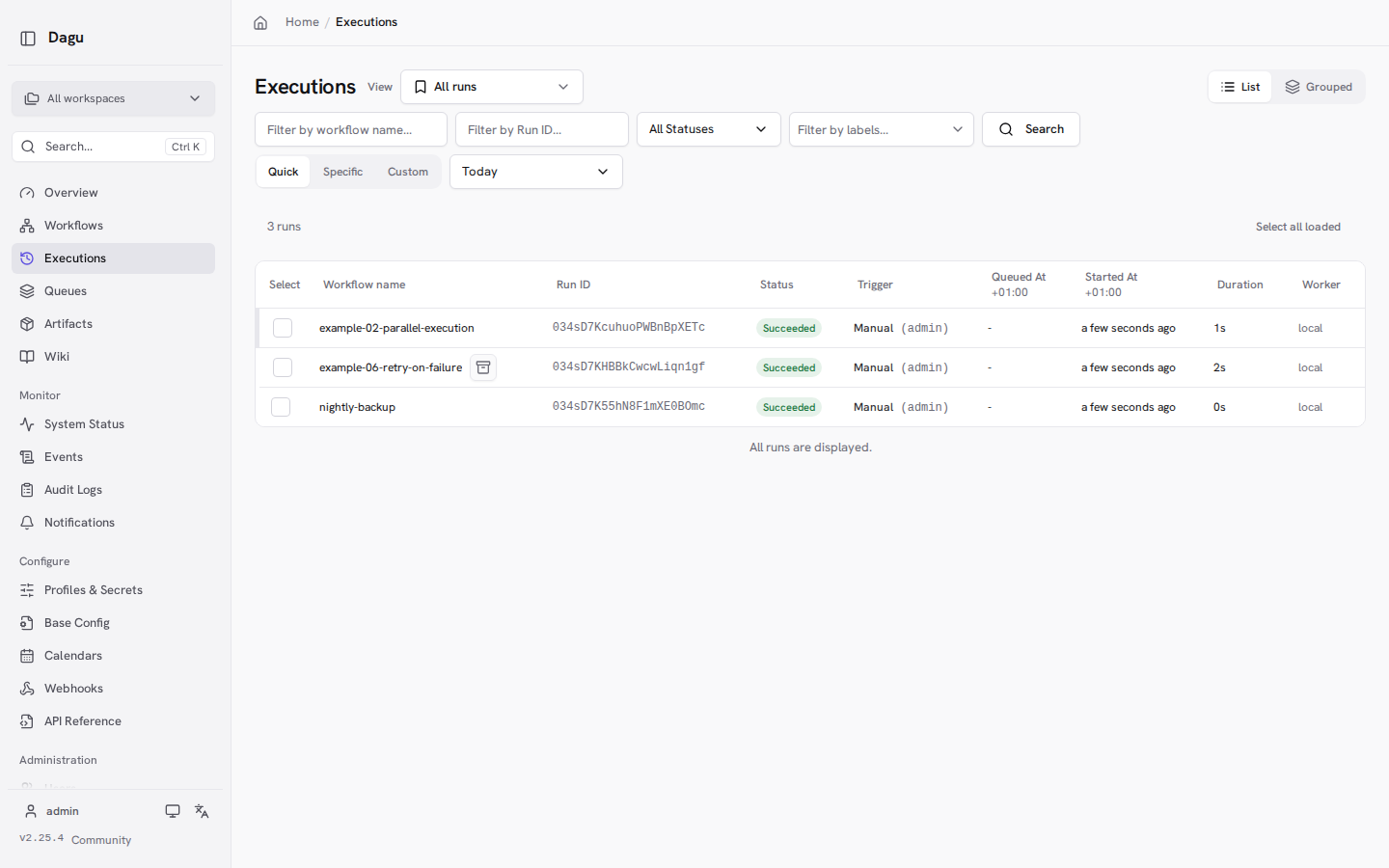
We started the demo workflow, the retry example and the parallel example by hand. All three succeeded. The retry example is a nice way to see the retry logic: its first attempt fails on purpose, and the run details showed exactly one retry for that step before it went green.
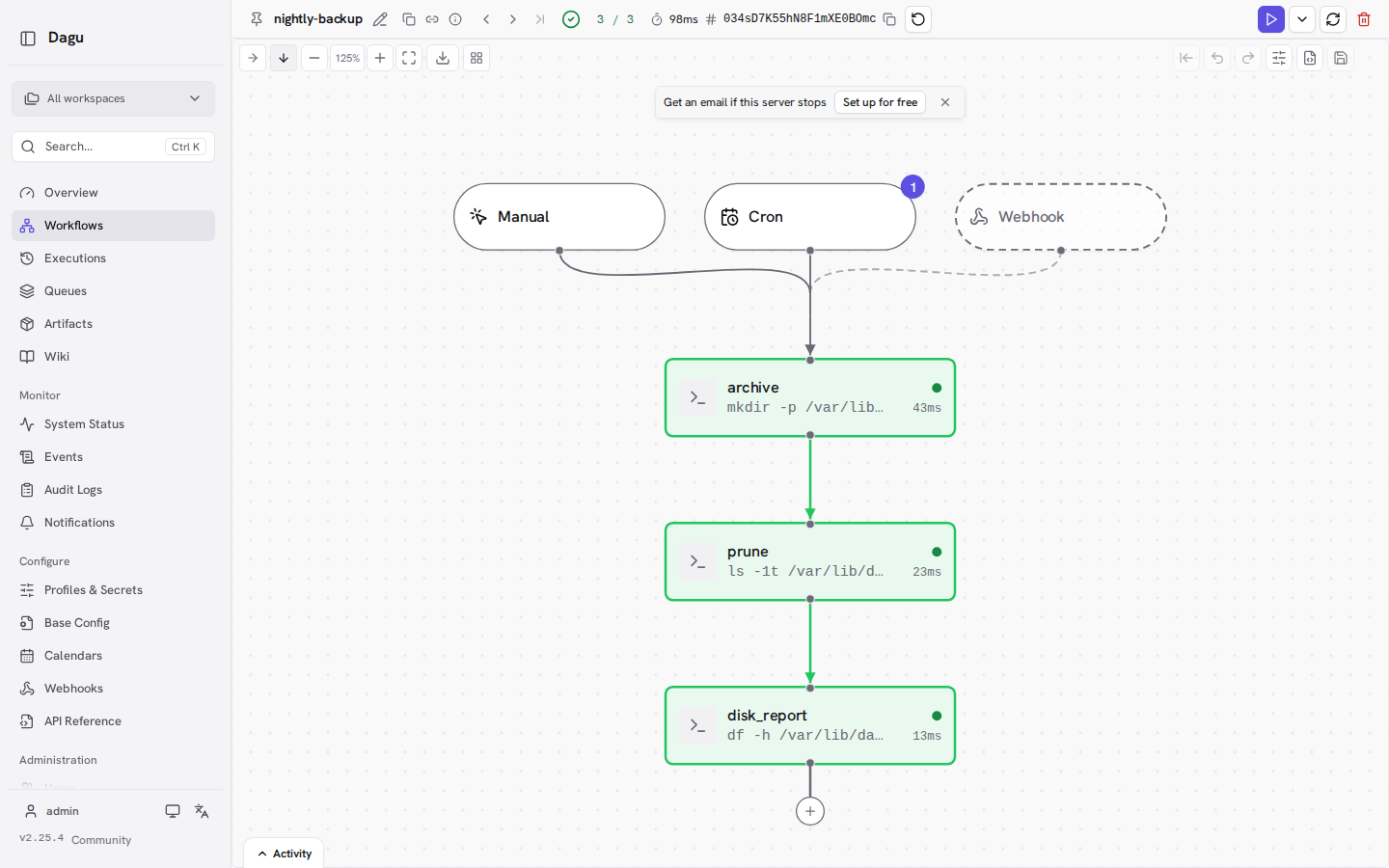
Clicking on a workflow opens a graph view of its steps, with the trigger types (manual, cron, webhook) on top, the duration of each step and the logs one click away. Edits made in the UI are saved back to the YAML file.
Where your commands actually run
This is the part that trips people up. With the Compose setup above, every run: command executes inside the Dagu container. It sees the container's filesystem, not your host. Our demo only touches files in Dagu's own data volume, which is why it works out of the box.
For real homelab jobs you have a few options. You can mount the folders you need into the container (read-only where possible). You can use Dagu's SSH action to run commands on other machines, including the Docker host itself. Or, if you need container steps, you can go the Docker socket route described in the official docs, with all the security trade-offs that come with it.
What we observed on the test VM
- Memory:
docker statsshowed about 48 MiB right after the start and about 74 MiB after running three workflows. CPU usage at idle was well below 1%. - Startup: about a second from container start to "Server is starting" in the logs.
- Image size: 617 MB for the Ubuntu-based image. Not tiny, but it includes tools such as
curl,git,jqand an SSH client that your workflows can use. - File permissions: workflow files that Dagu creates or saves end up owned by UID 1000 with mode 600. If you edit them on the host as a different user, you'll need
sudo. A YAML file we created as root on the host was still picked up, and after we saved a change through Dagu's API it belonged to UID 1000 as well.
Tips
Use -u dagu with docker exec. The image's entrypoint drops privileges to the dagu user, but a plain docker exec bypasses the entrypoint and runs as root. Anything you create that way in /var/lib/dagu will be owned by root. docker exec -u dagu dagu <command> avoids that.
Behind a reverse proxy, mind the setup page. Since v2.22, Dagu only accepts the first-admin setup request for host names it knows: localhost, IP addresses, the configured host and public_url, plus anything in DAGU_ALLOWED_HOSTS. If you want to do the initial setup through https://dagu.example.com, add DAGU_ALLOWED_HOSTS=dagu.example.com to the environment, or do the setup once through an SSH tunnel to 127.0.0.1:8080.
Keep history in check. hist_retention_days in a workflow limits how long runs are kept. Jobs that run every few minutes produce a lot of history otherwise.
Back up the volume. Users, run history, logs and settings live in the dagu-data volume, the workflows themselves in ./dags. Back up both.
Pair it with a dead man's switch. Dagu can tell you when a job fails, but not when Dagu itself is down. A final step that pings a self-hosted Healthchecks instance covers that gap.
Limits and security
At its core, Dagu is a web interface that runs shell commands. That has consequences.
- Admin access means code execution. Anyone who can log in as admin, or who holds an API key with enough permissions, can create a workflow and run arbitrary commands in the container. Strong password, TLS, no public exposure without an extra layer like a VPN or an authenticating proxy.
- Root inside the container is one command away. The image gives the
daguuser passwordlesssudo. We confirmed in our test thatsudo -n idreturns root inside the container. Without the Docker socket and without privileged mode that stays inside the container, but don't mount sensitive host paths read-write unless a workflow really needs them. - The Docker socket is a big deal. The docs say it plainly: mounting it grants workflows control of the host daemon, including starting privileged containers. Only do it for trusted workflows.
- Single admin on the free plan. Additional users, SSO and audit logs need a paid license, as described above.
- Fast release pace. Four releases between November 2 and 4 alone means fixes arrive quickly, but read the release notes before upgrading. v2.22, for example, changed how host names are checked and deprecated workspace settings ahead of v3.0.
- The web terminal is off by default (
DAGU_TERMINAL_ENABLED=false). Leave it that way unless you know why you need it.
Dagu vs. alternatives
Plain cron or systemd timers are still the simplest choice for one or two jobs. Once you want dependencies between jobs, retries, run history and a UI, Dagu gives you that with one extra container.
Cronicle is probably the closest match in spirit: a simple, distributed task scheduler and runner with a web UI. Dagu's advantage is that workflows are plain YAML files you can keep in Git, and that dependencies between steps are built in.
Apache Airflow is the heavyweight of the category, with Python-defined pipelines and a large ecosystem. It is built for data teams and needs considerably more infrastructure. For homelab automation it is usually overkill.
n8n targets a different crowd: visual automation that glues SaaS APIs together. It is "fair-code" rather than open source under an OSI license. If your jobs are mostly shell scripts and maintenance tasks, Dagu fits better. If they are mostly "when this webhook fires, post to that API", look at n8n.
Conclusion
Dagu sits somewhere between a crontab and a full orchestration platform. The setup takes a few minutes, it barely uses any memory, and the new UI makes it easy to see which job ran, how long it took and why it failed. The YAML format is readable enough that your future self will understand the workflow file.
The catches are real but manageable: whoever logs in can run commands on your server, so lock it down, and the free plan is built for a single admin. If you can live with that, it's a good way to get your scattered cron jobs into one place.
Sources
- Dagu on GitHub (README, license)
- Dagu v2.25.4 release notes, v2.25.1 and v2.22.0
- LICENSING.md and Dockerfile at v2.25.4
- Install with Docker and Docker Compose deployment
- Builtin authentication
- Configuration reference
- Self-host plan comparison
- SSH action
- Cronicle on GitHub, Apache Airflow on GitHub, n8n on GitHub