Paperless-ngx 3: Go Paperless at Home with AI Suggestions, Document Chat and Docker Compose
Paperless-ngx turns your paper mail into a searchable, tagged archive. Version 3 adds optional AI suggestions, document chat, file versions and a much faster search. Here is how to run 3.4 with Docker Compose and upgrade from v2.
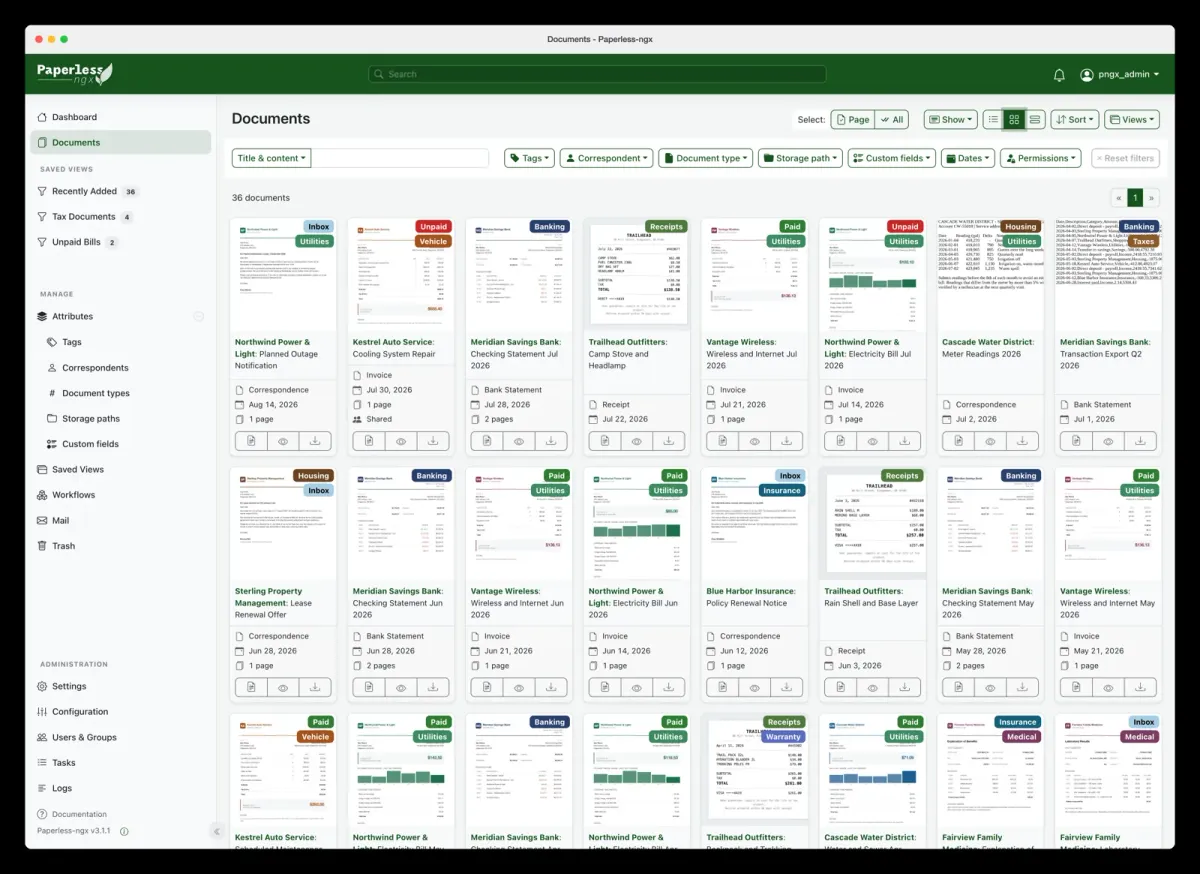
Letters from the tax office, insurance policies, warranty receipts, payslips: most of us still have a drawer (or three) full of paper. Paperless-ngx is the self-hosted answer. You scan or upload a document, it gets OCR'd, tagged, assigned to a correspondent and filed, and from then on you find it in seconds with full-text search.
This summer the project shipped its biggest update in years. Paperless-ngx 3.0 (22 July 2026) replaced the search engine, added document file versions and introduced optional AI features. The current release is 3.4.1 (31 October 2026). Here is what's new and how to run it with Docker Compose.
What is Paperless-ngx?
Paperless-ngx is a community-maintained document management system, the successor of Paperless and Paperless-ng. It is written in Python (Django) with an Angular frontend, licensed under GPL-3.0 and has around 47,000 stars on GitHub.
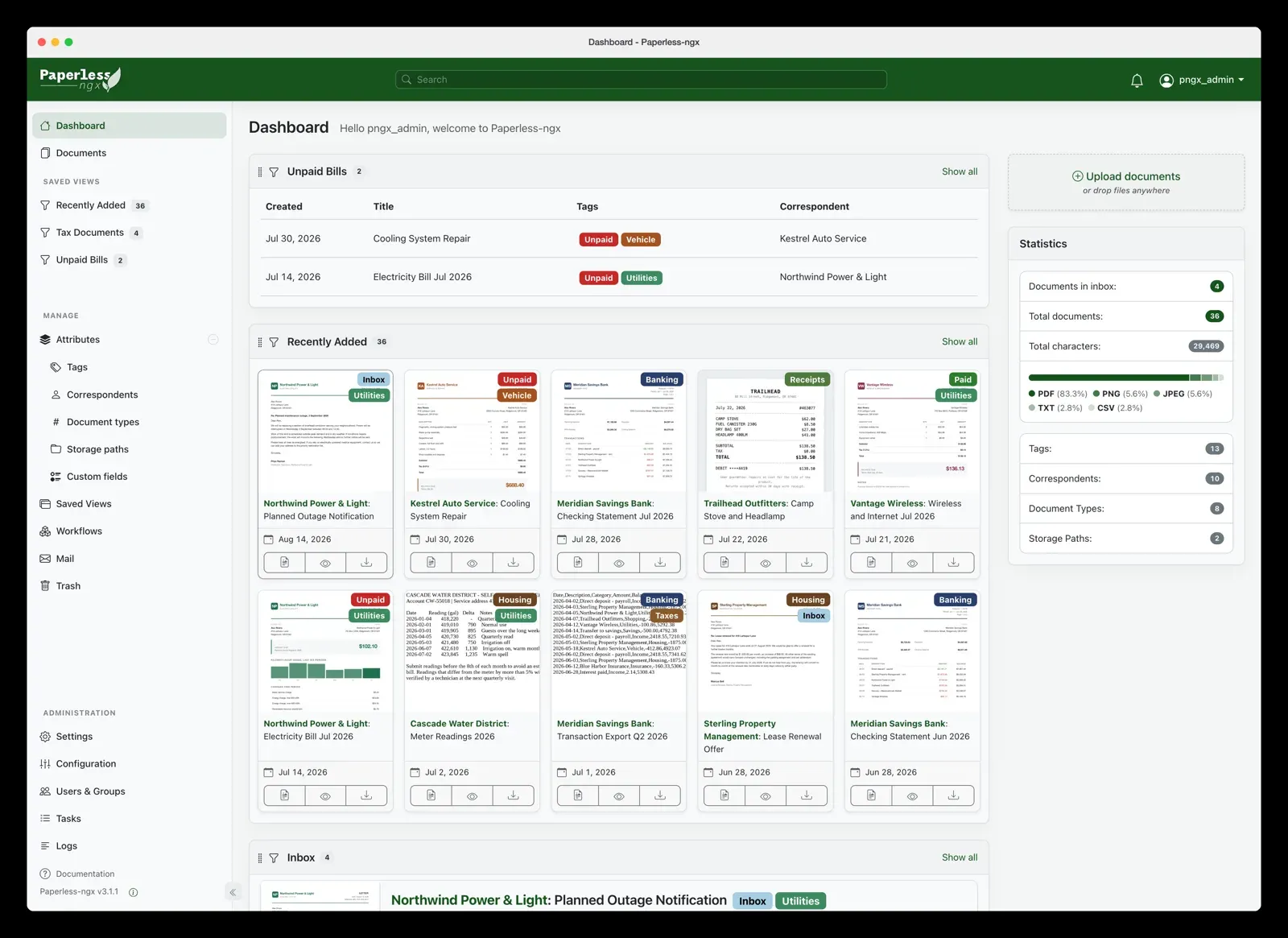
The core features:
- OCR with Tesseract (via OCRmyPDF), so even scanned images become searchable PDFs
- Automatic matching of tags, correspondents, document types and storage paths, based on rules or a machine-learning classifier that learns from your filing
- Consume folder, email import (IMAP with rules) and uploads from the web UI or mobile apps
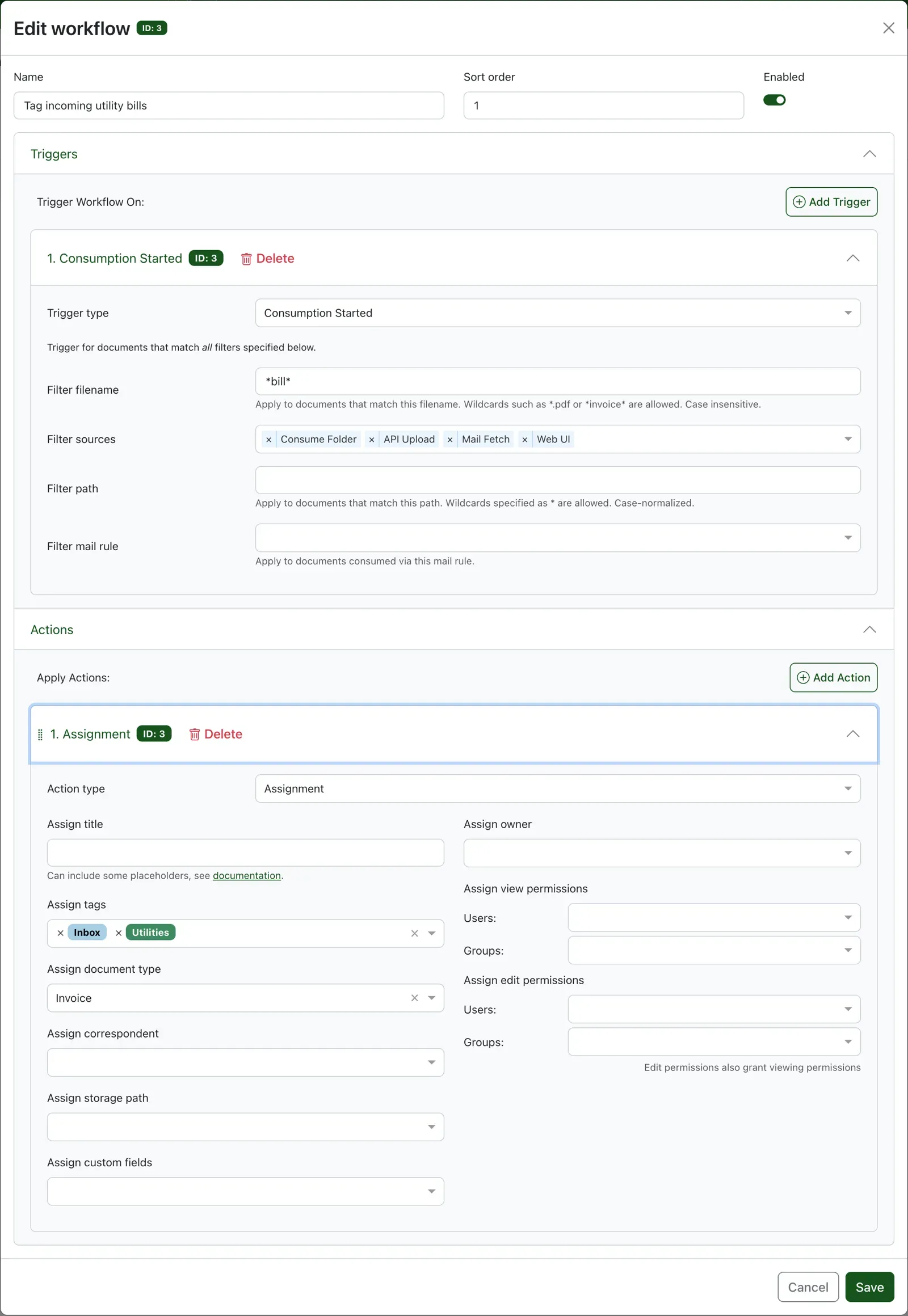
- Workflows that act on new documents (assign metadata, send email or webhooks, move to storage paths)
- Custom fields, saved views, permissions for multiple users, share links and a trash
- Archive format: originals are kept, plus a PDF/A archive version
What's new in Paperless-ngx 3
A new search engine
The old Whoosh index was replaced by Tantivy, a fast Rust search library. The index is rebuilt automatically after the upgrade. Later 3.x releases improved fuzzy matching and CJK search on top.
Document file versions
Documents can now have versions: you can upload a new scan of the same contract without creating a duplicate. Metadata stays on the "root" document; search uses the latest version by default.
Optional AI features
This is the headline feature, and it is strictly opt-in:
- AI-enhanced suggestions for title, date, tags, correspondent and document type. They complement the classic classifier rather than replacing it.
- Document chat: ask questions about one document or across your archive. It works best with the optional LLM index (RAG), which builds embeddings of your documents.
You can use a local model via Ollama or any OpenAI-compatible API. The docs are clear about the trade-off: with a remote provider, your document content is sent to that provider. For a document archive full of personal data, a local Ollama instance is the privacy-friendly choice.
More changes in 3.x
- Share link bundles (3.0) and centralized share link management (3.2)
- Remote OCR via Azure AI as an alternative to local Tesseract
- Barcode contents stored and searchable (3.3), with the more reliable zxing-cpp replacing pyzbar
- Relative date queries for custom fields and custom fields in workflow title templates (3.4)
- Faster PDF thumbnails via poppler (3.4) and lower idle memory use (3.4.1)
Security-wise, 3.3.2 fixed advisory GHSA-c8f3-pqr2-rr24 and 3.3.4 updated dependencies for the eMudhra CA incident and Pillow/aiohttp vulnerabilities, so stay on the latest 3.x.
Installing Paperless-ngx with Docker Compose
The project ships ready-made Compose files for SQLite, PostgreSQL and MariaDB, each optionally with Tika/Gotenberg for Office documents and emails. We use the PostgreSQL variant, which is the most common setup.
1. Folder and environment file
mkdir -p /opt/paperless/{consume,export} && cd /opt/paperless
python3 -c "import secrets; print(secrets.token_urlsafe(64))"
nano docker-compose.env
PAPERLESS_SECRET_KEY=<paste the generated key>
PAPERLESS_URL=https://paperless.example.com
PAPERLESS_TIME_ZONE=Europe/Berlin
PAPERLESS_OCR_LANGUAGE=deu+eng
USERMAP_UID=1000
USERMAP_GID=1000
PAPERLESS_SECRET_KEY is required in v3. PAPERLESS_OCR_LANGUAGE should match your documents; the image already includes English, German, Italian, Spanish and French, and you can add more with PAPERLESS_OCR_LANGUAGES. Set USERMAP_UID/GID to your host user so you can write to the consume folder.
2. The Compose file
Based on the official docker-compose.postgres.yml, with a pinned version and a database password you change:
services:
  broker:
    image: docker.io/valkey/valkey:9-alpine
    restart: unless-stopped
    volumes:
      - redisdata:/data

  db:
    image: docker.io/library/postgres:18
    restart: unless-stopped
    volumes:
      - pgdata:/var/lib/postgresql
    environment:
      POSTGRES_DB: paperless
      POSTGRES_USER: paperless
      POSTGRES_PASSWORD: change-me

  webserver:
    image: ghcr.io/paperless-ngx/paperless-ngx:3.4.1
    restart: unless-stopped
    depends_on:
      - db
      - broker
    ports:
      - "127.0.0.1:8000:8000"
    volumes:
      - data:/usr/src/paperless/data
      - media:/usr/src/paperless/media
      - ./export:/usr/src/paperless/export
      - ./consume:/usr/src/paperless/consume
    env_file: docker-compose.env
    environment:
      PAPERLESS_REDIS: redis://broker:6379
      PAPERLESS_DBHOST: db
      PAPERLESS_DBENGINE: postgresql
      PAPERLESS_DBPASS: change-me

volumes:
  data:
  media:
  pgdata:
  redisdata:
Note PAPERLESS_DBENGINE: postgresql: in v3 the engine must be set explicitly for PostgreSQL and MariaDB. If you use Traefik, replace the ports: section with the usual router labels pointing to port 8000.
docker compose up -d
Open the web UI. On first access you are prompted to create a superuser. The docs suggest using a separate, normal account for daily work.
3. Get documents in
- Consume folder: drop PDFs or images into
/opt/paperless/consume(or share it via SMB to your scanner). Paperless picks them up automatically. - Email: under Settings > Mail add an IMAP account and rules, for example "attachments from my insurance go to tag Insurance".
- Upload: drag and drop in the web UI, or use a mobile app that speaks the Paperless-ngx API.
Enabling local AI with Ollama (optional)
If you already run Ollama, turning on AI features takes a few variables:
PAPERLESS_AI_ENABLED=true
PAPERLESS_AI_LLM_BACKEND=ollama
PAPERLESS_AI_LLM_ENDPOINT=http://ollama:11434
PAPERLESS_AI_LLM_MODEL=llama3.1
# optional: RAG index for better chat answers
PAPERLESS_AI_LLM_EMBEDDING_BACKEND=ollama
PAPERLESS_AI_LLM_EMBEDDING_MODEL=embeddinggemma
PAPERLESS_AI_LLM_ALLOW_INTERNAL_ENDPOINTS=true
llama3.1 and embeddinggemma are the documented Ollama defaults. Because Ollama runs on an internal address, you need PAPERLESS_AI_LLM_ALLOW_INTERNAL_ENDPOINTS=true; otherwise Paperless blocks endpoints that resolve to non-public addresses. Local inference can be slow on a CPU-only server, so consider raising PAPERLESS_AI_LLM_REQUEST_TIMEOUT (default 120 seconds). The project wiki has a page with model recommendations.
Upgrading from v2 to v3: checklist
The v3 migration guide is worth reading in full. The key points:
- Upgrade to 2.20.15 first. v3 can only be installed on top of that version. And back up before you start (
document_exporterplus your database). - Set
PAPERLESS_SECRET_KEY. If you relied on the old built-in default, either set it to that value (keeps sessions) or rotate it (logs everyone out). - Set
PAPERLESS_DBENGINEfor PostgreSQL or MariaDB. - Review OCR settings.
PAPERLESS_OCR_MODE=skipandskip_noarchiveas well asPAPERLESS_OCR_SKIP_ARCHIVE_FILEare gone. OCR and archive creation are now separate:PAPERLESS_OCR_MODE(auto,force,redo,off) andPAPERLESS_ARCHIVE_FILE_GENERATION(auto,always,never). - Duplicates are now allowed by default and flagged in the UI. Set
PAPERLESS_CONSUMER_DELETE_DUPLICATES=truefor the old behaviour. - Consumer settings were renamed (e.g.
CONSUMER_POLLING→CONSUMER_POLLING_INTERVAL), and ignore patterns are now regex. - Pre/post-consume scripts no longer get positional arguments; use the environment variables instead.
- Encrypted documents must be decrypted with
decrypt_documentsbefore upgrading. - Behind a reverse proxy, set
PAPERLESS_TRUSTED_PROXIES(and possiblyPAPERLESS_ALLAUTH_TRUSTED_PROXY_COUNT) if you see403 Forbiddenon login. - Very old CPUs without SSE4.2 will crash the classifier. Check with
grep -o -m1 sse4_2 /proc/cpuinfo; if it prints nothing, setPAPERLESS_TRAIN_TASK_CRON=disable.
Tips from practice
- Back up with the exporter.
docker compose exec -T webserver document_exporter ../exportwrites all documents and metadata to the export folder. Back that up off-site and let the job ping Healthchecks. - Single sign-on. Paperless-ngx supports OpenID Connect via django-allauth, and Pocket ID has a ready-made client guide for it.
- Start simple. Create a handful of tags and correspondents, let the classifier learn for a few weeks, then add workflows.
- Office files and emails need the Tika/Gotenberg variant of the Compose file.
- PDF tools on the side. For merging, splitting or redacting before you archive, a self-hosted toolkit like BentoPDF is handy.
- Notifications. Workflow webhook actions can push to ntfy, for example when a document from the tax office arrives.
What about alternatives?
There are other self-hosted document managers, such as Docspell, Mayan EDMS or newer, more minimal projects like Papra. For most homelabs, though, Paperless-ngx is the default for a reason: a very large community, frequent releases, good mobile app support from third parties and a polished web UI. The new optional AI features widen that gap further.
Conclusion
Paperless-ngx 3 is a big step forward: a faster search, versioning and, if you want it, AI that suggests metadata and answers questions about your documents, fully local with Ollama. New installs take ten minutes. Existing users should read the migration guide carefully, especially the new OCR and database settings, and upgrade via 2.20.15.