Libredesk: A Self-Hosted Zendesk and Intercom Alternative in a Single Go Binary
Libredesk is an open-source customer support desk that handles email, live chat and WhatsApp in one shared inbox. It ships as a single Go binary, needs only PostgreSQL and Redis, and version 2.9.2 landed on 31 October. Here is what it does and how to run it with Docker Compose.
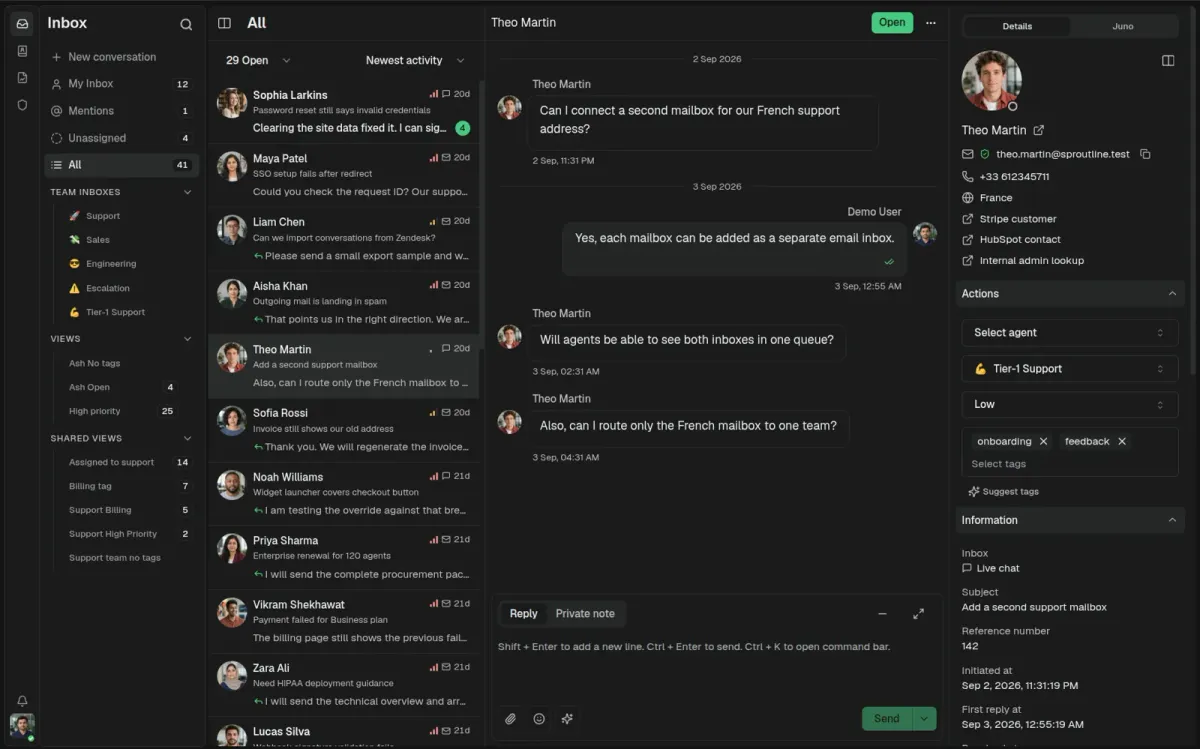
If you run a small business, an open-source project or a side hustle, support requests tend to arrive everywhere at once: a shared mailbox, a chat bubble on your website, maybe a WhatsApp number. The usual answer is a hosted helpdesk like Zendesk or Intercom, which works well until the per-agent pricing and the fact that all your customer conversations live on someone else's servers start to bother you.
Libredesk is an open-source answer to that. It's a customer support desk that pulls email, live chat and WhatsApp into one shared inbox, and it ships as a single Go binary that only needs PostgreSQL and Redis next to it. The latest release, v2.9.2, came out on 31 October 2026, just a few days after a bigger v2.9.1 update with a round of security fixes.
In this guide I'll walk through what Libredesk does, how to run it with Docker Compose, and what to keep in mind before you put it in front of real customers.
What is Libredesk?
Libredesk describes itself as an open-source, self-hosted customer support desk and a lightweight alternative to Intercom, Zendesk and Chatwoot. The backend is written in Go, the frontend in Vue.js 3 with shadcn UI, and the whole thing is licensed under AGPL-3.0. At the time of writing the repository has a little over 3,100 stars on GitHub, and the README carries the Zerodha Tech badge.
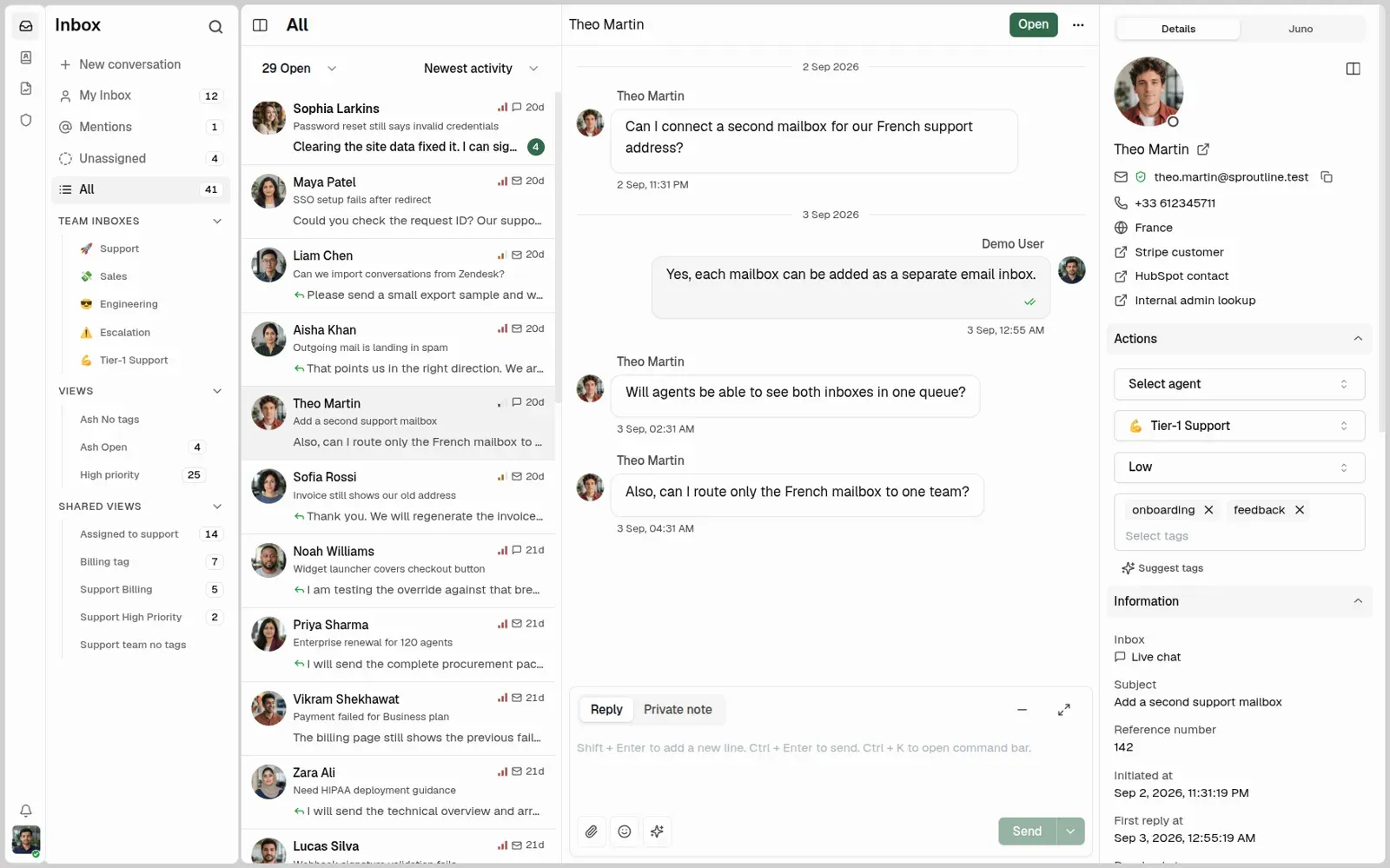
The idea is simple: your support team works in one place, no matter which channel a customer used to reach you. Conversations can be assigned, tagged, snoozed, routed to teams and tracked against response targets, just like in the big commercial tools.
Key features
Going by the README and the official docs, these are the highlights:
- Shared inbox for email, live chat and WhatsApp (WhatsApp connects through Meta's Cloud API).
- Live chat widget you can embed on your website.
- Inbox organisation with teams, tags, custom statuses, custom attributes, snoozing and search.
- Help center: a searchable, multilingual knowledge base for your customers.
- Automations and macros to tag, assign and route conversations and to send saved replies in one step.
- Auto assignment based on agent capacity or your own rules.
- SLA management with alerts for conversations that are about to breach their targets.
- CSAT surveys and analytics for response times, resolution rates and agent activity.
- Roles with per-action permissions, plus SSO via Google, Microsoft or any other OIDC provider.
- Activity logs, an API and webhooks for integrating with the rest of your stack.
- Optional AI: an agent copilot (drafted replies, summaries, tag suggestions) and an AI assistant that answers live chat questions from your knowledge base and hands over to a human when it can't help.
Why self-host your helpdesk?
Support conversations are full of personal data: names, email addresses, phone numbers, order details, sometimes screenshots of invoices. Keeping that on your own server is a big part of the appeal, especially if you have to think about GDPR.
The other part is cost and simplicity. Libredesk has no per-seat licence fees, and its footprint is small: one application container, a PostgreSQL database and a Redis instance. That's a lot lighter than many helpdesk stacks and fits comfortably next to your other homelab or small-business services.
If you already run your own mail server (we covered Stalwart earlier), Libredesk is a natural next step: a shared support address that your whole team can work from, without everyone logging into the same mailbox.
Installing Libredesk with Docker Compose
The project recommends Docker and publishes the image as libredesk/libredesk on Docker Hub. The official quick start downloads the project's docker-compose.yml and config.sample.toml. Below I use the same services, with a few small changes for a cleaner production setup: the web port is only bound to localhost (so a reverse proxy can sit in front), the database password comes from an .env file, and Postgres and Redis aren't published to the host at all.
Step 1: Create a project folder and download the sample config
mkdir -p ~/libredesk && cd ~/libredesk
curl -LO https://github.com/abhinavxd/libredesk/raw/main/config.sample.toml
cp config.sample.toml config.toml
mkdir uploads
Step 2: Generate the secrets
Libredesk needs an encryption key that is exactly 32 characters long. It encrypts stored secrets such as inbox passwords. The docs suggest generating it with OpenSSL:
openssl rand -hex 16   # use this as app.encryption_key
openssl rand -hex 24   # use this as the database password
Important: set the encryption key before the first start and don't change it afterwards. According to the docs, saved secrets can no longer be read if the key changes. Store it somewhere safe, for example in your password manager.
Step 3: Edit config.toml
Open config.toml and change at least these values:
[app]
log_level = "info"
env = "prod"
encryption_key = "PASTE-YOUR-32-CHARACTER-KEY-HERE"

[db]
host = "db"
user = "libredesk"
password = "PASTE-YOUR-DATABASE-PASSWORD-HERE"
database = "libredesk"

[redis]
address = "redis:6379"
The sample file ships with log_level = "debug" and env = "dev", which is fine for testing but too noisy for production. Leave disable_secure_cookies = false as it is; the sample config explicitly warns against turning it off in production.
Step 4: Create the .env file
cat > .env <<'ENV'
POSTGRES_USER=libredesk
POSTGRES_PASSWORD=PASTE-YOUR-DATABASE-PASSWORD-HERE
POSTGRES_DB=libredesk
ENV
chmod 600 .env config.toml
The password here must match db.password in config.toml.
Step 5: The docker-compose.yml
services:
  app:
    image: libredesk/libredesk:latest
    container_name: libredesk_app
    restart: unless-stopped
    ports:
      - "127.0.0.1:9000:9000"
    networks:
      - libredesk
    depends_on:
      db:
        condition: service_healthy
      redis:
        condition: service_started
    volumes:
      - ./uploads:/libredesk/uploads:rw
      - ./config.toml:/libredesk/config.toml
    command: [sh, -c, "./libredesk --install --idempotent-install --yes --config /libredesk/config.toml && ./libredesk --upgrade --yes --config /libredesk/config.toml && ./libredesk --config /libredesk/config.toml"]

  db:
    image: postgres:17-alpine
    container_name: libredesk_db
    restart: unless-stopped
    networks:
      - libredesk
    environment:
      POSTGRES_USER: ${POSTGRES_USER}
      POSTGRES_PASSWORD: ${POSTGRES_PASSWORD}
      POSTGRES_DB: ${POSTGRES_DB}
    healthcheck:
      test: ["CMD-SHELL", "pg_isready -U ${POSTGRES_USER} -d ${POSTGRES_DB}"]
      interval: 10s
      timeout: 5s
      retries: 6
    volumes:
      - postgres-data:/var/lib/postgresql/data

  redis:
    image: redis:7-alpine
    container_name: libredesk_redis
    restart: unless-stopped
    networks:
      - libredesk
    volumes:
      - redis-data:/data

networks:
  libredesk:

volumes:
  postgres-data:
  redis-data:
The command line comes straight from the official compose file. On every start it runs an idempotent install (which only creates the schema if it doesn't exist yet), then applies pending database upgrades, then starts the server. That's what makes updates painless later on.
For production you may want to pin a specific version tag instead of latest, so updates only happen when you decide.
Step 6: Start it and set the admin password
docker compose up -d
docker compose logs -f app   # wait until the server is up, then Ctrl+C
docker exec -it libredesk_app ./libredesk --set-system-user-password
Now open http://localhost:9000 (or tunnel the port if the server is remote) and log in with the email System and the password you just set. From there you can create your real agent accounts, teams and inboxes.
Putting it behind a reverse proxy
Libredesk should be served over HTTPS, and the docs recommend Nginx as the reverse proxy. There is one detail that's easy to miss: the proxy must set the X-Client-IP header to the real client address. Libredesk uses it for rate limiting and audit logs. Without it, every request appears to come from the proxy, which means one noisy client can trip the rate limit for everybody.
A minimal Nginx server block, based on the official example, looks like this (add your TLS configuration as usual):
server {
    listen 80;
    server_name support.example.com;
    client_max_body_size 30M;

    location / {
        proxy_pass http://127.0.0.1:9000;
        proxy_http_version 1.1;
        proxy_set_header Upgrade $http_upgrade;
        proxy_set_header Connection 'upgrade';
        proxy_set_header Host $host;
        proxy_set_header X-Client-IP $remote_addr;
        proxy_cache_bypass $http_upgrade;
    }
}
The Upgrade and Connection lines come from the official example and allow connection upgrades (WebSockets) to pass through the proxy. If you sit behind Cloudflare or another CDN, the docs say to forward the CDN's real-client header instead and to firewall your origin so that only the CDN can reach it, otherwise clients could spoof the header. If you use a different proxy such as Traefik or Caddy, check that it can set X-Client-IP before you go live.
Configuration tips
- Environment variables instead of a config file. Every setting can also be passed as an environment variable with the
LIBREDESK_prefix and double underscores for nesting, for exampleLIBREDESK_APP__ENCRYPTION_KEYorLIBREDESK_DB__HOST. Pass--config=""to run without a config file at all. - Single sign-on. Libredesk supports Google, Microsoft and generic OIDC providers. If you already run a small identity provider like Pocket ID, your agents can log in with passkeys. The sample config notes that local password login stays available as long as no OIDC provider is enabled, so you can't lock yourself out by accident.
- Rate limits for the chat widget, login, public pages and media downloads are configurable in
config.toml. The defaults are 100, 30, 100 and 300 requests per minute per IP. - File storage defaults to the local
uploadsfolder; S3-compatible storage (including MinIO) is supported too. - SSRF protection for outbound URLs (webhooks, OIDC discovery, AI providers) is off by default, because internal endpoints are normal in single-tenant setups. If you host Libredesk for other people, consider turning it on.
- Monitoring. Since v2.9.1 the health check also verifies PostgreSQL and returns HTTP 503 when the database is unavailable, which makes it a good target for Uptime Kuma.
About the AI features
The AI features are optional and, according to the docs, still in beta. Libredesk talks to any OpenAI-compatible endpoint and has presets for OpenAI, Anthropic, OpenRouter, Groq, Together AI and Ollama. You configure two providers: one for completions (drafts, summaries, assistant replies) and one for embeddings (searching your snippets and help center articles).
Two honest warnings from the docs are worth repeating: AI assistant replies go straight to customers, so test them on a low-volume inbox first, and every AI call costs money on your provider account. With Ollama you can keep everything local, but expect weaker answers from small models.
Updating Libredesk
The upgrade guide boils down to: back up first, then pull and restart.
# 1. Back up the database
docker exec libredesk_db pg_dump -U libredesk libredesk > libredesk_backup_$(date +%F).sql

# 2. Pull the new image and restart the app
docker compose pull
docker compose up -d app
Because the container runs --upgrade on every start, the database migrations happen automatically. Also back up your uploads folder and, of course, keep a copy of config.toml with the encryption key.
v2.9.1 (28 October) is worth installing if you're on an older version: its release notes list fixes that prevent template execution in reply content, unwanted session creation, forced logout and unauthorized contact messages. It also contains two small breaking changes for API users: creating conversations with initiator set to contact now needs the Send messages as contact permission, and logout integrations must use POST /api/v1/auth/logout with the session CSRF token. v2.9.2 then fixed line breaks in outgoing email subjects.
Limitations to keep in mind
- Young project, small ecosystem. Libredesk is far smaller than the big players. Chatwoot, the best-known open-source alternative, has close to 39,000 GitHub stars and a much larger ecosystem of integrations. If you need lots of ready-made connectors, check whether Libredesk covers them first.
- Channels. Out of the box you get email, live chat and WhatsApp. If you need other messaging channels, you'll have to build something with the API and webhooks.
- WhatsApp needs Meta. The WhatsApp integration goes through Meta's Cloud API, so you need a Meta business setup and that part is not self-hosted.
- AGPL licence. For internal use this changes nothing, but if you modify Libredesk and offer it to others over a network, the AGPL requires you to share those changes.
- AI is beta. Treat the assistant as an experiment, not as your first line of support.
Libredesk vs. Chatwoot vs. Zammad
A quick orientation, based on the projects' repositories:
| Libredesk | Chatwoot | Zammad | |
|---|---|---|---|
| Language | Go (Vue.js frontend) | Ruby | Ruby |
| Licence (GitHub) | AGPL-3.0 | see repo (core plus enterprise code) | AGPL-3.0 |
| GitHub stars (Nov 2026) | ~3,100 | ~38,900 | ~6,100 |
| Footprint | single binary + PostgreSQL + Redis | larger multi-service stack | larger multi-service stack |
If you want something lightweight that's easy to run and understand, Libredesk is a very attractive option. If you need a mature ecosystem or a classic ticketing system with years of history, Chatwoot or Zammad are worth a look.
Conclusion
Libredesk is one of the most pleasant surprises in self-hosted customer support right now. It covers the features small teams actually use (a shared inbox, live chat, a help center, automations, SLAs and CSAT) without the heavy infrastructure many helpdesks require. Setup takes a few minutes with Docker Compose, upgrades are a docker compose pull away, and the project is actively maintained, with two stable releases and two release candidates in the last ten days alone.
Just remember the two things that are easy to get wrong: keep your encryption key safe and unchanged, and make sure your reverse proxy passes the real client IP in X-Client-IP.
Do you self-host your support inbox, or is that one thing you happily leave to a SaaS? Let me know.