Memos 26.11: Self-Host a Private Timeline for Your Everyday Notes with Docker Compose
Memos is an MIT-licensed, self-hosted note-taking app that collects quick thoughts, checklists and links in a personal timeline. Version 26.10 brought a rich editor, usage limits and declarative configuration. Here is how to run Memos 26.11 with Docker Compose, back it up and upgrade safely.
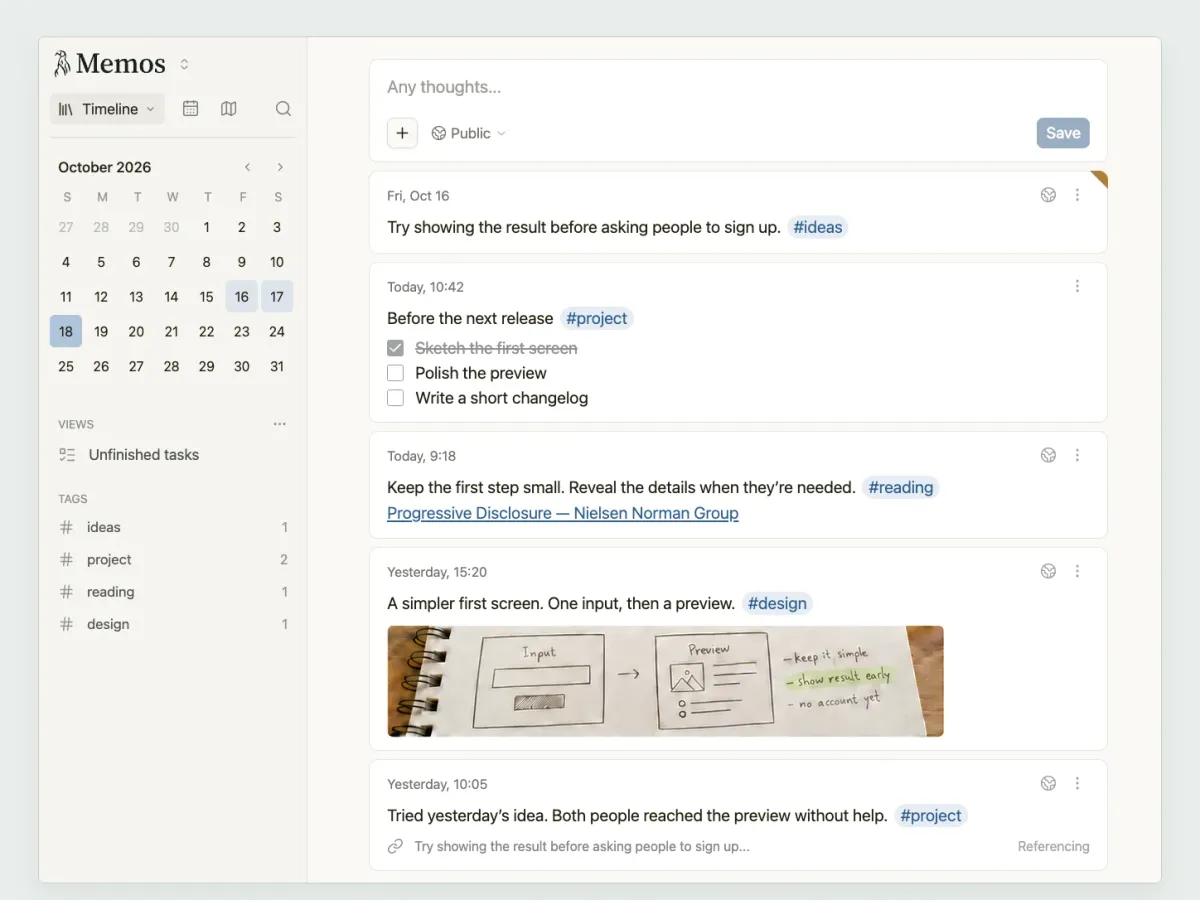
Most note apps want to be everything at once: wiki, project planner, database, second brain. Sometimes you just want somewhere to drop a thought, a link or a quick checklist, and find it again next week. That's exactly the gap Memos fills, and it's one of the most popular self-hosted apps on GitHub with more than 64,000 stars.
Memos just went through its biggest release in a while. Version 26.10.0 (31 October 2026) switched to calendar-based version numbers and added a rich editor, per-user usage limits and declarative configuration files. 26.11.0 followed on 1 November with fixes. In this post I'll explain what Memos is, what changed, and how to run it with Docker Compose.
What is Memos?
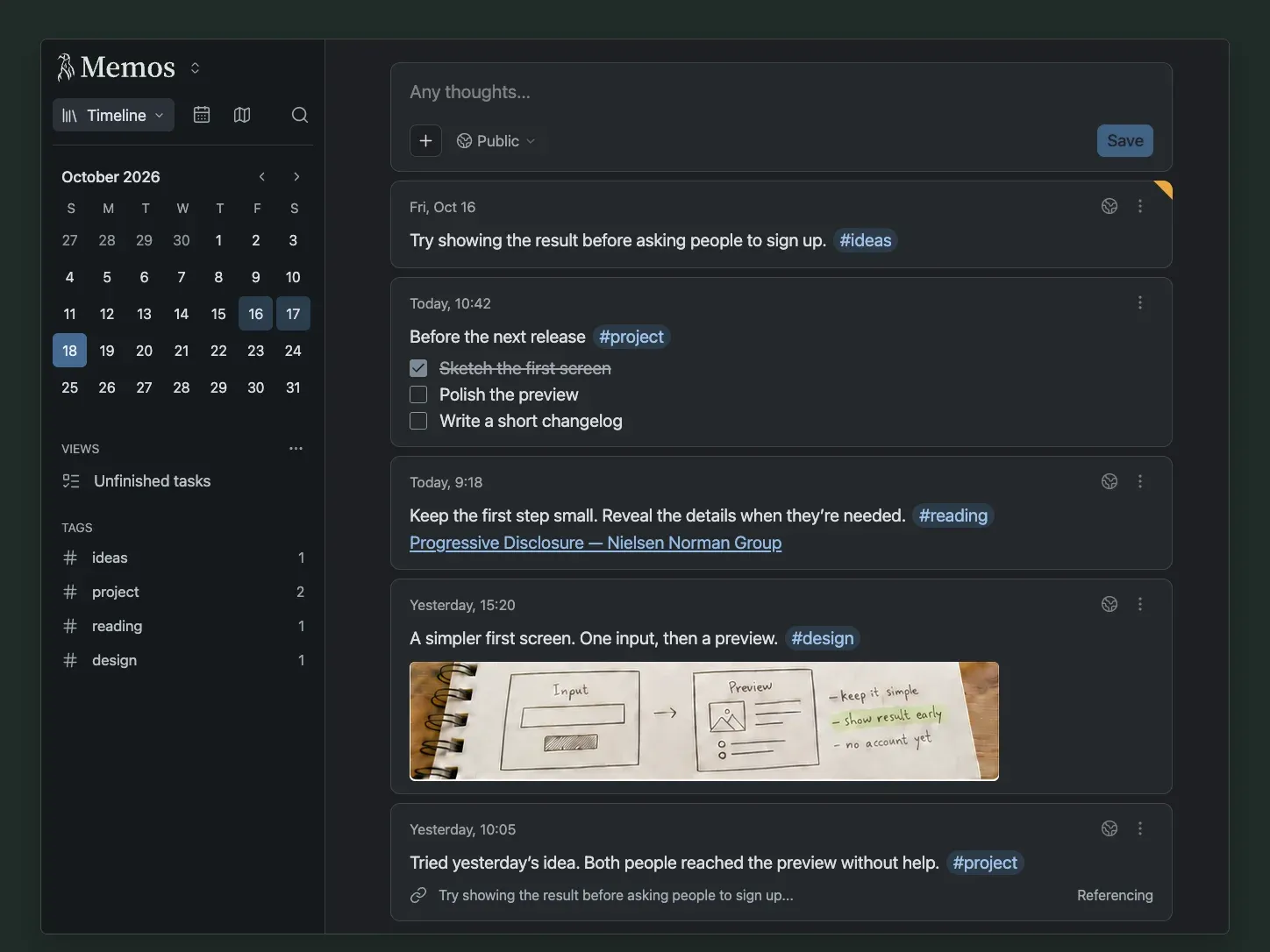
Memos describes itself as an open-source, self-hosted note-taking app for your everyday thoughts. Instead of folders and pages, everything you write ends up in a personal timeline, sorted by the day you wrote it. A memo can be one sentence or a longer Markdown entry, and tags link related thoughts across days.
It's written in Go with a React frontend, ships as a single container, and stores everything in SQLite by default. MySQL and PostgreSQL also work. The project is licensed under the MIT License.
Key features
- Timeline-first writing: a composer at the top, your memos below, and a calendar to jump to any day.
- Markdown, tags and checklists: including tables, footnotes, callouts and Mermaid diagrams.
- Sharing you control: every memo is private, shared with signed-in users, or public. Spaces let several people write in a shared area while each person keeps their own memos.
- Views and filters: saved filters such as "unfinished tasks", plus filters like
has_attachmentsandhas_image(new in 26.10). - Attachments: stored in the database, on the local filesystem or in S3-compatible object storage.
- Sign-in options: passwords, OAuth2/SSO identity providers, and personal access tokens for scripts.
- API and MCP server: a REST API and a built-in Model Context Protocol endpoint at
/mcp, so AI assistants can search and create memos with your token. - Extras around the app: an official web clipper for Chrome and Firefox, and Memogram, a Telegram bot that saves your messages to Memos.
What's new in 26.10 and 26.11
According to the release notes, these are the big changes:
- Calendar versioning. Releases are now tagged
YY.MM.Nwithout avprefix, for example26.11.0. The Docker tagstablefollows stable releases, a month tag like26.11follows the newest patch of that month, andcanaryis for development builds. - A new rich editor. Memos now opens in a rich editor by default, so text looks the way the saved memo will, with a toolbar, a slash menu and Markdown shortcuts. If you prefer raw Markdown, switch on Markdown mode under Settings › Editor.
- Usage limits. The old upload size and memo length settings became one feature that can also cap memo count and total storage, with per-user entries.
- Declarative configuration. Identity providers, instance settings and bootstrap users can be described in JSON files in
/etc/memos/configand applied at startup or withmemos config plan/memos config apply. - Security and server work. The HTTP layer now runs on Go's standard library,
/healthzreports database outages, outbound fetches refuse the CGNAT range, and Go and gRPC were updated for two CVEs. - 26.11.0 fixes typing Japanese and Korean in Safari, returns clear errors for broken attachments, fixes a cache bug under load, and logs a warning if old
/etc/secretsconfiguration files are still present.
Installing Memos with Docker Compose
You need a Linux host with Docker and the Compose plugin. Memos is light, and the image is multi-arch (amd64, arm64 and arm/v7), so a Raspberry Pi works too.
1. Create a project folder
mkdir -p ~/memos && cd ~/memos
2. Write compose.yaml
This is based on the official Compose guide. I pin the exact version instead of stable, so updates only happen when you decide.
services:
  memos:
    image: neosmemo/memos:26.11.0
    container_name: memos
    restart: unless-stopped
    ports:
      - "127.0.0.1:5230:5230"
    volumes:
      - ./data:/var/opt/memos
    environment:
      MEMOS_PORT: 5230
      MEMOS_DRIVER: sqlite
      MEMOS_INSTANCE_URL: https://memos.example.com
A few notes:
./dataholds the SQLite database (memos_prod.db) and uploaded files (assets/). That's what you back up.- Binding to
127.0.0.1keeps port 5230 off the network and leaves HTTPS to your reverse proxy. If you just want to try Memos on your LAN, use"5230:5230"instead. MEMOS_INSTANCE_URLis the public URL Memos uses for links. Replacememos.example.comwith your own domain. According to the Docker docs, setting this URL on a fresh instance starts it with public access, while leaving it out starts it as private. You can change access later in the instance settings, so double-check it after the first start.- The container runs as a non-root user (UID/GID
10001) and fixes the ownership of mounted volumes on startup. If you need other IDs, setMEMOS_UIDandMEMOS_GID.
3. Start it
docker compose up -d
docker compose logs -f memos
Open the instance in your browser and create the first account: it becomes the administrator. Do this right away, before anyone else can reach the page.
4. Put it behind a reverse proxy
For anything beyond local testing, serve Memos over HTTPS. The reverse proxy docs ask you to set MEMOS_INSTANCE_URL to the public URL and to forward the standard Host, X-Forwarded-Proto and X-Forwarded-For headers. With Caddy, that's one block:
memos.example.com {
    reverse_proxy 127.0.0.1:5230
}
If you use Traefik, remove the ports: section, attach the container to your proxy network and add the usual router labels for your domain, pointing the service at port 5230.
Configuration tips
- Using an external database: set
MEMOS_DRIVERtomysqlorpostgresand pass aMEMOS_DSN. SQLite is the default and is enough for a single-node instance. EveryMEMOS_*variable also works with a_FILEsuffix, so you can keep the DSN in a Docker secret. - Single sign-on: Memos supports OAuth2/SSO identity providers, and admins can turn off password sign-in for regular users once SSO works. If you already run an OIDC provider such as Pocket ID, that's the natural place to plug it in. I haven't tested this exact combination myself, so check the authentication docs for the fields.
- Default limits: out of the box, a memo can be 8 KiB and a file 32 MiB. Raise them under Settings › Usage limits if you attach larger files.
- Monitoring: since 26.10, the
/healthzendpoint reports database outages, which makes it a good target for an HTTP check in Uptime Kuma. - AI assistants: create a personal access token in your user settings and point an MCP client at
https://memos.example.com/mcpwithAuthorization: Bearer <token>. The token gets exactly your account's permissions, so treat it like a password.
Backups
The backup guide is refreshingly clear: back up the database, local attachments, and your deployment files (compose file, proxy config, configuration directory). With the setup above, the simplest safe approach is a short stop, a tarball and a restart:
#!/bin/bash
set -e
cd ~/memos
docker compose stop memos
tar -czf "/var/backups/memos-$(date +%Y%m%d).tar.gz" data compose.yaml
docker compose start memos
find /var/backups -name 'memos-*.tar.gz' -mtime +7 -delete
Run it from cron at night and copy the archives off the machine. If you'd rather not stop the container, the docs show an online backup with SQLite's .backup command (sqlite3 data/memos_prod.db ".backup memos_backup.db"), which needs sqlite3 installed on the host. Want to know when the backup job silently stops? Add a ping to Healthchecks at the end of the script.
Upgrading safely
Memos runs database migrations automatically at startup, and the upgrade guide says plainly that downgrading after a migration isn't supported, so your backup is the rollback plan. For 26.10 and later, keep this in mind:
- Coming from 0.31.0 (or a 26.10 release candidate), you can upgrade directly. From 0.22 to 0.30, run 0.31.0 once first. From anything older than 0.22, go through 0.25.3, then 0.31.0.
- Everyone signs in again after the upgrade. Personal access tokens keep working.
- Old upload and memo length settings are not carried over. Set them again under Usage limits if you changed them.
- Config files in
/etc/secretsare no longer read. If you used them for SSO or storage, convert them to the new configuration directory before upgrading, or settings like password sign-in may come back. - API clients must switch from
/api/v1/...to/api/....
With a pinned tag, an upgrade is: back up, change the tag in compose.yaml, then:
docker compose pull && docker compose up -d
Limitations and honest notes
- It's not a knowledge base. There are no nested pages or folders. If you want structured documentation, a wiki like BookStack is a better fit.
- Breaking changes happen. The 26.10 release changed API paths, removed member self-export (exports are now an administrator action) and dropped some settings. Read the release notes before every upgrade.
- The new editor is a change of habit. Long-time users who liked raw Markdown need to turn on Markdown mode once.
- Public access by accident: because a configured instance URL can start a fresh instance as public, check the access setting right after installing.
Memos vs. the alternatives
Compared with Google Keep or Apple Notes, Memos gives you a similar quick-capture experience, but the data sits in one folder on your own server and there's an API and MCP endpoint for automation. Among self-hosted tools, it's closest to a private microblog. If you mainly want to publish short posts publicly, take a look at Ech0. If your "notes" are mostly saved links, a bookmark manager like Karakeep or Linkwarden will serve you better.
Conclusion
Memos does one thing and does it well: it makes writing something down feel as quick as sending yourself a message, without handing your thoughts to a cloud service. It's MIT-licensed, runs in a single small container, and the backup story is one folder. The 26.10 release makes it noticeably more polished, as long as you read the upgrade notes if you're coming from an older version.
Do you use Memos as a journal, a task inbox or a link dump? I'm curious how other self-hosters use it.
Sources
- Memos on GitHub (README, MIT license)
- Memos releases (26.10.0, 26.11.0)
- Docker deployment and Docker Compose deployment
- Reverse proxy
- Backup & Restore
- Upgrade
- Authentication and Storage
- MCP server
- neosmemo/memos on Docker Hub