Miniflux 2.3.5: Self-Host a Fast, Minimalist RSS Reader with Docker Compose
Miniflux is an Apache-2.0, Go-based RSS reader that uses only a few MB of RAM, speaks the Fever and Google Reader APIs and pushes new articles to ntfy, Apprise and 25+ other services. Here's what's new in 2.3.5 and how to run it with Docker Compose and PostgreSQL.
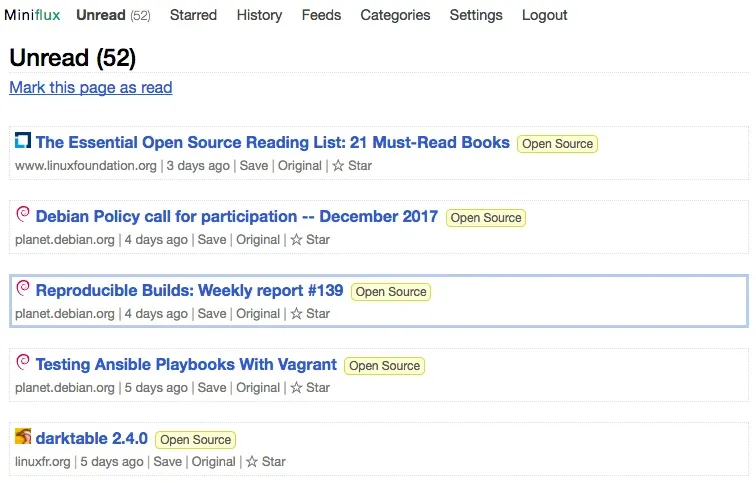
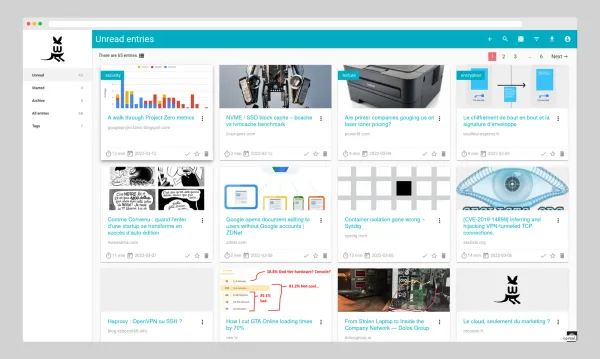
Some self-hosted apps try to be everything at once. Miniflux goes the opposite way: it reads feeds, and that's it. No plugin store, no JavaScript framework, no fancy cards – just a fast, text-first list of new articles that you can work through with the keyboard.
That stubbornness is exactly why it has been a homelab favourite for years. The project is close to 10,000 GitHub stars, it's still actively developed, and version 2.3.5 shipped on 2 November 2026 with OpenID Connect group mapping, passkey-only logins and a long list of security fixes. If you've read our posts on CommaFeed or DanB/RSS, this is the next RSS reader worth a look – especially if you care about speed and mobile app support.
What is Miniflux?
Miniflux calls itself "a minimalist and opinionated feed reader". It is written in Go by Frédéric Guillot and contributors and released under the Apache License 2.0. The whole application, including all static files, is compiled into a single binary, and it stores everything in PostgreSQL – which is the only database it supports.
The project is open about its philosophy: the Opinionated? page explains that the feature set is intentionally limited, the layout is inspired by Hacker News, Lobsters and Pinboard, and that there is no native mobile app because the web UI is a responsive progressive web app. If you want a reader that looks like a magazine, this isn't it. If you want something that stays out of your way, keep reading.
Key features
According to the project's README and docs, Miniflux offers:
- Feed formats: Atom 0.3/1.0, RSS 1.0/2.0 and JSON Feed 1.0/1.1, plus OPML import/export.
- Media: podcast, video, music and image enclosures; YouTube videos play inside Miniflux via
youtube-nocookie.com, with Invidious as an alternative player. - Organisation: categories, bookmarks, public sharing of single articles and full-text search powered by PostgreSQL.
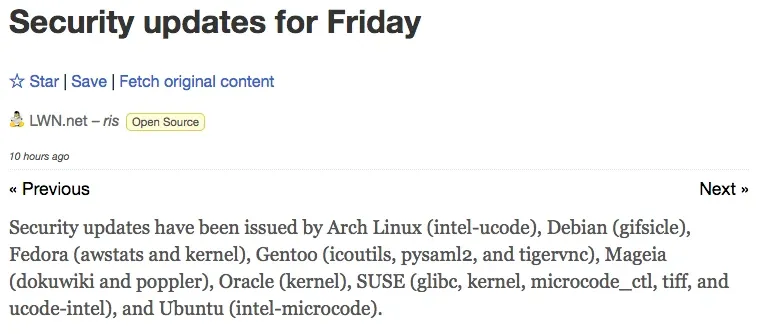
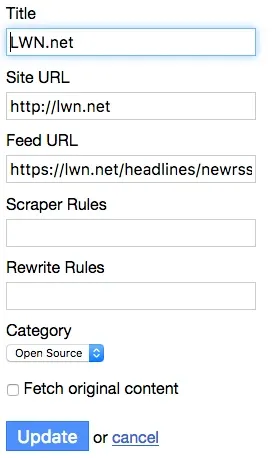
- Full content: a built-in Readability parser fetches the original article, and you can add your own CSS-selector scraper rules, rewrite rules and regex filters to include or exclude entries.
- Privacy: pixel trackers are removed, tracking parameters like
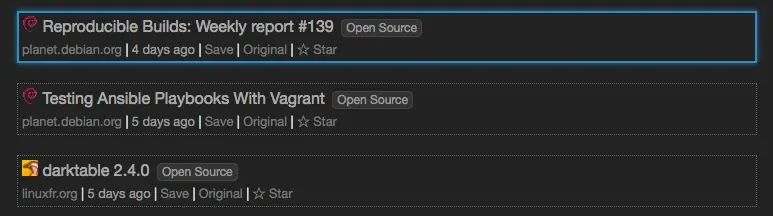
utm_sourceorfbclidare stripped, external JavaScript is blocked, and an optional media proxy hides your IP from image hosts. - Interface: six themes (light, dark and system, each in sans-serif and serif), lots of keyboard shortcuts, optional touch gestures and custom CSS/JS.
- Authentication: local username and password, passkeys (WebAuthn), Google, generic OpenID Connect and reverse-proxy authentication.
- Integrations: more than 25 services, including Apprise, Gotify, ntfy, Linkwarden, Wallabag, Readeck, Matrix, Telegram and Discord, plus webhooks, a bookmarklet and a REST API with Go and Python clients.
- Mobile apps: compatible with the Fever and Google Reader APIs, so apps like NetNewsWire, Reeder Classic, Capy Reader and RSS Guard can sync with it.
- Tiny footprint: the README says it uses only a couple of MB of memory and negligible CPU, even with several hundred feeds. It also respects caching headers like ETag and Last-Modified and polls every hour by default.
What's new in Miniflux 2.3.5
The 2.3.5 release notes are worth reading in full, but these are the highlights for self-hosters:
- OIDC admin role mapping. With
OAUTH2_ADMIN_GROUPandOAUTH2_GROUP_CLAIM, Miniflux grants or removes the admin role at login based on the user's groups from your identity provider. - Passkeys as the only login method. When
DISABLE_LOCAL_AUTHis enabled, passkeys can now be the only way to sign in. Register at least one passkey before turning local authentication off. - New Authentication settings page. Username, password, OAuth2 linking and passkeys moved to their own page under Settings.
- Forced feed refresh via API:
PUT /v1/feeds/{id}/refresh?force=truebypasses the HTTP cache. - Fewer database sessions. Anonymous visitors, crawlers and media proxy requests no longer create web sessions, which keeps the
web_sessionstable from bloating. - Security fixes: changing a password now requires the current one and signs out other sessions; the SSRF filter blocks 6to4 and IPv4-compatible IPv6 addresses; feed cookies are no longer sent to third-party hosts; and the client IP is taken from the right side of
X-Forwarded-For, skipping trusted proxies. - Fever and Google Reader API fixes for starring, "mark all as read" and missing entries.
That X-Forwarded-For change matters if you run Miniflux behind more than one proxy: the release notes say you should add the networks of every proxy in the chain to TRUSTED_REVERSE_PROXY_NETWORKS.
Why use Miniflux?
- It's fast and light. A single Go binary plus PostgreSQL runs happily on a small VPS or a Raspberry Pi – the Docker image is published for amd64, arm64, arm/v7 and arm/v6.
- Your phone app keeps working. Thanks to Fever and Google Reader API support you aren't locked into the web UI.
- It plays well with the rest of your homelab. Send new entries to ntfy, Gotify or Apprise, or save articles straight into Linkwarden.
- Single sign-on is built in. Generic OIDC works with identity providers like Pocket ID.
- No surprises. The project explicitly avoids feature creep, so updates rarely change how you use it.
Installing Miniflux with Docker Compose
You'll need a Linux host with Docker and the Compose plugin. Images are available as miniflux/miniflux on Docker Hub, ghcr.io/miniflux/miniflux and quay.io/miniflux/miniflux. The docs recommend pinning a version instead of using latest; at the time of writing the current tag is 2.3.5 (there is also a 2.3.5-distroless variant).
1. Create a project folder and an .env file
mkdir -p ~/miniflux && cd ~/miniflux
cat > .env <<'ENV'
POSTGRES_PASSWORD=change-me-to-a-long-random-string
MINIFLUX_ADMIN_PASSWORD=change-me-too
ENV
chmod 600 .env
Generate real passwords, for example with openssl rand -base64 32. If your database password contains characters like @, / or :, URL-encode it or stick to letters and digits, because it ends up inside DATABASE_URL.
2. Write compose.yml
This is based on the official Compose example, with a pinned version, secrets in .env, a health check and a port bound to localhost only:
services:
  miniflux:
    image: miniflux/miniflux:2.3.5
    restart: unless-stopped
    ports:
      - "127.0.0.1:8080:8080"
    depends_on:
      db:
        condition: service_healthy
    environment:
      - DATABASE_URL=postgres://miniflux:${POSTGRES_PASSWORD}@db/miniflux?sslmode=disable
      - RUN_MIGRATIONS=1
      - CREATE_ADMIN=1
      - ADMIN_USERNAME=admin
      - ADMIN_PASSWORD=${MINIFLUX_ADMIN_PASSWORD}
      - BASE_URL=https://rss.example.com
    healthcheck:
      test: ["CMD", "/usr/bin/miniflux", "-healthcheck", "auto"]

  db:
    image: postgres:18
    restart: unless-stopped
    environment:
      - POSTGRES_USER=miniflux
      - POSTGRES_PASSWORD=${POSTGRES_PASSWORD}
      - POSTGRES_DB=miniflux
    volumes:
      # Postgres 18 uses /var/lib/postgresql, 17 and older use /var/lib/postgresql/data
      - miniflux-db:/var/lib/postgresql
    healthcheck:
      test: ["CMD", "pg_isready", "-U", "miniflux"]
      interval: 10s
      start_period: 30s

volumes:
  miniflux-db:
What the important variables do:
DATABASE_URL– the PostgreSQL connection string.RUN_MIGRATIONS=1– applies database migrations automatically on start. Keep it, because upgrades need it too.CREATE_ADMIN,ADMIN_USERNAME,ADMIN_PASSWORD– create the first admin account. The docs say you can remove them after the first start.BASE_URL– the public URL used for links and cookies; it defaults tohttp://localhost, so set it to your real domain.
3. Start it
docker compose up -d
docker compose ps
docker compose logs -f miniflux
Once both containers are healthy, open http://127.0.0.1:8080 on the host (or through an SSH tunnel), log in as admin and change the password under Settings. Then remove the three ADMIN_*/CREATE_ADMIN lines from the compose file and run docker compose up -d again.
4. Put it behind HTTPS (Traefik example)
Miniflux can fetch Let's Encrypt certificates itself (CERT_DOMAIN), but in most homelabs it sits behind a reverse proxy. If you already run Traefik with a certificate resolver, drop the ports: section and add labels like these (adjust the entrypoint, resolver and network names to your setup):
    labels:
      - "traefik.enable=true"
      - "traefik.http.routers.miniflux.rule=Host(`rss.example.com`)"
      - "traefik.http.routers.miniflux.entrypoints=websecure"
      - "traefik.http.routers.miniflux.tls.certresolver=myresolver"
      - "traefik.http.services.miniflux.loadbalancer.server.port=8080"
The project also ships ready-made Traefik and Caddy examples in its repository.
Configuration tips
Import your feeds. Go to Feeds → Import and upload an OPML file from your old reader. You can export again any time, either in the UI or with miniflux -export-user-feeds <username>.
Connect a mobile app. Under Settings → Integrations, enable the Google Reader API (or Fever) and choose a separate username and password for it. Then point an app like NetNewsWire or Capy Reader at your Miniflux URL. The docs note that only a subset of the Google Reader API is implemented.
Get push notifications for important feeds. The ntfy integration (available since 2.2.0) sends new entries to any ntfy server. To avoid noise, you enable push notifications per feed in the feed's settings – perfect for release feeds or security advisories.
Tune polling. POLLING_FREQUENCY (default 60 minutes) and BATCH_SIZE (default 100 feeds) control how many feeds are refreshed per interval. With POLLING_SCHEDULER=entry_frequency, Miniflux polls busy feeds more often and quiet ones less. WORKER_POOL_SIZE defaults to 16 workers.
Decide how long to keep entries. By default, the cleanup job archives read entries after 60 days (CLEANUP_ARCHIVE_READ_DAYS) and unread entries after 180 days (CLEANUP_ARCHIVE_UNREAD_DAYS). Bookmarked and shared entries are kept. Set a value to -1 to disable archiving.
Proxy all images. MEDIA_PROXY_MODE defaults to http-only. Set it to all if you don't want image hosts to see your IP address – at the cost of more traffic through your server.
Use single sign-on. For a generic OIDC provider, set OAUTH2_PROVIDER=oidc, OAUTH2_CLIENT_ID, OAUTH2_CLIENT_SECRET, OAUTH2_REDIRECT_URL (for example https://rss.example.com/oauth2/oidc/callback) and OAUTH2_OIDC_DISCOVERY_ENDPOINT – without the /.well-known/openid-configuration suffix. OAUTH2_USER_CREATION=1 lets new users sign up through the provider, and the new OAUTH2_ADMIN_GROUP/OAUTH2_GROUP_CLAIM options map admins from groups. Most secrets also have a _FILE variant (DATABASE_URL_FILE, ADMIN_PASSWORD_FILE, OAUTH2_CLIENT_SECRET_FILE) for Docker secrets.
Reverse-proxy authentication. If you already protect services with a forward-auth proxy, AUTH_PROXY_HEADER lets Miniflux trust a username header – but only from networks listed in TRUSTED_REVERSE_PROXY_NETWORKS. Never set this without restricting the trusted networks.
Monitoring. METRICS_COLLECTOR=1 exposes a Prometheus /metrics endpoint, which you can protect with METRICS_USERNAME and METRICS_PASSWORD.
Backups and updates
Everything lives in PostgreSQL, so a database dump is your backup:
docker compose exec -T db pg_dump -U miniflux miniflux | gzip > miniflux-$(date +%F).sql.gz
The upgrade guide asks you to read the release notes before every update and to back up the database first. With Docker Compose, change the image tag, keep RUN_MIGRATIONS=1 and run:
docker compose pull && docker compose up -d
If you forget a password, docker compose exec miniflux miniflux -reset-password resets it interactively.
Honest limitations
- PostgreSQL only. There's no SQLite or MySQL option, so even a single-user install needs a database container. The project explains this choice on its Opinionated page.
- Intentionally limited features. Feature requests that don't fit the minimalist vision are unlikely to land, and the UI is deliberately plain.
- No official native mobile app. You either use the PWA or a third-party client through the Fever/Google Reader API, which only covers a subset of the original API.
- Modern browsers only. The README states that Miniflux is compatible only with modern browsers.
- Some sites need work. Feeds that only contain summaries require scraper rules or the "fetch original content" option, and sites with aggressive bot protection may still block your server despite the custom user agent and proxy options.
Miniflux vs. other self-hosted readers
We've covered a few readers on this blog already. CommaFeed is the closest match if you liked Google Reader's layout and want the option of running without a separate PostgreSQL server (it supports H2). DanB/RSS is even simpler: one container, feeds in a text file and no accounts. And if you'd rather see feeds next to other widgets, Glance works as a dashboard instead of a reader. Miniflux stands out with its API compatibility for mobile apps, its long list of integrations and built-in OIDC and passkey support.
Conclusion
Miniflux is one of those apps you set up once and then simply use every day. It's small, it's fast, it's Apache-2.0 licensed, and 2.3.5 makes it an even better citizen in a homelab with SSO and a reverse proxy. Pin the version, keep your PostgreSQL backups, connect your favourite mobile app – and enjoy reading the web without algorithms. More readers and feed tools are collected under our RSS tag.
Sources
- Miniflux repository and README: github.com/miniflux/v2
- Miniflux 2.3.5 release notes: github.com/miniflux/v2/releases/tag/2.3.5
- Docker installation: miniflux.app/docs/docker.html
- Configuration parameters: miniflux.app/docs/configuration.html
- Command line usage: miniflux.app/docs/cli.html
- Upgrade guide: miniflux.app/docs/upgrade.html
- Google Reader API: miniflux.app/docs/google_reader.html
- ntfy integration: miniflux.app/docs/ntfy.html
- Project philosophy: miniflux.app/opinionated.html
- Docker Compose examples: github.com/miniflux/v2/tree/main/contrib/docker-compose
- Screenshots: miniflux.app and miniflux.app/features.html