Apprise API 2: One Self-Hosted Notification Gateway for Your Whole Homelab
Every homelab app wants its own notification settings. Apprise API gives them one endpoint instead: save your Discord, ntfy, Gotify or Telegram targets once, tag them, and send to all of them with a single HTTP call. Here is how to run version 2 with Docker Compose.
Sooner or later every homelab hits the same wall. Your backup script wants to send a message, your monitoring tool wants a webhook, the NAS has its own email settings, and that small cron job on the Raspberry Pi is still silent because you never got around to it. Every tool speaks a slightly different notification language.
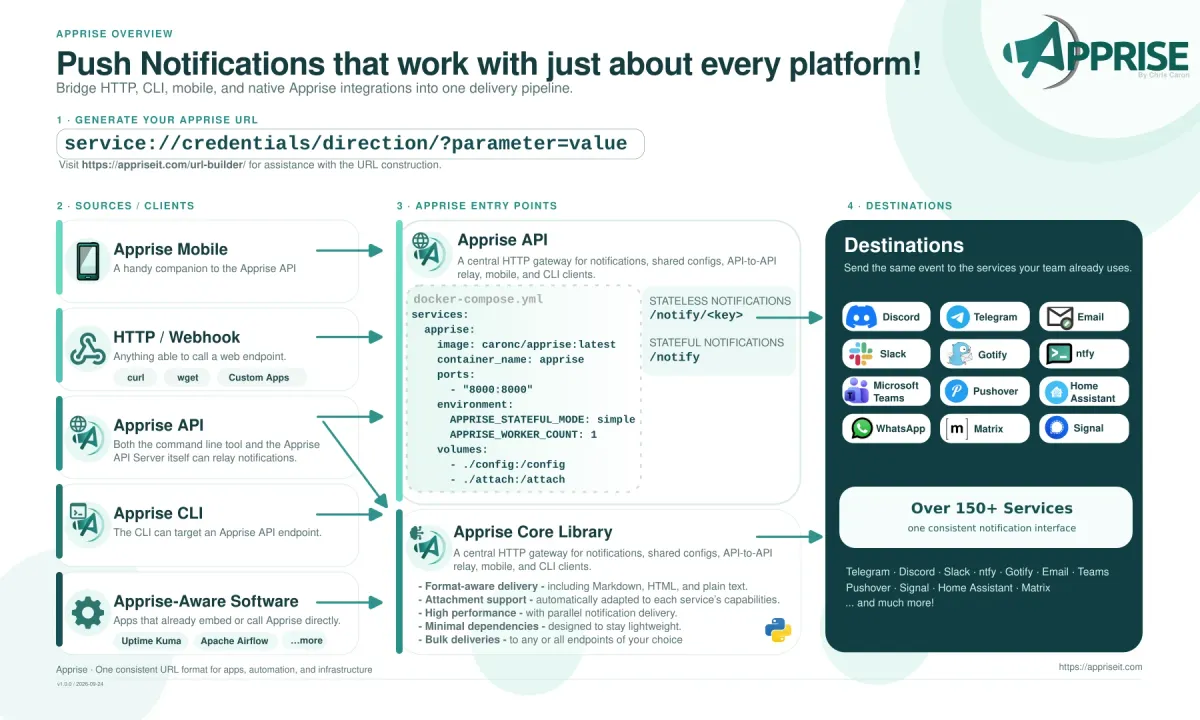
Apprise solves this with one simple idea: every notification target is just a URL. discord://..., ntfy://..., gotify://..., tgram://.... Apprise API wraps that library in a small web service, so anything on your network that can do an HTTP POST can notify you on any of those services. In late September the project released Apprise API 2.0 with login protection, live delivery logs and an Android app, and the current release is 2.0.2 (24 October 2026). Let's set it up.
What is Apprise?
Apprise is a Python library and command line tool by Chris Caron that sends notifications to a long list of services through one consistent interface. It is licensed under BSD-2-Clause and has roughly 17,700 stars on GitHub. With Apprise 2.1.0 (24 October 2026) the project counts 170 supported plugins. That release alone added twelve, including GitHub issue and pull request comments, AMQP, Gorush, Better Stack, incident.io and ilert.
Apprise API is the companion web service (MIT license). It gives you:
- A stateless
/notifyendpoint where the caller sends the target URLs along with the message - A stateful mode where you save a set of URLs under a key and later just call
/notify/{KEY} - Tags to send to only some of the saved targets (for example
backupsorcritical) - Attachments, a
/statushealth check and a Prometheus/metricsendpoint - A small web interface to edit, review and test your configuration
You may already be using Apprise without knowing it: changedetection.io, for example, builds its notifications on the Apprise library.
What's new in Apprise API 2
Version 2.0 (26 September 2026) is built on Apprise v2 and was a big step for anyone exposing the service beyond localhost:
- Password protection. Authentication is still off by default, but
APPRISE_AUTH_REQUIRED=yesplusAPPRISE_PASSWORDturns on HTTP Basic Auth and a real login screen for the web interface. - Per-configuration logins. Each saved key can get its own username, password and access level (
user,locked,publicordisabled). - Template variables. Saved YAML configurations can use
${NAME}placeholders, so the secret does not have to live in the stored config. - Live delivery logs. You can watch a notification go out in real time in the web UI, or add
?stream=yesto an API call. - Config ID in a header. The key can travel in an
X-Apprise-Config-IDheader instead of the URL, which keeps it out of proxy logs. - Apprise Mobile, an Android companion app (currently in beta) that connects to your server via a QR code.
- The web interface is now available in 20 languages and works well on a phone.
The follow-up releases 2.0.1 and 2.0.2 are smaller. 2.0.2 accepts plain-text message bodies on /notify and adds AMQP support to the Docker image.
Installing Apprise API with Docker Compose
The official image is caronc/apprise on Docker Hub. It runs nginx and gunicorn inside one container and listens on port 8000. I pin the version tag instead of latest so updates happen when I choose.
Create a folder and the three directories the container uses:
mkdir -p ~/apprise && cd ~/apprise
mkdir -p config plugin attach
configholds your saved configurations (and the persistent store underconfig/store)pluginis for optional custom pluginsattachis used for file attachments
Now create docker-compose.yml. This is based on the hardened example from the project README:
services:
  apprise:
    image: caronc/apprise:2.0.2
    container_name: apprise
    restart: unless-stopped
    user: "1000:1000"
    read_only: true
    security_opt:
      - no-new-privileges:true
    cap_drop:
      - ALL
    ports:
      - "8000:8000"
    environment:
      TZ: Europe/Berlin
      APPRISE_STATEFUL_MODE: simple
      APPRISE_WORKER_COUNT: "1"
      APPRISE_DEFAULT_FORMAT: "text"
      APPRISE_AUTH_REQUIRED: "yes"
      APPRISE_USER: admin
      APPRISE_PASSWORD: ${APPRISE_PASSWORD}
    volumes:
      - ./config:/config
      - ./plugin:/plugin
      - ./attach:/attach
    tmpfs:
      - /tmp
A few notes on these settings:
user: "1000:1000"should match the owner of your three folders (check withid -uandid -g).APPRISE_STATEFUL_MODE: simplestores each key as a readable{KEY}.cfgor{KEY}.ymlfile inconfig. The defaulthashmode stores them hashed instead.APPRISE_WORKER_COUNT: "1"is plenty for a homelab. By default the image starts(2 × CPUs) + 1workers.TZcontrols the timestamps in the logs (the default is UTC).
Put the admin password in a .env file next to the compose file, generate it randomly and keep the file readable only by you:
echo "APPRISE_PASSWORD=$(openssl rand -base64 24)" > .env
chmod 600 .env
docker compose up -d
Check that the service is healthy. /status returns OK (or a list of permission problems, such as CONFIG_PERMISSION_ISSUE, if a folder is not writable):
curl -u admin:"$(grep APPRISE_PASSWORD .env | cut -d= -f2-)" http://localhost:8000/status
Then open http://<your-server>:8000/ in your browser.
Saving your first configuration
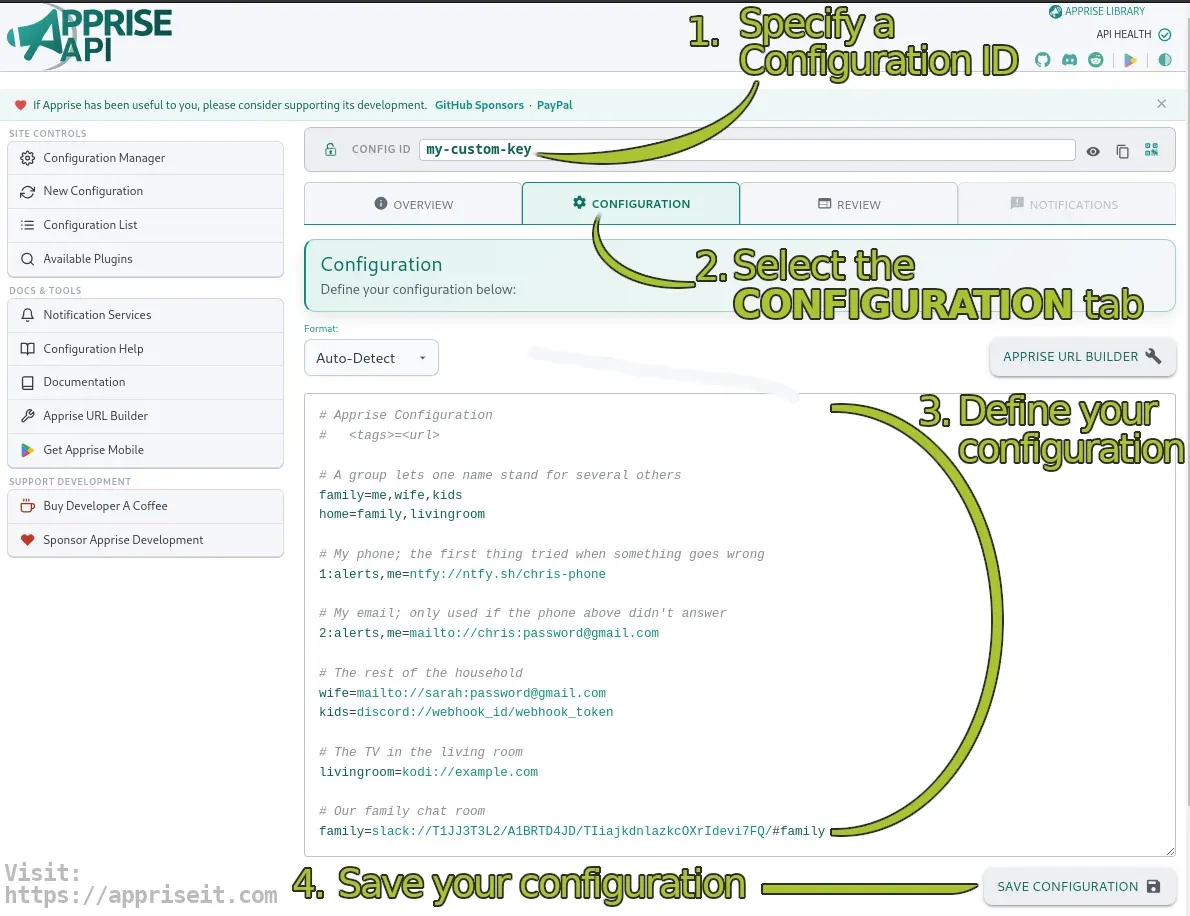
In stateful mode you pick a key (the docs use apprise as the default) and store your targets under it. The simplest format is a text file with one URL per line, optionally prefixed with a tag:
# ~/apprise/config/homelab.cfg
critical=ntfys://ntfy.example.com/homelab-critical
critical=gotifys://gotify.example.com/YourAppToken
backups=discord://webhook_id/webhook_token
You can type this into the web UI, drop it into the config folder, or send it to the API:
curl -u admin:yourpassword -X POST \
  --data-urlencode "config@homelab.cfg" \
  -d "format=text" \
  http://localhost:8000/add/homelab
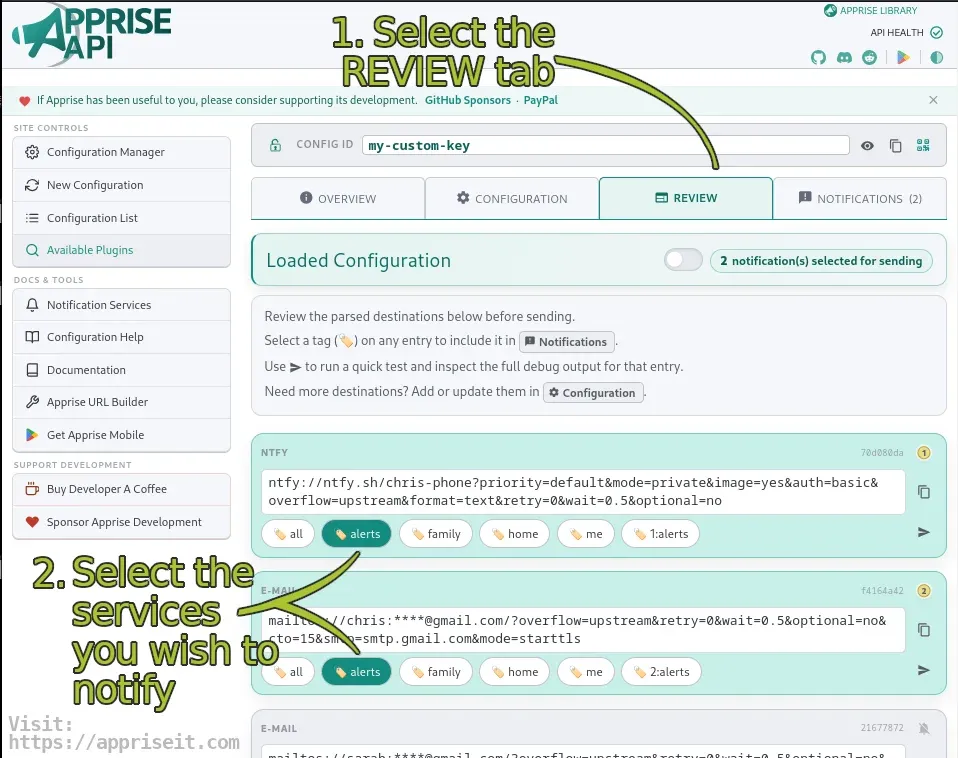
The Review tab in the web interface shows which URLs and tags were loaded, and lets you send a test notification.
Not sure what the URL for a service looks like? The Apprise README has a table with examples for every service, and there is an official URL builder. If you run your own push server, see our guides to ntfy and Gotify.
Sending notifications
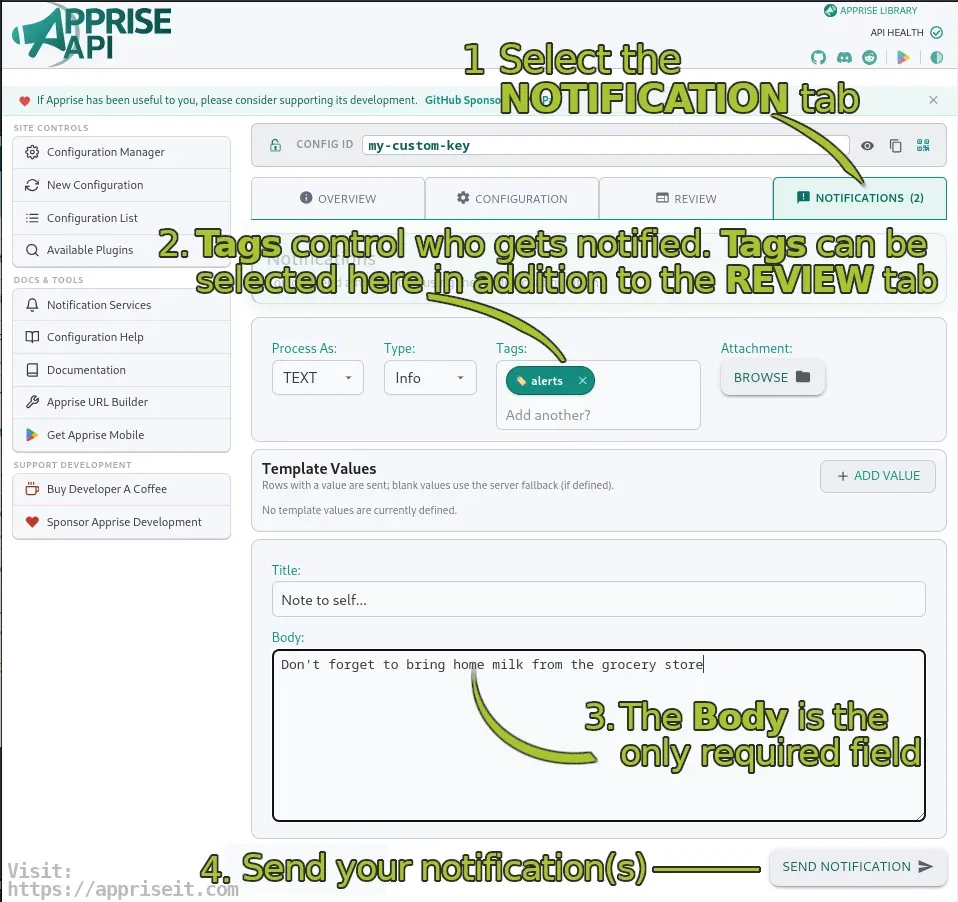
Now any script can notify you with one curl call. Without a tag, a stateful request only goes to the URLs that have no tag (the same behavior as the CLI), so in practice you will almost always pass one:
# Only the "backups" targets
curl -u admin:yourpassword -X POST \
  --data-urlencode "tag=backups" \
  --data-urlencode "title=Nightly backup" \
  --data-urlencode "body=Backup finished in 4 minutes" \
  http://localhost:8000/notify/homelab

# JSON works too, with a message type (info, success, warning, failure)
curl -u admin:yourpassword -X POST -H "Content-Type: application/json" \
  -d '{"tag":"critical","type":"failure","title":"Disk alert","body":"/data is 95% full"}' \
  http://localhost:8000/notify/homelab
Tag logic is flexible: a space (or +) means AND, a comma means OR. "tag": "critical, backups" reaches both groups.
A typical use is the end of a backup script:
#!/bin/bash
if restic backup /data; then
  TYPE=success; MSG="Backup OK on $(hostname)"
else
  TYPE=failure; MSG="Backup FAILED on $(hostname)"
fi
curl -s -u admin:"$APPRISE_PASSWORD" -X POST \
  --data-urlencode "tag=backups" \
  --data-urlencode "type=$TYPE" \
  --data-urlencode "body=$MSG" \
  http://localhost:8000/notify/homelab
If you'd rather keep a single tool on the client side, the apprise CLI (pip install apprise) can also talk to your server through the apprise:// URL scheme.
Keeping secrets out of the stored config
The new template variables are handy when you want to commit your configuration to Git. In a YAML config you declare the names and use ${name} in the URL:
# ~/apprise/config/homelab.yml
template:
  ntfy_token:

urls:
  - ntfys://${ntfy_token}@ntfy.example.com/homelab:
      - tag: critical
The value is then taken from the notification request, from a default in the template: section, or from an environment variable APPRISE_TEMPLATE_<NAME> on the server, in that order. Server environment values are never shown to callers. The docs warn that a variable can change any part of a URL, including the host, so don't let untrusted callers fill them in.
Running it behind a reverse proxy
If you put Apprise API behind Traefik, Caddy or nginx with HTTPS, set APPRISE_TRUSTED_ORIGINS to your public origin (for example https://apprise.example.com). The README explains that the bundled nginx does not forward the original scheme, so browser writes from the web UI can otherwise fail. A few more variables worth knowing:
| Variable | What it does |
|---|---|
APPRISE_API_ONLY=yes |
Turns off the web interface completely, API only |
APPRISE_CONFIG_LOCK=yes |
Hides configuration content from everyone except the admin |
APPRISE_STATELESS_MODE=disabled |
Rejects /notify calls that bring their own URLs |
APPRISE_ALLOW_SERVICES / APPRISE_DENY_SERVICES |
Limit which notification plugins can be used |
APPRISE_ATTACH_REJECT_URL |
Blocks remote attachment URLs; add internal to block all private addresses |
APPRISE_BASE_URL |
Needed if you serve the API under a subpath |
Honestly, for most homelabs the best place for Apprise API is your internal network or VPN only. It holds tokens for all your notification channels, so there is little reason to expose it to the internet.
Limitations and things to know
- Authentication is off by default. If you skip
APPRISE_AUTH_REQUIRED, anyone who can reach port 8000 can send messages through your channels and read saved configs. - It is a sender, not a receiver. Apprise forwards messages to services, it does not give you an inbox or a push app of its own. For that you still need something like ntfy, Gotify, Telegram or Matrix.
- Untagged sends only reach untagged URLs, which surprises many people on the first try.
- Apprise Mobile is Android-only and in beta, and it needs your own running server.
- Service URLs contain secrets. Treat
config/like a password file and back it up accordingly.
Apprise API vs. ntfy and Gotify
These are often mentioned together, but they do different jobs. ntfy and Gotify are push servers with their own apps that receive and display messages. Apprise API is the router in front: one endpoint for your scripts that fans out to ntfy, Gotify, Discord, email and many more at the same time. Many homelabs run both, with Apprise as the single place where notification targets are managed.
Conclusion
Apprise API is one of those small tools that quietly makes everything else easier. You configure your notification channels once, give them tags, and every script, cron job and container just needs curl. Version 2 finally adds the login protection and access levels that were missing for multi-user or shared setups, and the live delivery logs make debugging a broken webhook much less painful.
If you already run Uptime Kuma, Healthchecks or Beszel for monitoring, Apprise API is a natural next step for all the small scripts those tools don't cover.
Do you route your homelab alerts through one gateway, or does every app send its own notifications? Let us know.
Sources
- caronc/apprise-api on GitHub (README, docker-compose.yml, environment variables)
- Apprise API v2.0.0 release notes and v2.0.2
- caronc/apprise on GitHub and the Apprise v2.1.0 release notes
- caronc/apprise on Docker Hub
- Official Apprise documentation